AI chatbot for any website, in one line of code
Paste one script before the closing body tag and an AI sales agent answers from your pages; add a product feed and it sells as well.
- Install in 5 minutes
- GDPR Friendly
- Human support

- One script line
- Any stack or site builder
- Products from a feed
- Live in 5 minutes
This is the whole install
On the Install page of the Ovebot app, your workspace address is already filled in.
<script src="https://YOUR-WORKSPACE.ovebot.ai/widget/chat-loader.js"></script>It loads asynchronously, after your content, so it never holds up rendering. Shopify, Wix, Squarespace, Webflow, Joomla, Drupal, Google Tag Manager or plain HTML: if it accepts a script tag, it runs Ovebot.

Three steps, no plugin needed
-
Set your allowed websites
In Setup, list the domains where the widget may load and add your company contact details. Everything else has a working default.
-
Copy it from Install
The configurator rewrites the snippet as you change position, colors, language or auto-open.

-
Paste and reload
A layout template, the theme footer, a tag manager or a custom HTML box: anywhere just before </body>. No build step on our side.

No plugin for your platform? A product feed does the job
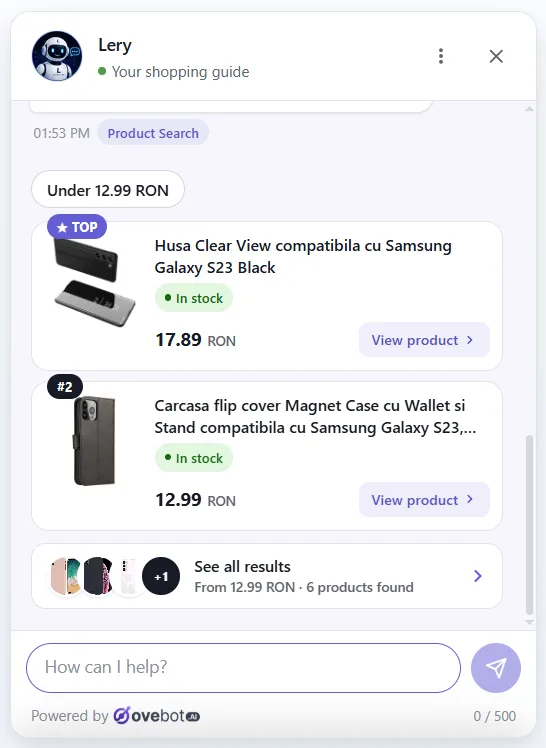
Paste the URL of a Google Merchant XML or JSON feed in the Ovebot app. The agent matches what the shopper asks for, like a laptop with 16GB RAM and a 512GB SSD, and shows what is available, with cards, prices and links. An item disappears as soon as the feed marks it out of stock.

The snippet covers most of it. Three extras need your site.
Snippet alone
- Answers from your pages and documents
- Product cards from your feed
- Handoff to your team and lead capture
- Reports, in every language
With a small job on your site
- Order status: an order lookup endpoint you register in the app, checked by email or phone
- Add to cart: one JavaScript function named in the snippet options
- Orders influenced: a purchase event, or the Google Analytics one you already send
Exactly what Ovebot takes from your site
-
Information pages
About, contact, shipping, returns, FAQ. Product and blog pages are skipped: products come from the feed.
-
Feed fields
Name, price, availability, images and link, plus SKU, GTIN and specifications when present.
-
Orders, only if connected
Nothing until you set up the endpoint, then one order at a time, after the details match.
Questions about the snippet
Does the snippet do less than a plugin?
My platform cannot export a product feed. Now what?
Can I load it through Google Tag Manager?
Other integrations


Whatever your site is built with, it can sell in the chat by this afternoon.
Copy the snippet, paste it, reload. Add the feed when it is ready, and the order lookup whenever your developer has an hour.
The 14-day trial plan at signup costs nothing and needs no card; test first, pay later.