AI chatbot for OpenCart stores
Upload one archive through the Extension Installer and your shop gets an AI sales agent that knows its catalog, its information pages and its orders.
- Install in 5 minutes
- GDPR Friendly
- Human support


- On the OpenCart Marketplace
- One archive, Extension Installer
- Finds products by code or link
- Answers in the shopper's language
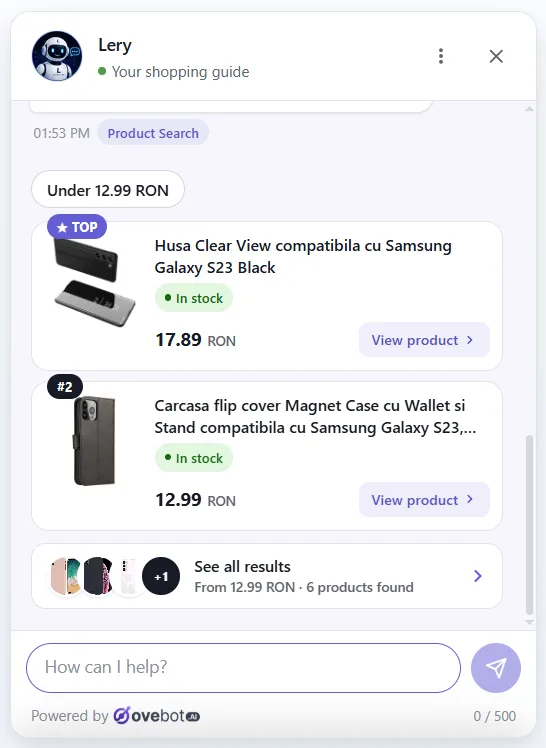
A shopper describes a laptop. The agent finds it in your OpenCart catalog.
Ovebot reads your OpenCart product feed, so a request like "16GB RAM, 512GB SSD, preferably HP" gets the models that match, with stock and price, best match first.

The upload flow every OpenCart admin already knows
Upload, open, connect. The connection runs over OAuth, so nothing is copied by hand.
-
Download from the Marketplace
The extension is free on the OpenCart Marketplace and comes as a single .zip archive.
-
Upload in Extensions > Installer
Click Upload File and pick the archive. Then open the Modules list under Extensions and open Ovebot.

-
Connect and tick your pages
Sign in to Ovebot or create an account, and you land back in the admin. Then tick the information pages: delivery, returns, warranty.

-
Products, then live
Keep the feed the extension publishes, or set your own in the Ovebot app. The last step switches the chat on in your storefront.


"Where is my order?" Answered with the real status
The extension publishes an order lookup on your store. The agent asks it about one order, the store checks the customer's details, and only then does the chat show the status and tracking number.

Less admin work once it is running
Pages that stay current
Edit a returns page in OpenCart and the agent's copy updates at once. Disable it and the entry goes inactive.
Agent memory
A short note read before every chat, like free delivery above 300 lei this weekend.
Everything at a glance
The extension dashboard shows the connection, products indexed and synced pages, each one a click from editing.
The orders the chat helped close
A purchase snippet on the checkout success page reports each order with its items. The Ovebot report then counts orders influenced, their value and the recommendations shoppers clicked most.
- Most clickedUSB-C cable 240 W
What the extension shares with Ovebot
Product feed
Name, price, availability, images and link, plus SKU and the EAN as GTIN. Sold-out items leave the chat.
Information pages
Only the ones you ticked in the wizard.
One order per question
Status and tracking number, once the customer's details match.
Ovebot never browses your database. It calls the endpoints the extension publishes, and asks only for what the conversation needs.
OpenCart questions
Will the extension touch my theme files?
A customer writes in English. Do the cards still work?
What if a product code does not exist?
Is the OpenCart extension free?
Other integrations


Give your OpenCart shop an AI sales agent that reads product codes.
One archive through the Extension Installer, one sign-in, and tonight the chat answers from your own catalog.
The 14-day trial plan at signup costs nothing and needs no card; test first, pay later.