24/7 customer support without a night shift
Set up 24/7 customer support for your online store without night staff: what to automate, what waits for a human, offline messages and a morning routine.


You can offer 24/7 customer support without a night shift. The method is simple: an AI agent answers the routine questions shoppers ask at night, and your team handles everything else first thing in the morning. What makes it work is deciding in advance which questions go in which pile, and telling shoppers honestly when a person will reply.
Shoppers already expect this. In Zendesk’s CX Trends 2026 research, 74% of consumers said they now expect 24/7 service because of AI, and 86% said responsiveness and accurate resolution highly influence their purchase decisions (Zendesk, 2025).
This guide gives a small or mid-size store a night triage table, a working-hours setup with ready-to-use offline messages, after-hours lead capture with GDPR in mind, and a 15-minute morning routine. It ends with a comparison of the three common ways to cover the night. If chat on a store is new to you, start with our ecommerce chatbot guide.
Key Takeaways
- Automate night answers that are the same for every shopper and already written down: order status, delivery times, shipping costs, returns, sizing, stock and payment methods.
- Keep refund exceptions, damaged goods, complaints, B2B quotes and legal or data requests for a human, and collect the details overnight.
- Outside working hours, stop offering a live person and say exactly when the team will reply.
- A 15-minute morning review of transcripts, leads and escalations turns overnight chats into fast first replies.
- If most of your exported questions land in the Automate rows (Step 1), an AI agent with a handoff needs the least daily effort; if many need judgment, an on-call person or outsourced team fits better.
Why shoppers expect answers after hours
Most EU internet users shop online. In 2025, 78% of EU internet users aged 16 to 74 bought something online in the previous 12 months, rising to 90% among 25 to 34 year olds (Eurostat, data extracted February 2026).

Timing matters too. Payment data from Adyen, reported by Modern Retail in December 2025, showed the busiest Black Friday hour was 7 p.m. in Italy and 9 p.m. in Germany, compared with 12 p.m. in the US. That covers a single shopping event, but it suggests European shoppers are often active in the evening, after your team has gone home. If nothing answers them, their questions wait until morning.
Speed also shapes the sale. In HubSpot’s 2018 consumer survey, reported in its 2022 State of Service report, 90% of customers rated an “immediate” response as important or very important, and 60% defined immediate as 10 minutes or less (HubSpot). The survey is several years old, so read it as a direction rather than a current benchmark.
Shoppers are also open to automation for simple tasks. Zendesk’s earlier CX Trends 2025 research found that 67% of consumers were ready to hand tasks like order tracking to AI (Zendesk, 2024). Like the 74% figure above, it comes from Zendesk, so treat the two as one publisher’s consistent view rather than independent confirmations.
Before you start
You need a few things in place before the AI agent starts answering at night:
- Written policies: shipping zones and costs, delivery times, returns, payment methods, size charts.
- Order data access: a way for the AI agent to look up order status and tracking, or at least a tracking page link.
- A morning owner: one named person who reviews the night every working day.
- A privacy notice: text that explains what you do with contact details left in the chat.
- Time: plan an afternoon for the first setup, then about 15 minutes each morning.
Step 1: Sort night questions into “answer now” and “wait for a human”
This step gives you a triage table that tells your AI agent what to answer alone and what to hand to a person.
The rule of thumb: automate an answer when it is the same for every shopper and already written down, or comes live from your order system. Leave it for a human when it needs judgment, money outside your policy, or carries a legal deadline.
| Question type | What shoppers type | At night | Overnight action |
|---|---|---|---|
| Order status | “Where is my order 2680953?” | Automate | Live lookup with order number plus email or phone |
| Delivery times | “How long does shipping to Austria take?” | Automate | Answer from your shipping policy |
| Shipping costs | “Is shipping free if I add one more item?” | Automate | Answer from your shipping rules |
| Returns policy | “How many days do I have to send it back?” | Automate | Answer from your returns policy, including the 14-day withdrawal period for EU online buyers |
| Sizing | “I’m 180 cm, should I take M or L?” | Automate | Answer from your size chart, and say when sizes run small |
| Stock | “Is the black one in stock in 42?” | Automate | Answer from a live catalog; offer a back-in-stock alert |
| Payment methods | “Can I pay by bank transfer?” | Automate | Answer from your checkout options |
| Refund exceptions | “It’s past 30 days, I was abroad. Can I still return it?” | Wait for a human | Collect order number and reason |
| Damaged goods | “The vase arrived broken.” | Wait for a human | Collect order number, ask for photos by email |
| Complaints | “This is the second late order, I’m not happy.” | Wait for a human | Acknowledge, collect details, promise a reply time |
| B2B quotes | “Price for 200 units with a VAT invoice?” | Wait for a human | Collect company, quantity, contact |
| Legal or data requests | “Delete all my data.” / “I’ve opened a chargeback.” | Wait for a human | Log the time, collect contact, never improvise |
To verify the table, export your last 50 support emails or chats and sort each one into a row. Questions that fit nowhere become new rows. If most land in the “Automate” rows, an AI agent can carry most of your nights.
Step 2: Set working hours and an honest offline message
Here you decide how the AI agent behaves when nobody is at work, so shoppers know when to expect a person.
Even at night, shoppers should always see a path to a human. In a 2024 Gartner survey, 64% of customers said they would prefer companies didn’t use AI for customer service, and their top concern was that it would get harder to reach a person. A clear offline message answers that worry.
- Set hours for each day in your store’s time zone. If your team works from Bucharest and you sell to Portugal, remember that 9 a.m. for you is 7 a.m. in Lisbon.
- Decide what changes at closing time. During working hours, the AI agent can offer a live person. After hours, it should stop offering one, show your contact details and say when you reply.
- Write the offline message. Promise a specific time, not “shortly”.
- Plan holidays. If your tool only knows weekdays, change the schedule before a public holiday and back afterward. Put a reminder in your calendar.
- Match the shopper’s language. A shopper in Milan should read the offline message in Italian, not in your office language.
You can adapt these templates:
Weeknight: “Our team is offline right now and back at 9:00 ([your time zone]) tomorrow. I can still help with orders, delivery, returns and products. For anything else, leave your email and we’ll reply before 11:00.” Weekend: “Our team is back on Monday at 9:00 ([your time zone]). I can answer most questions now. If you need a person, leave your details and we’ll reply on Monday morning.” Holiday: “We’re closed for the holiday until [date]. Orders still ship from [date]. Leave your details and we’ll reply on our first working day.”
To verify, open your store on your phone at 11 p.m. and ask for a person. You should see the offline message, contact details and a reply time, with no promise of a live agent.
Step 3: Capture leads after hours, with GDPR in mind
By the end of this step, a shopper who can’t get an answer at night will leave a way to reach them, for a clear reason.
Lead capture handles the questions automation can’t answer. Store-specific leads go beyond “contact me”. Each type needs different details:
| Lead type | What to ask | What to promise |
|---|---|---|
| Out-of-stock alert | Email, product, size or variant | A message when it is back, nothing else |
| Quote request | Company, quantity, delivery country, email | A quote by a stated time |
| Complex product question | Email or phone, the question in their words | An expert reply in the morning |
| Damaged goods or refund exception | Order number, email | A reply and next steps in the first hour after opening |
Collecting contact details means processing personal data under the GDPR, so build these habits into the form:
- State the purpose next to the field, for example “We’ll use your email only to answer this request.”
- Link your privacy notice where the shopper types.
- Ask only for what the task needs. A back-in-stock alert does not need a phone number.
- Keep it separate from marketing. Adding a lead to your newsletter needs its own consent.
- Delete leads you no longer need once the request is closed.
This is general guidance, not legal advice. Check your privacy notice with your adviser if you collect new types of data.
Step 4: Run a 15-minute morning hand-over
The goal is a fixed routine that turns overnight chats into first replies before mid-morning. This is where your team picks up everything the AI agent left for a person.
Name one owner and do the review at the same time every working day. A suggested 15-minute order:
- Minutes 0 to 3: escalations. Open chats flagged for a human: refund exceptions, damaged goods, complaints, legal or data requests. Reply to these first.
- Minutes 3 to 7: leads. Answer quote requests and product questions. Log out-of-stock alerts against the product.
- Minutes 7 to 12: transcripts. Skim the night’s conversations. Look for wrong answers, “I don’t know” replies and repeated questions.
- Minutes 12 to 15: fixes. Add missing answers to your knowledge base or policy pages so tonight goes better.
Set a target for the first human reply and publish it in the offline message. Our recommendation is the first hour after opening for escalations, including damaged goods and refund exceptions, and the same morning for other leads. HubSpot’s older (2018) survey suggests shoppers think in minutes, so an instant automated answer to routine questions covers the urgent part, and a punctual morning reply covers the rest.
If returns questions keep landing in the human pile, your policy may be unclear. A clear return policy template can cut that queue at the source.
Three ways to cover the night, compared
Ovebot, which publishes this guide, builds an AI agent, so weigh the options against your own question mix. If most of your exported questions land in the Automate rows (Step 1), an AI agent with a handoff needs the least daily effort; if many need judgment, an on-call person or outsourced team fits better.
| Option | How it works | Pros | Cons | Fits |
|---|---|---|---|---|
| On-call owner | The owner answers chats from a phone in the evening | No extra cost, personal tone, full authority | Burnout, slow replies while asleep, no cover on holidays | Very small stores with low night volume |
| Outsourced agents | A support agency staffs chat or email overnight | Real people at night, handles complaints | Monthly cost, training needed, agents lack store knowledge and authority on refunds | Larger stores with steady night volume |
| AI agent plus human handoff | AI answers routine questions 24/7, people take over during working hours | Instant answers in many languages, captures leads, low daily effort | Needs good policies and data, can’t decide exceptions, needs a morning review | Stores whose night questions are mostly routine |
For a closer look at the tool choice itself, see free live chat compared with AI chat.
What 24/7 customer support looks like in practice
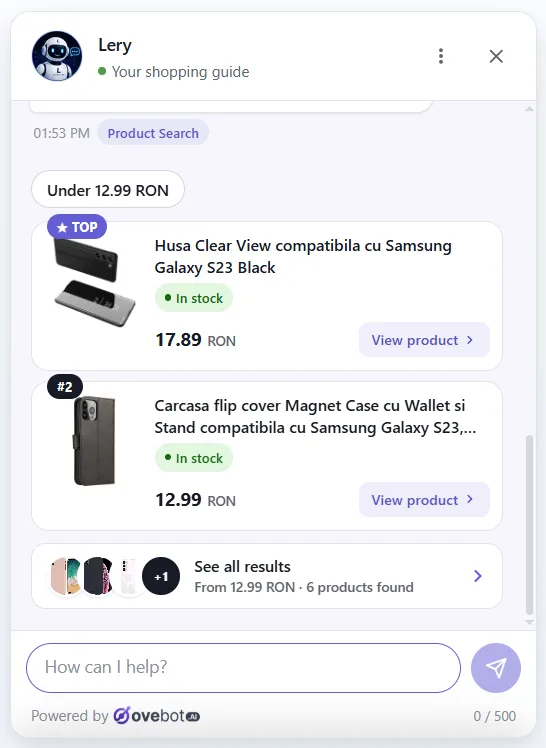
The screens below come from Ovebot, the AI sales and support agent our team builds. Whatever tool you consider, check that it handles the same four jobs.
Answering policy questions at night
The agent answers from the store’s own content, such as shipping and returns pages, in the shopper’s language. It supports 29+ languages and can switch mid-chat.

Looking up an order without a person
The shopper gives an order number plus the email or phone used at checkout. The agent then asks the store’s system live and shows status, carrier, tracking number and a tracking link, without storing the order. For a WooCommerce walk-through, read how to add order tracking to WooCommerce chat.

Switching the handoff off when the team goes home
Working hours are set per day with a time zone. Inside those hours, the agent offers a human and the team takes over with one click. Outside them, it stops offering a person, shows the store’s contact details and lets visitors leave their details as a lead.

Reviewing the night in the morning
The messages overview is where the morning hand-over starts: open sessions, chats with pending requests and the full history by date.

Common mistakes and a launch checklist
These mistakes undo most of the benefit of after-hours customer service:
- Promising “a human will reply shortly” at 2 a.m. The shopper waits, nothing happens, and trust drops. Promise a clock time instead.
- Letting the AI agent decide exceptions. A generous answer to a refund question becomes a commitment. Keep exceptions in the human pile.
- Collecting emails with no stated purpose. It confuses shoppers and creates GDPR risk. Say why you ask, every time.
- Nobody owns the morning. Leads that wait a day are easy to lose. Put one name on the review.
- Forgetting holidays and time zones. The AI agent promises a Monday reply on a bank holiday. Check the schedule each month.
Run through this checklist before you switch it on:
- Triage table written and shared with the team
- Shipping, returns, payment and size policies published and up to date
- Order lookup or tracking link available in the chat
- Working hours set per day, in the right time zone
- Offline, weekend and holiday messages written with a reply time
- Contact form states its purpose and links the privacy notice
- Offline message available in the languages you sell in
- Morning owner named and a daily 15-minute slot booked
- Test chat done at night from a phone
Frequently asked questions
How can a small business offer 24/7 customer support without night staff?
Let an AI agent answer routine questions with fixed answers, have it stop offering a live person after hours, and name one person to review the night for 15 minutes each morning. Steps 1 to 4 above cover each part.
What is a good response time for an online store?
HubSpot’s older (2018) survey suggests shoppers judge customer service response time in minutes: 60% defined an immediate response as 10 minutes or less. Overnight, only automated answers can meet that. For questions that need a person, aim for the first hour after opening and state it as a clock time in your offline message.
Can an AI chatbot replace after-hours service?
It can cover most of it, but not all. An AI agent handles questions with written or live answers well, such as delivery, returns, sizing and order tracking. Refund exceptions, complaints and legal or data requests should wait for your team, with the details collected overnight.
Which questions should always go to a human?
Refund or return exceptions, damaged or missing goods, complaints, B2B quotes and any legal or data protection request. These need judgment, can cost money outside your policy or carry legal duties, so the AI agent should collect the details and say when your team will reply.
How do I handle messages that arrive outside business hours?
Answer routine questions instantly, acknowledge everything else with a clear reply time, and collect only the contact details the request needs. Next morning, work through escalations, leads and transcripts in that order.
Start with tonight’s questions
You don’t need night staff to answer shoppers around the clock, only a clear split between what software answers and what people decide. Write the triage table first, set honest working hours, and book the 15-minute morning review. The rest of the setup follows from those three decisions.
About this guide: written by the Ovebot team, the developers, ecommerce specialists and support staff who build the product and talk with store owners every day. Facts are checked against the sources listed below. About us · Contact
Sources
- Zendesk – Contextual intelligence becomes the new standard for exceptional customer experience in 2026 (CX Trends 2026 press release) – 2025 – https://www.zendesk.com/newsroom/press-releases/contextual-intelligence-becomes-the-new-standard-for-exceptional-customer-experience-in-2026/
- Zendesk – 2025 CX Trends Report – 2024 – https://www.zendesk.com/newsroom/articles/2025-cx-trends-report/
- HubSpot – Annual State of Service Report 2022 (consumer data from HubSpot’s 2018 survey) – 2022 – https://hubspot.com/hubfs/assets/flywheel%20campaigns/HubSpot%20Annual%20State%20of%20Service%20Report%20-%202022.pdf
- Eurostat – E-commerce statistics for individuals (data extracted February 2026) – 2026 – https://ec.europa.eu/eurostat/statistics-explained/index.php?title=E-commerce_statistics_for_individuals
- Modern Retail – What an outsized Cyber Week abroad reveals about the European consumer – 2025 – https://www.modernretail.co/marketing/what-an-outsized-cyber-week-abroad-reveals-about-the-european-consumer/
- Gartner – Gartner survey finds 64% of customers would prefer that companies didn’t use AI for customer service – 2024 – https://www.gartner.com/en/newsroom/press-releases/2024-07-09-gartner-survey-finds-64-percent-of-customers-would-prefer-that-companies-didnt-use-ai-for-customer-service
- Your Europe (European Union) – Returns and cancellation – n.d. – https://europa.eu/youreurope/citizens/consumers/shopping/returns/index_en.htm
This article was written with the help of artificial intelligence and reviewed by a human editor.