Cart abandonment: why shoppers leave and how chat helps
Cart abandonment averages about 70%. Learn why shoppers leave, how to calculate your rate, and which reasons a timely answer can fix before checkout.

Cart abandonment happens when a shopper adds products to the cart and leaves without placing the order. It is the norm in online retail. The Baymard Institute puts the average documented abandonment rate at 70.22%, based on 50 different studies (page updated September 2025).
Some of those shoppers were never going to buy. Many others left over something specific: a surprise shipping fee, an unclear delivery date, a return policy they could not find, or a checkout that asked for too much.
This guide shows how to calculate your own rate, which reasons a quick, accurate answer can resolve, and which ones only a checkout change will fix. It ends with a checklist you can work through in an afternoon.
Key Takeaways
- About 70% of online carts are abandoned on average, according to Baymard Institute’s average of 50 studies.
- Calculate your rate as abandoned carts ÷ carts created × 100, and track it by device and traffic source.
- Show costs, delivery dates, the return policy and the full total early, and answer questions quickly. That can reduce abandonment caused by surprise costs and unclear delivery, but it cannot make a high price or slow shipping acceptable.
- Forced account creation, long forms, site errors, missing payment methods and declined cards need checkout changes, not answers.
- Recovery emails help win back some carts, but consent rules depend on the country, so check them before you send.
What is cart abandonment and how do you calculate the rate?
Cart abandonment is any session where a cart is created but no order follows. Your cart abandonment rate is the share of created carts that never become orders.
Cart abandonment rate = abandoned carts ÷ carts created × 100
Abandoned carts equal carts created minus completed orders. So if your store saw 400 carts created last month and 120 orders completed, 280 carts were abandoned. That gives 280 ÷ 400 × 100 = 70%.
A few rules keep the number honest:
- Use the same date range for carts and orders. Mixing a weekly cart count with a monthly order count produces nonsense.
- Decide what “cart created” means and keep it fixed. Most stores count the first add-to-cart event in a session.
- Segment before you act. Split the rate by device, traffic source and new versus returning visitors. Statista reports that mobile users generally abandon carts more often than desktop users, so a blended rate can hide a mobile problem.
- Compare against your own trend. Industry averages mix different methods and markets. Your month-over-month change tells you more.
Many ecommerce platforms and analytics tools can report add-to-cart events and completed purchases. If yours only reports checkout starts, calculate a second rate from checkout start to order. That one isolates problems inside the checkout itself.
Why do customers abandon carts?
Shoppers abandon carts mostly because of costs, delivery, trust and a hard checkout. Baymard’s latest survey asked US online shoppers who had abandoned during checkout why they left, and their reasons are listed below. It excludes the 42% who said they were “just browsing” or not ready to buy, and respondents could choose more than one reason, so the bars add up to more than 100%.

Extra costs lead by a wide margin: twice as many shoppers named them as named slow delivery. Several reasons involve information the shopper did not have in time: what the total will be, when the parcel arrives, how returns work, and whether the store is legitimate. Others are mechanical: those shoppers knew what they wanted, but the checkout got in the way.
The two largest reasons can go either way. A shipping fee that appears only at the last step is a surprise, and showing it earlier helps. A fee the shopper simply finds too high stays a price problem, however early it appears. Delivery works the same way: an unclear date can be answered, but a carrier that is too slow for the shopper needs a logistics change.
The survey covers US shoppers, and European buyers may weigh payment methods or delivery differently. Use the list as a starting map, then confirm it with your own data and the questions customers actually send you.
Which reasons can a timely answer fix?
A timely answer can fix the part of each reason caused by surprise or uncertainty: costs that appear late, unclear delivery dates, hard-to-find return terms and doubts about the store. It cannot make an unacceptable price or delivery speed acceptable; those need pricing, policy or logistics changes. Checkout friction needs a change to the checkout itself. The table sorts each Baymard reason by the type of fix it needs.
| Abandonment reason (Baymard) | Share of shoppers | What fixes it | Type of fix |
|---|---|---|---|
| Extra costs too high (shipping, tax, fees) | 40% | Show shipping costs and fees early; answer “how much is shipping to me?” on the product page | Answer + display change |
| Delivery was too slow | 20% | State an expected delivery date, not only a speed; answer delivery questions per country; offer a faster option where you can | Answer + logistics |
| Didn’t trust the site with card information | 19% | Visible contact details, known payment providers, quick and human replies to “are you a real store?” | Answer + display change |
| Site wanted me to create an account | 18% | Offer guest checkout | Checkout change |
| Too long or complicated checkout | 17% | Remove unneeded fields and steps | Checkout change |
| Website had errors or crashed | 17% | Test checkout on real devices; monitor errors | Checkout change |
| Returns policy wasn’t satisfactory | 13% | Clear, findable return policy; answer return questions before purchase | Answer + policy |
| Couldn’t see or calculate total cost up front | 12% | Show the full total early; answer “what will I pay in total?” | Answer + display change |
| Credit card was declined | 10% | Clear error messages and an alternative payment method | Checkout change |
| Not enough payment methods | 9% | Add the methods your market expects | Checkout change |
Answers reach into the two largest reasons, but only into their surprise and uncertainty side. A store that answers cost, delivery, return and trust questions in seconds removes doubt that stops some people at the cart. Shoppers who find the price or the delivery speed unacceptable need a different offer, not a faster answer.
How to reduce cart abandonment with timely answers
To reduce cart abandonment from information gaps, put the answer where the doubt appears: on the product page, in the cart, and in a chat window that responds at any hour. The tactics below follow the reasons roughly in order of size.
Show extra costs before the cart
Extra costs hurt most when they appear late. Shoppers accept a shipping fee more readily on the product page than on the final checkout step.
- Show a shipping estimate or a “shipping from” price on product pages.
- List any fees (cash on delivery, small-order fee, packaging) on one shipping page.
- If you offer free shipping above a threshold, show how far the current cart is from it.
- Make sure your chat or FAQ can answer cost questions for each country you ship to.
Typical questions shoppers ask at this stage:
- “How much is shipping to Austria?”
- “Is VAT included in this price?”
- “Do you charge extra for cash on delivery?”
Give a delivery date, not just a speed
“Ships in 2-3 days” leaves the shopper doing math. A date answers the real question: will it arrive before I need it? Baymard’s 2023 benchmark found that 41% of the sites it reviewed showed only shipping speed, not a delivery date, which causes hesitation.
- Show an estimated delivery date or date range near the “Add to cart” button.
- Publish delivery times per country or region in one place.
- Prepare answers for urgent questions: “Will it arrive before Friday?” and “Do you have express delivery?”
Make the return policy easy to find and understand
A return policy works as a purchase guarantee. In the 2024 Consumer Returns report by the NRF and Happy Returns, 76% of consumers said free returns are a key factor in deciding where to shop.
- Link the return policy from the product page, cart and footer.
- State the window, who pays return shipping, and how refunds arrive.
- Answer the questions people actually ask: “Can I return it if it doesn’t fit?” and “Who pays for the return?”
If your policy needs work, start with a clear return policy template and adapt it to your rules.
Show the total cost up front
Shoppers who cannot see the total stop to find it, and some never come back. Show tax, shipping and fees in the cart, not only in the last checkout step. When the total depends on the address, offer a simple shipping calculator or a country selector in the cart.
Build trust before the payment step
Trust problems are partly about design and partly about reassurance. Show a real address, a phone number or email, and recognized payment logos. Then make sure someone, or something trained on your policies, answers quickly when a shopper asks “Are you a real company?” or “Is it safe to pay by card here?”
Product pages also carry trust. Clear photos, specifications and stock status reduce doubt; see these product page best practices for a full list.
Checkout fixes that answers cannot replace
Five of Baymard’s reasons need changes to the checkout, and no amount of chat will fix them. Baymard estimates the average large ecommerce site could gain a 35.26% increase in conversion rate through better checkout design, and puts recoverable lost orders across the US and EU at about $260 billion (Baymard, page updated September 2025).
Forced account creation. Offer guest checkout and invite shoppers to create an account after the order, using the details they already entered.
Long or complicated checkout. Baymard found the average US checkout has 23.48 form elements, including 14.88 form fields. It considers 12 to 14 elements, or 7 to 8 fields, achievable (Baymard, page updated September 2025). Remove optional fields, combine name fields and hide “company” behind a link.
Errors and crashes. Place a test order each week on a phone and a desktop, with a real card. Watch your error logs after every plugin or theme update.
Not enough payment methods. Check which methods your market expects. Cards alone may not be enough in countries where bank transfers, wallets or cash on delivery are common.
Declined cards. Show a clear error message that keeps the cart intact, and offer a second payment method on the same screen.
What this looks like in practice
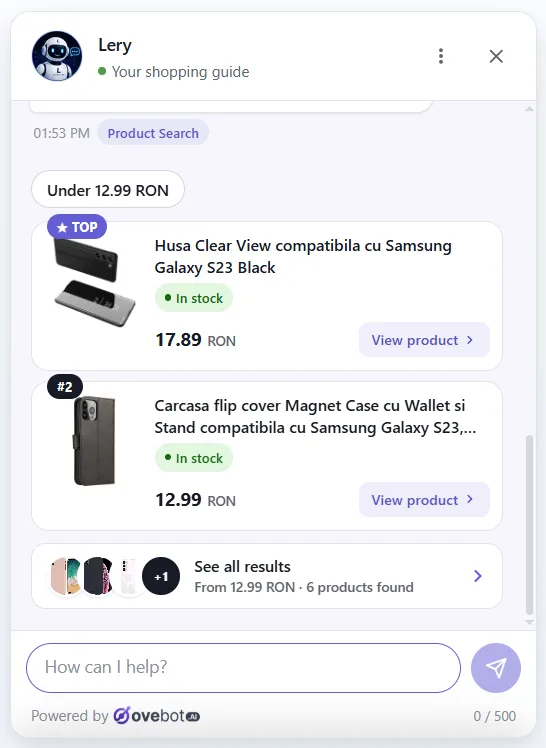
An AI chat agent trained on your store’s own content can cover the “answer” group of reasons around the clock. The screenshots below come from Ovebot, one such tool. They show how a chat agent handles cart questions in practice.

The agent answers from the store’s knowledge base: shipping pages, return policy, FAQs and documents the owner uploads. Delivery and return questions get the same answer at 3 a.m. as at noon. Consistent answers at any hour are the core of 24/7 customer support.

Product questions work from a live product catalog feed, so recommendations show real stock and price. The shopper can add the product to the cart from the chat.

When a question needs a person, the agent offers a handoff to the team during working hours. Outside those hours it shows contact details and lets the shopper leave their details so the team can follow up.
How to measure the effect of your changes
Measure each change against your own baseline, one change at a time where possible. Record your cart abandonment rate for at least four weeks before a change, then compare the same length of time after it.
Track these numbers together:
- Cart abandonment rate, overall and by device.
- Checkout abandonment rate, from checkout start to order, to see whether the problem sits before or inside checkout.
- Questions by topic, from chat logs or support emails: shipping, returns, payment, stock.
- Chat-assisted add-to-carts and orders, if your chat tool reports them.

Some chat tools report products clicked, add-to-carts and attributed orders, often through an order tracking snippet. Whatever tool you use, look at the questions people ask. A cluster of “how much is shipping to…” questions tells you to show shipping costs earlier on the page.
Seasonality, promotions and traffic mix move the rate too. A drop during a sale may come from the discount, not from your new delivery date banner.
A short note on recovery emails
Cart recovery emails remind shoppers who left after entering an email address. They can bring some carts back, but they treat the symptom after the fact. Consent rules for these emails depend on the country, so check what applies to your store before you turn them on.
Cart abandonment checklist
Work through this list in order. The first half covers information, the second half covers checkout.
Information (answers)
- Shipping costs or a “from” price shown on product pages
- All fees listed on one shipping page
- Estimated delivery date or range shown near “Add to cart”
- Delivery times published per country
- Return policy linked from product page, cart and footer
- Return window, return shipping cost and refund method stated plainly
- Full total (tax, shipping, fees) visible in the cart
- Real contact details and payment logos visible
- Chat or FAQ answers cost, delivery, returns and trust questions at any hour
Checkout (changes)
- Guest checkout available
- Optional fields removed or hidden
- Weekly test order on mobile and desktop
- Payment methods match what your market expects
- Declined-card message keeps the cart and offers an alternative
Measurement
- Baseline cart and checkout abandonment rates recorded
- Rates split by device and traffic source
- Shopper questions grouped by topic each month
For the bigger picture of what chat can do across the store, read the ecommerce chatbot guide.
Frequently asked questions
What is the average cart abandonment rate?
About 70% (70.22% across 50 studies, per Baymard Institute, updated September 2025). Treat it as context, not a target: the studies differ in method, market and period, so the average tells you nothing about what your store could reach.
What is a good cart abandonment rate?
No single number counts as good for every store. Rates depend on product type, price, device mix and traffic sources. Compare yourself with your own baseline first: a falling rate after a change is the signal that matters. Baymard’s 70.22% average is useful as a reference point, but a rate below it does not mean your checkout has no problems left to fix.
What is the most common reason for cart abandonment?
In Baymard’s latest survey of US online shoppers who had abandoned during checkout, the top reason was extra costs such as shipping, tax and fees, named by 40%. Slow delivery (20%), lack of trust with card details (19%) and forced account creation (18%) followed. The survey excluded shoppers who were just browsing, and respondents could pick several reasons.
How can I reduce cart abandonment?
Split the problem in two. For information gaps, show costs, delivery dates, returns and the full total early, and answer shopper questions quickly at any hour. For checkout friction, offer guest checkout, remove optional fields, test on mobile, add expected payment methods and handle declined cards clearly. Then measure each change against your own baseline.
How do you calculate cart abandonment rate?
Divide abandoned carts by carts created, then multiply by 100. Abandoned carts are carts created minus completed orders in the same period. For example, 600 carts and 150 orders give 450 abandoned carts, so the rate is 450 ÷ 600 × 100 = 75%. Use one fixed definition of “cart created” so your monthly numbers stay comparable.
Where to start
Start with the reasons you can fix fastest: show costs and delivery dates earlier and make your return policy easy to find. Then answer the questions shoppers ask before they buy, and fix checkout friction one item at a time while you measure the result.
About this guide: written by the Ovebot team, the developers, ecommerce specialists and support staff who build the product and talk with store owners every day. Facts are checked against the sources listed below. About us · Contact
Sources
- Baymard Institute – Cart Abandonment Rate statistics – 2025 – https://baymard.com/lists/cart-abandonment-rate
- Baymard Institute – Shipping speed vs. delivery date – 2023 – https://baymard.com/blog/shipping-speed-vs-delivery-date
- National Retail Federation and Happy Returns – 2024 Consumer Returns in the Retail Industry – 2024 – https://nrf.com/research/2024-consumer-returns-retail-industry
- Statista – Online shopping cart abandonment rate – 2026 – https://www.statista.com/statistics/457078/abandonment-rate-shopping-cart
This article was written with the help of artificial intelligence and reviewed by a human editor.