Ecommerce chatbot guide: what it should do and how to choose
What an ecommerce chatbot should handle, rule-based vs AI, what it needs from your store, EU rules, pricing models and how to measure it honestly.


An ecommerce chatbot is a chat assistant on your online store that answers shoppers’ questions, suggests products and handles routine requests like “where is my order?” without a person typing every reply. The useful ones work from your own catalog, policies and order data. They also hand the conversation to your team when a question needs a human.
Most businesses are still at the start. In 2025, 20.0% of EU enterprises with 10 or more employees used some form of AI, up from 13.5% in 2024, according to Eurostat. That figure covers every kind of AI, not only chat, but it shows that many stores are still deciding.
This guide explains what a chatbot for an online store should do, how rule-based and AI bots differ, and what data the bot needs from you. It also covers choosing a tool under EU rules, setting it up and measuring results honestly.
Key Takeaways
- An ecommerce chatbot earns its place on six jobs: pre-sales questions, product recommendations, order status, returns and shipping policy, handoff to humans and lead capture.
- Answer quality depends on your inputs: a live product feed, written policies, an FAQ and a secure order lookup.
- In the EU, the AI system must be designed so visitors are told they are talking to an AI, unless that is obvious (Art. 50(1), duty on the provider; applies since 2 August 2026). Chat data also falls under GDPR.
- 64% of customers in a Gartner survey (2024) would prefer companies didn’t use AI for service, so a visible route to a person matters.
- Measure resolved conversations, not deflected ones. No credible independent study yet measures the sales lift from on-site store chatbots.
What is an ecommerce chatbot?
An ecommerce chatbot is software in your store’s chat widget that reads what a shopper types and replies with an answer, a product or an action. It sits where a live chat box would, but it can reply at 3 a.m. and hold many conversations at once.
Rule-based bots follow scripted menus and keyword triggers. AI chatbots use a large language model to understand free-form questions and write replies, ideally grounded in your store’s own content.
Many current tools also take actions, such as looking up an order or adding an item to the cart. When software takes steps like that for a shopper, vendors often call it an AI agent. A bot focused on helping people find the right product is often called an AI shopping assistant.
Either way, the bot is a front desk, not a replacement for your team. It handles repeat questions and routes the rest.
Adoption differs sharply across the EU. Denmark had the highest share of enterprises using AI in 2025 at 42.0%, and Romania the lowest at 5.2% (Eurostat, 2025). Only 8.8% used AI to generate written or spoken language, the kind of AI a chat assistant relies on.

Six jobs for an ecommerce chatbot, with example questions
The questions below are typical of what shoppers type in store chat, and each job notes what the bot needs to answer well.
1. Pre-sales questions
Pre-sales questions come right before a purchase decision: size, fit, compatibility, materials and delivery time.
- “Does this charger work with a Samsung S23?”
- “Is size 42 true to size, or should I go up?”
- “Can you deliver to Germany by Friday?”
The bot can only answer if the details exist in your product data. Thin product pages lead to thin answers, so the product page best practices that help human shoppers also help your bot.
2. Product recommendations and add to cart
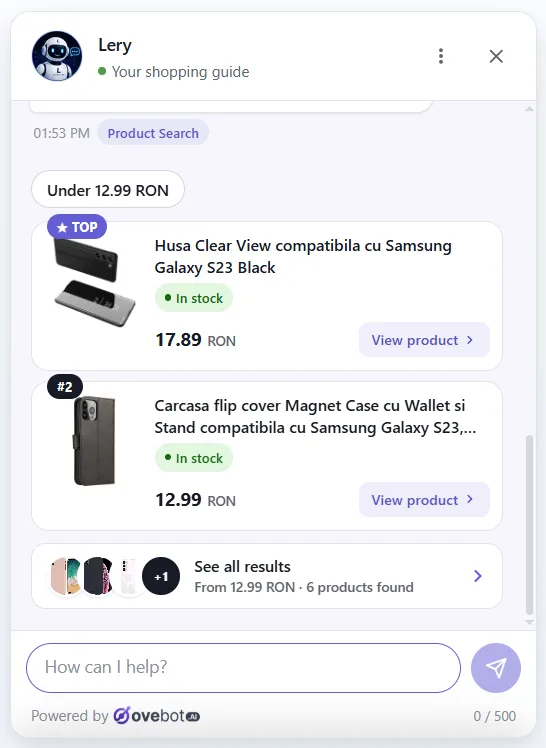
Recommendations turn a vague need into a specific product. The bot should search your live catalog, respect the budget, skip out-of-stock items and show a product card with price and an add-to-cart button.
- “I need a laptop for office work and some photo editing, up to 900 euros.”
- “Which ink fits the printer in my cart?”
- “Put the black one in my cart.”
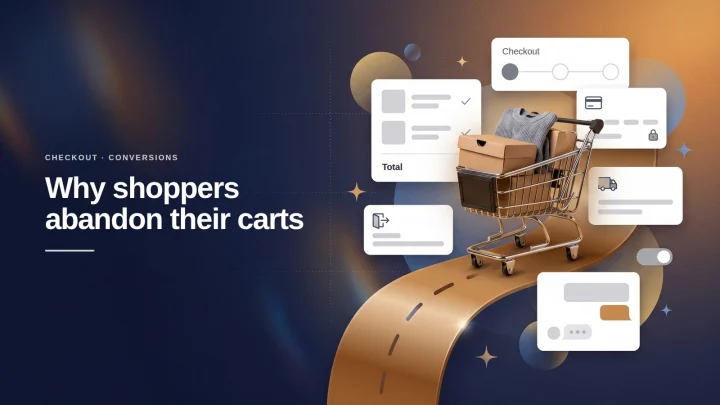
A shopper who leaves with an unanswered question is one form of cart abandonment. A quick, accurate answer at that moment is where chat can help most.

3. Order status
“Where is my order?” is one of the most common questions a store gets, and the answer already sits in your order system.
Shoppers seem open to it. In the Zendesk CX Trends 2025 survey of about 5,100 consumers in 22 countries (Zendesk sells AI customer-service software), 67% said they were ready to delegate tasks such as order tracking to AI agents.
- “Where is my order 10482?”
- “The tracking says delivered, but I don’t have it.”
- “Can I change the delivery address?”
A safe setup asks for the order number plus the email or phone used at checkout, then reads the live status from your store. Never show order details based on an order number alone. Our guide to order tracking in chat for WooCommerce covers the setup.

4. Returns, shipping and store policies
Policy questions need exact answers, because a wrong return window or shipping fee becomes a dispute later. They are also frequent: in a working paper on Alibaba’s Taobao marketplace, after-sales issues such as exchanges, returns, refunds, repairs and shipping fees made up 56.5% of all customer service chats (Ni et al., 2026). That is one marketplace and the paper is not peer reviewed, so check your own inbox before deciding what to automate first.
- “How many days do I have to return this?”
- “Who pays for return shipping?”
- “Do you ship to Austria, and how much does it cost?”
The bot should quote your written policy, not improvise around it. If the policy itself is vague, fix it first; a return policy template gives you a clear starting point.
5. Handoff to a human
Handoff decides whether shoppers trust the bot at all. In a Gartner survey of 5,728 customers (December 2023), 64% said they would prefer companies didn’t use AI for customer service. And 53% would consider switching to a competitor if they found out a company was going to use it. Their top concern was that reaching a person would get harder.
Offer a human when the shopper asks, when the bot has no answer, when someone complains, or when a large order is at stake. Pass the full transcript so nobody repeats themselves. Outside working hours, show your contact details and collect the shopper’s details instead of promising a live reply.
- “Can I talk to a person?”
- “This is the second parcel you’ve lost.”
- “I want to order 200 units for my company.”
Good handoff design is the core of 24/7 customer support for a small team.
6. Lead capture
Lead capture keeps a conversation alive when nobody can answer right away or the request needs a quote. The bot collects a name, an email and the question, with a clear note on how the data will be used.
- “Can you tell me when this is back in stock?”
- “Do you offer wholesale prices?”
Rule-based, AI or hybrid: which type fits your store?
For most small stores, we recommend a hybrid, with the caveat that the publisher of this guide sells a hybrid tool. An AI layer answers open questions from your content, fixed flows handle sensitive actions like order lookup, and a clear button leads to a human. A pure rule-based bot is enough when shoppers ask a handful of fixed questions and the bot never needs to search a catalog.
| Rule-based | AI (language model) | Hybrid | |
|---|---|---|---|
| How it understands shoppers | Buttons and keywords | Free-form text | Free-form text, plus fixed flows |
| Setup work | Build every path by hand | Load your content and feed | Load content, define a few flows |
| Unexpected questions | Often “I didn’t understand” | Usually answered | Usually answered |
| Main risk | Dead ends and frustration | Confident wrong answers if not grounded | Lower, if flows cover risky actions |
| Best for | Tiny catalogs, a few fixed questions | Large catalogs, varied questions | Most stores that sell and support online |
AI working alongside people has some evidence behind it. A 2023 NBER study of 5,179 support agents found that an AI assistant raised issues resolved per hour by 14% on average and by 34% for novice agents. That tool helped human agents at a software company, so it was neither a customer-facing bot nor an ecommerce setting.
Still weighing a free widget against an AI bot? See free live chat vs AI chat.
What an ecommerce chatbot needs from your store
An ecommerce chatbot can only be as accurate as the data you give it: a product feed, written policies, an FAQ and a secure order lookup.
| Input | What it powers | How to keep it fresh |
|---|---|---|
| Product catalog feed (JSON, Google Merchant feed or platform connector) | Recommendations, stock, prices, variants, specs | Scheduled sync, at least daily |
| Written policies (shipping, returns, payment, warranty, privacy) | Policy answers | Update the source page, then re-sync |
| FAQ built from your real inbox | Pre-sales and post-sales answers | Add new questions from transcripts |
| Order lookup through your store’s API | Order status and tracking | Live, read-only call on each request |
Build the FAQ from your own email and chat history. Collect three months of questions, merge the duplicates and write one clear answer for each.

Why wrong answers happen, and how grounding prevents them
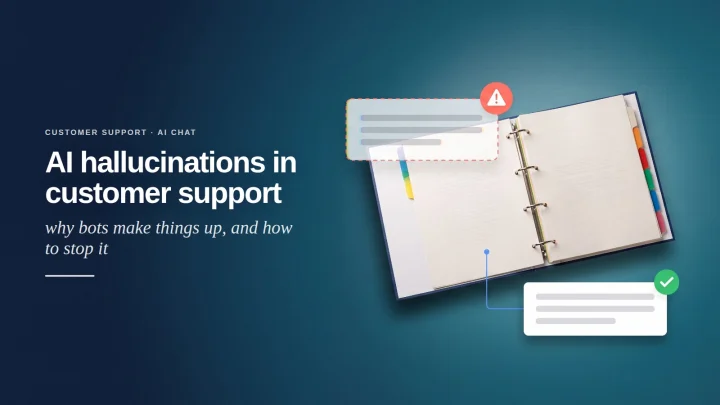
AI chatbots can produce fluent answers that are wrong: a discount that doesn’t exist, a return window from another shop, a product you don’t sell. Grounding means the bot answers only from your content and says “I don’t know” when the content is missing. Bad experiences of any kind are costly: in the Zendesk CX Trends 2025 survey, 63% of consumers said they would switch to a competitor after one bad experience. That figure is about customer experience in general, not chatbot errors specifically.
- Limit the bot to your own sources for policy and product answers.
- Take prices and stock only from the live feed.
- Give it a fallback: a handoff or a contact form.
- When an answer is wrong, fix the source content, not just that one reply.
For testing methods and guardrails, read about AI hallucinations in customer support.
How to choose an AI chatbot for ecommerce
Choose by fit with your platform, your markets and your team’s hours, not by the longest feature list. Use this checklist with vendors.
| Criterion | What to ask |
|---|---|
| Platform connector | Is there an official plugin for your platform, or only a code snippet? |
| Catalog sync | How often does it refresh stock and price? Does it handle variants? |
| Order lookup | How is the shopper verified before order details appear? |
| Grounding | Can it say “I don’t know”? Can you restrict it to your sources? |
| Handoff | Working hours, notifications, full transcript for your team? |
| Languages | Which languages, and can it switch mid-chat? |
| GDPR | Where is data stored? Is there a DPA and a sub-processor list? |
| AI disclosure | Does the widget tell visitors they are talking to an AI? |
| Analytics | Does it report resolution, handoffs and assisted orders? |
| Pricing model | Per seat, per conversation or per resolution? What happens at the limit? |
| Exit | Can you export and delete all your data? |
On WooCommerce, weigh a chat plugin against the other WooCommerce plugins for conversion you already run.
Multilingual stores in the EU
Cross-border stores get questions in several languages. Check that the bot detects the visitor’s language, can switch mid-chat, and answers correctly from content written in only one language. Test your policy questions in every target language, since legal terms and product names go wrong more often than small talk.
GDPR and AI Act disclosure
Under the EU AI Act, the AI system must be designed so visitors are told they are talking to an AI, unless that is obvious (Art. 50(1), duty on the provider; applies since 2 August 2026). The Commission’s AI Act Service Desk explains it. In practice, show a short disclosure when the chat opens.
Chat transcripts also contain personal data, so GDPR applies. Ask where data is stored, which sub-processors (including AI model providers) see it, how long it is kept, and how visitors can access or delete it. This is general information, not legal advice; our GDPR guide for AI chatbots goes through the details.
Pricing models and hidden costs
Per-seat, per-conversation and per-resolution pricing each shift the risk differently.
| Model | You pay for | Watch out for |
|---|---|---|
| Per seat | Each human agent login | AI usage may cost extra |
| Per conversation or message | Volume of chats or AI replies | Traffic spikes; what happens at the limit |
| Per resolution | Each chat the vendor counts as solved | How “resolved” is defined, and who checks |
Your own time rarely appears on a pricing page. Budget a few hours to write policies and an FAQ, then regular time to read transcripts. Check add-on fees for languages, integrations and overage too.
How to set up an ecommerce chatbot in 5 steps
- List your top questions. Pull three months of emails and chats, then sort the questions into the six jobs above.
- Fix your sources. Complete product attributes, rewrite vague policies and write the FAQ answers.
- Connect the store. Install the plugin or snippet, connect the catalog feed and order lookup, and set working hours and handoff.
- Test before launch. Ask 30 to 50 real questions in every language you sell in. Try to make it promise a discount or delivery date you can’t keep.
- Launch and review weekly. Read transcripts every week for the first month, correct the sources and add missing answers.
How to measure an ecommerce chatbot honestly
Measure whether shoppers got what they needed, not how many chats the bot closed.
| Metric | What it tells you | Watch out for |
|---|---|---|
| Resolution rate | Share of chats where the issue was solved | Needs a clear definition, ideally confirmed by the shopper |
| Deflection rate | Share of chats that never reached a human | Includes shoppers who gave up |
| Speed and satisfaction (CSAT) | How fast and pleasant it felt | Can rise while quality stays flat |
| Repeat contacts | Shoppers returning with the same issue | The best check on real quality |
| Assisted orders | Orders placed after a chat | Correlation, not proof that chat caused the sale |
Speed and ratings can mislead. In the Taobao field experiment (Ni et al., 2026), generative AI help for human agents improved speed and customer ratings but had no significant effect on objective quality, measured by customers who had to try again. Track repeat contacts next to CSAT.
Assisted orders need the same care, because shoppers who start a chat may already be keen to buy. We found no credible independent study measuring the conversion lift from on-site ecommerce chatbots, so treat vendor uplift figures with skepticism. With enough traffic, the cleanest test is showing the widget to half your visitors and comparing.

Common mistakes with ecommerce chatbots
- Skipping the checklist basics. A stale catalog, a hidden human option, an improvising bot or order lookup by number alone each undo the setup above.
- Counting deflection as success. A shopper who gives up is not a resolved ticket.
- Set and forget. Without weekly transcript reviews, small errors repeat for months.
What this looks like in practice
Ovebot, the tool built by the team behind this blog, shows how the jobs above map to one product. The earlier screenshots come from the same product.
On WooCommerce, one settings screen turns on the chat bubble, product recommendations and the Add to cart button. It also exposes a product feed the service reads on a schedule, and an order tracking endpoint that answers “where is my order?” with live data after verification. Handoff follows the store’s working hours; outside them, the widget shows contact details and collects leads. The full feature list covers the rest.

Frequently asked questions
What is an ecommerce chatbot and how does it work?
It is a chat assistant that reads a shopper’s question, checks your product feed, policies or order system, and replies with an answer, a product card or an action such as adding an item to the cart. Good ones answer only from your store’s data and pass harder conversations to a person.
Can a chatbot increase online sales?
It can help by answering the last question before checkout, but no credible independent study yet measures the conversion lift from on-site store chatbots. A split test on your own traffic gives the most reliable answer.
What is the difference between a rule-based and an AI chatbot?
A rule-based chatbot follows scripted menus and keywords, so it is predictable but often stuck on unexpected questions. An AI chatbot understands free-form text but needs grounding in your data to avoid confident wrong answers.
How much does an ecommerce chatbot cost?
It depends on whether the vendor charges per seat, per conversation or per resolution. The hidden costs are add-ons, overage and your own time for writing policies, building an FAQ and reviewing transcripts.
Do customers prefer chatbots or humans?
Both, depending on the task. Gartner found 64% would prefer companies didn’t use AI for service, yet 67% of consumers in Zendesk’s research were ready to let AI handle tasks like order tracking. Offer fast answers and an easy route to a person.
What makes an ecommerce chatbot work
An ecommerce chatbot works when it answers from accurate store data, admits what it doesn’t know and hands off to people without friction. Start with your real questions, fix your sources, disclose the AI and measure resolution rather than deflection. The content and review habits behind the bot matter more than the tool you pick.
About this guide: written by the Ovebot team, the developers, ecommerce specialists and support staff who build the product and talk with store owners every day. Facts are checked against the sources listed below. About us · Contact
Sources
- Eurostat – News release on the use of AI technologies by EU enterprises (11 December 2025) – 2025 – https://ec.europa.eu/eurostat/web/products-eurostat-news/w/ddn-20251211-2
- Gartner – Gartner Survey Finds 64% of Customers Would Prefer That Companies Didn’t Use AI for Customer Service – 2024 – https://www.gartner.com/en/newsroom/press-releases/2024-07-09-gartner-survey-finds-64-percent-of-customers-would-prefer-that-companies-didnt-use-ai-for-customer-service
- Zendesk – CX Trends 2025 report (published November 2024) – https://www.zendesk.com/newsroom/articles/2025-cx-trends-report
- Ni et al. – Generative AI in Action: Field Experimental Evidence from Alibaba’s Customer Service Operations (arXiv working paper, not peer reviewed) – 2026 – https://arxiv.org/abs/2603.29888
- Brynjolfsson, Li and Raymond – Generative AI at Work (NBER Working Paper 31161) – 2023 – https://www.nber.org/papers/w31161
- European Union – Regulation (EU) 2024/1689 (Artificial Intelligence Act), Official Journal – 2024 – https://eur-lex.europa.eu/eli/reg/2024/1689/oj
- European Commission – AI Act Service Desk, Article 50 – 2026 – https://ai-act-service-desk.ec.europa.eu/en/ai-act/article-50
This article was written with the help of artificial intelligence and reviewed by a human editor.