AI Shopping Assistant: What It Is and How It Sells
An AI shopping assistant guides shoppers from need to cart using your live catalog. Learn what it does, the data it needs, and what results to expect.


An AI shopping assistant is a chat helper inside your online store that turns a shopper’s need into a short list of real products. A visitor types “a laptop for office work and some photo editing, under €900,” and the assistant answers with matching items, current stock and price, and a button to add one to the cart.
Shoppers already use AI this way outside your store. In an Adobe survey of more than 5,000 US consumers published in March 2025, 39% said they had used generative AI for online shopping. Research (55%) and product recommendations (47%) were the top uses.
For the wider picture of chat in online stores, see our complete guide to ecommerce chatbots.
Key Takeaways
- An AI shopping assistant matches a shopper’s needs, use case or compatibility question to real products from your live catalog, then helps them add one to the cart.
- It covers the queries classic site search handles worst: Baymard found compatibility and use-case searches poorly supported on 44% and 43% of ecommerce sites (Baymard Institute, 2026).
- Answer quality depends on your product feed. Messy titles, missing attributes and stale stock produce wrong answers.
- Measure add-to-cart from chat and assisted orders against a baseline. Published “users buy more” figures show correlation, not cause.
- In the EU, plan for multilingual catalogs and a clear AI disclosure when the chat opens.
What is an AI shopping assistant?
An AI shopping assistant is software that holds a conversation with a shopper and recommends products from one specific store’s catalog. It uses a large language model to understand the request and the store’s product data to answer it. That second part separates it from a general chatbot that only produces fluent text.
A useful assistant understands what the shopper means, even when they describe a problem instead of a product. It finds matching items that are in stock and fit the budget. Then it moves the shopper toward a decision with a comparison, an answer to a doubt or an add-to-cart button.
Some assistants can also take actions, such as adding items to the cart or checking an order. That makes them a simple form of AI agent. Merchant-facing tools are a different category: Shopify Sidekick, for example, helps store owners run their admin, not shoppers choose products.
What does a virtual shopping assistant do in a store?
A virtual shopping assistant does the work of a good salesperson on the shop floor: it works out what the shopper needs, narrows the catalog, explains the differences and removes the last doubt before purchase.
Large retailers describe the same jobs. Walmart says its Sparky assistant summarizes reviews, suggests items for occasions, answers product questions and compares options “so shoppers can add items to their cart with confidence.” The Zalando Assistant gives fashion advice in the shopper’s local language and uses location, weather and occasion. It reached all 25 Zalando markets on 1 October 2024.
For a small or mid-size store, the core tasks are these:
- Guided discovery: from a need or use case (“something for a 6-year-old who likes building things”) to a short list.
- Comparisons: two or three products side by side on the specs the shopper cares about.
- Compatibility checks: “Does this charger work with a Dell Latitude 5420?”
- Recommendations with live data: only products that are in stock, at today’s price.
- Add to cart: a button on the product card, or a plain request like “put the black one in my cart.”
- Answering doubts: delivery time, returns, warranty, sizing, pulled from your policies.


Example questions shoppers ask a shopping assistant
Test questions like these before you go live, with products from your own catalog.
- “I need running shoes for flat feet, under €120. What do you have in size 43?”
- “Which of these two coffee machines is easier to clean?”
- “Will this case fit an iPhone 16 Pro Max?”
- “What’s a good gift for a dad who likes grilling, around €50?”
- “My printer shows streaks. Which cartridge do I need for model X?”
- “Is the blue one in stock, and when would it arrive in Germany?”
- “Can I return it if the size is wrong?”
How is it different from site search, filters and a support bot?
The main difference is that an AI shopping assistant handles requests that do not match your product titles. Site search and filters work well when the shopper already knows the product name or the exact attribute. They struggle when the shopper describes a use, a symptom or a device they own.
Baymard Institute’s research on more than 170 sites shows where classic search breaks. It found that 56% of ecommerce sites fail to adequately support users’ search needs. Problems were most common for compatibility and use-case queries, and least common for simple product-type searches.

The worst-supported query types (compatibility, use case and symptom) are the ones shoppers tend to phrase as full sentences, so that is where a conversational assistant can help most and where gaps in your catalog data show first.
| Site search | Filters | Support bot | AI shopping assistant | |
|---|---|---|---|---|
| Best input | Product name or keyword | Known attributes | Policy or order question | A need, use case or problem in plain words |
| Uses live catalog | Yes | Yes | Usually not | Yes |
| Handles “fits my model X” | Only if the text matches | Only with a compatibility filter | Rarely | Yes, if compatibility data exists |
| Explains trade-offs | No | No | Sometimes, from FAQ text | Yes |
| Can add to cart | No | No | Usually not | Often |
| Main risk | Zero results | Too many choices | Generic answers | Confident wrong answers |
A good setup uses all of them: search and filters for shoppers who know what they want, the assistant for those who would otherwise leave after a “no results” page.
Your catalog data decides the quality of the answers
An AI shopping assistant can only recommend what your product data describes correctly. If the feed says a cable is “USB-C” but not which wattage it supports, the assistant cannot answer a charging question truthfully.
Most assistants read your catalog from a product feed (JSON, CSV or a Google Merchant feed) that refreshes on a schedule. These fields matter most:
| Field | What the assistant uses it for | What goes wrong when it is weak |
|---|---|---|
| Title | Matching brand, model and key spec | “Laptop 15” matches everything and nothing |
| Attributes (size, color, material, capacity, power) | Filtering by need and comparing | The assistant guesses or avoids the question |
| Compatibility (models, sizes, standards) | “Does it fit X?” answers | Wrong part recommended, returns follow |
| Variants (size and color grouped under one product) | Offering the right option | Duplicates, or “in stock” when only one size is |
| Stock / availability | Showing only buyable products | Out-of-stock recommendations |
| Price and sale price | Respecting budgets | Wrong price quoted in chat |
| Images | Product cards the shopper trusts | Cards without photos get ignored |
| Category / product type | Narrowing broad requests | Accessories shown instead of the main product |
| Translated titles and descriptions | Answers in the shopper’s language | Mixed-language replies |
The same data work also improves your product pages. Our guide to product page best practices covers titles, specs and images in more detail.

Quick catalog readiness checklist
- Titles include brand, model and the one spec shoppers filter by.
- Each key attribute lives in its own field, not only inside the description.
- Compatibility lists name exact models, not “most devices.”
- Variants are grouped, and each variant has its own stock value.
- The feed refreshes at least as often as your stock changes in a normal week.
- Every language you sell in has translated titles, not only translated menus.
Is an AI shopping assistant worth it for a small store?
An AI shopping assistant can pay off for a small store when shoppers ask questions before buying and your catalog data is clean. A store with 500 SKUs needs no data team, only a tidy feed, written policies and a few hours of testing.
To decide, weigh the monthly fee against how many pre-purchase questions your shoppers actually ask. Also count the hours for setup and testing, plus the ongoing time someone needs to read transcripts and fix the data gaps they reveal.
What a minimum setup looks like for 500 SKUs
- Connect the product feed. Use the export your platform already produces, and check that stock and price update on a schedule.
- Add the policy content. Shipping, returns, warranty, size guides and payment options, as pages or documents.
- Write 30 to 50 test questions. Start with the examples above, plus real questions from your inbox.
- Test and fix the data, not only the prompt. When an answer is wrong, check for missing attributes and vague titles first.
- Set up human handoff. Decide who answers during working hours and what the chat shows outside them.
- Turn on order or conversion tracking so chat activity connects to revenue.
Questions to ask a vendor
- Does the assistant sync live stock and price, and how often does it refresh the feed?
- Which feed formats does it accept, for example CSV, JSON or a Merchant Center feed?
- Can a person take over the chat, and what does the shopper see outside working hours?
- Which languages does it answer in, and does it use your translated product fields?
- How does the chat disclose that it is an AI, and where is conversation data stored (inside the EU or elsewhere)?
- Does add-to-cart work on your ecommerce platform, or does the chat only link to product pages?
- What does attribution reporting show (add-to-carts, assisted orders, revenue), and over which window?
- What happens when you reach your plan’s limits: does the chat stop, fall back to something else or bill extra?
How to measure whether it sells
Record four weeks of baseline numbers before launch if you can. Then track these:
| Metric | What it tells you |
|---|---|
| Chats that show products | Whether shoppers use it for buying, not only support |
| Add-to-cart from chat | Clicks on add-to-cart buttons inside the chat, per chat session |
| Assisted orders and revenue | Orders placed after a chat in the same session or attribution window |
| Handoff and unanswered rate | Where the assistant lacks data or confidence |
| Wrong-answer rate | Found by reading 20 transcripts a week and checking claims against the catalog |
Compare chat users with non-users carefully. Shoppers who open a chat may already be more motivated to buy, so a higher conversion rate among them does not prove the chat caused it.
Common failure modes and how to prevent them
In the setups our support team reviews, failures that cost sales usually have a data or setup cause you can fix.
| Failure | Usual cause | Prevention |
|---|---|---|
| Hallucinated specs | The attribute is missing, so the model fills the gap | Add the field; instruct the assistant to say “I don’t know” and offer a human |
| Out-of-stock recommendations | Feed refreshes too rarely, or variants share one stock value | Refresh more often; track stock per variant |
| Wrong price | Sale price not in the feed, or currency mismatch | Map sale price and currency fields explicitly |
| No human handoff | Nobody assigned, or handoff hidden | Offer a person in working hours; collect contact details outside them |
| Guessing between similar items | Ambiguous request like “add the Dell” | Ask the shopper to pick from product cards |
For the mechanics behind invented answers, read our article on AI hallucinations in customer support.
What results should you expect?
Expect a sales channel that improves with your data, not an instant conversion jump. Most public numbers describe external AI tools or correlations rather than on-site assistants.
- Shoppers arrive from AI tools, and the conversion gap is closing. In early 2025, Adobe found that visitors referred by generative AI tools were 9% less likely to convert than other traffic. In July 2024, that gap had been 43%. The same visitors had a 23% lower bounce rate (Adobe, 2025). Over the 2025 holidays, this traffic to US retail sites rose 693.4% year over year (Adobe, 2026).
- Demand is high, satisfaction less so. A Capgemini Research Institute survey covered 12,000 consumers in 12 countries in late 2024. In it, 71% wanted generative AI built into shopping. Of the respondents, 58% had replaced search engines with generative AI tools for product recommendations. In 2023, that share was 25%. The same survey reported lower satisfaction (37% in 2024 vs 41% in 2023).
- Usage links to purchases, causation unproven. Amazon said 250 million customers used its Rufus assistant in 2025. It also reported that Rufus users are 60% more likely to complete a purchase (Amazon Q3 2025 results). Shoppers who ask questions may simply be closer to buying.
Your own baseline comparison is the number that matters for your store.
EU stores: languages and AI disclosure
EU stores need two things a single-market store can skip: answers in each shopper’s language and a clear notice that the shopper is talking to AI.
Language goes beyond translating the widget: the assistant should reply in the visitor’s language with product titles that make sense in it, which depends on translated feed fields.
Disclosure is now a legal topic. Article 50(1) of the EU AI Act puts the obligation on the provider: an AI system that interacts with people must be designed so they know they are talking to an AI, unless that is obvious from the context. It has applied since 2 August 2026. As the store deploying the chat, make sure it shows that disclosure, for example a short notice when the chat opens, next to the privacy information.
What this looks like in practice
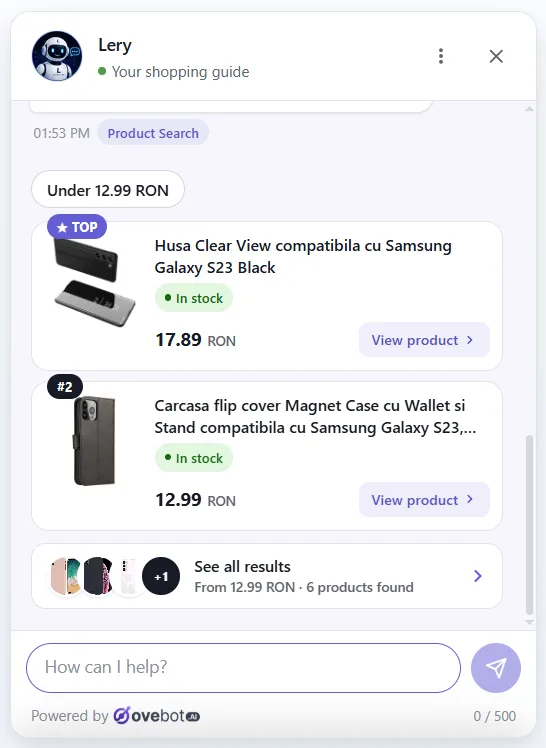
One illustration is our own product, Ovebot, which publishes this blog. Here is how its shopping assistant works: it reads the store’s product catalog from a JSON or Google Merchant feed refreshed on a schedule. It recommends real products with current stock and price, and puts an “Add to cart” button on each card.

When a request is ambiguous, a careful assistant asks instead of guessing. Below, the shopper asked to add a Dell Precision 5680, and the catalog holds several configurations. The assistant shows the matches and lets the shopper choose.

It also hands the chat to a human during working hours, replies in 29+ languages and reports add-to-carts and orders attributed to the chat.
Frequently asked questions
What is the difference between an AI shopping assistant and a chatbot?
An AI shopping assistant is a chatbot focused on selling. A support chatbot answers order, shipping or returns questions, often from FAQ text. A shopping assistant also searches your live catalog, compares items and adds products to the cart. Many tools do both, so ask whether the bot reads live stock and price or only static pages.
Do AI shopping assistants increase sales?
They can, but public figures show correlation, not a fixed uplift. The reliable answer is your own before-and-after test on add-to-cart from chat and assisted orders.
What data does an AI shopping assistant need from my store?
A product feed with clear titles, separate attributes, compatibility, grouped variants, stock, prices, images, categories and translations, plus your shipping, returns, warranty and sizing policies.
Do I have to tell shoppers they are chatting with an AI?
In the EU, the chat must make it clear in most cases. Article 50(1) of the EU AI Act, applicable since 2 August 2026, obliges the provider to design the system so people know they are talking to an AI, unless that is obvious. The store should make sure the chat it deploys shows that disclosure. Outside the EU, it is still good practice.
The bottom line
An AI shopping assistant sells when it answers the questions your search box cannot, using product data you have cleaned and kept current. Start with the feed, test with real shopper questions, keep a human available and judge the results against your own baseline.
About this guide: written by the Ovebot team, the developers, ecommerce specialists and support staff who build the product and talk with store owners every day. Facts are checked against the sources listed below. About us · Contact
Sources
- Adobe – Adobe Analytics: Traffic to US retail websites from generative AI sources jumps 1,200% – 2025 – https://blog.adobe.com/en/publish/2025/03/17/adobe-analytics-traffic-to-us-retail-websites-from-generative-ai-sources-jumps-1200-percent
- Adobe – Adobe holiday shopping season results – 2026 – https://news.adobe.com/news/2026/01/adobe-holiday-shopping-season
- Baymard Institute – Ecommerce search query types – 2026 – https://baymard.com/research-articles/ecommerce-search-query-types
- Capgemini Research Institute – What Matters to Today’s Consumer 2025 (71% of consumers want generative AI integrated into their shopping experiences) – 2025 – https://www.capgemini.com/news/press-releases/71-of-consumers-want-generative-ai-integrated-into-their-shopping-experiences/
- Amazon – Amazon.com announces third quarter results – 2025 – https://ir.aboutamazon.com/news-release/news-release-details/2025/Amazon-com-Announces-Third-Quarter-Results/default.aspx
- Walmart – The future of shopping is agentic: meet Sparky – 2025 – https://corporate.walmart.com/news/2025/06/06/walmart-the-future-of-shopping-is-agentic-meet-sparky
- Zalando – Zalando Assistant – 2024 – https://corporate.zalando.com/en/node/10667
- European Union – Regulation (EU) 2024/1689 (Artificial Intelligence Act) – 2024 – https://eur-lex.europa.eu/eli/reg/2024/1689/oj
- European Commission, AI Act Service Desk – Article 50: Transparency obligations for providers and deployers of certain AI systems – https://ai-act-service-desk.ec.europa.eu/en/ai-act/article-50
This article was written with the help of artificial intelligence and reviewed by a human editor.