Product page best practices: answer what shoppers still ask
Product page best practices: find the questions shoppers still ask, answer them on the page, and know what to leave to chat. Includes a checklist.


Product page best practices come down to one test: can a shopper decide to buy without having to ask you anything? Most stores fail that test somewhere. Baymard Institute’s 2026 benchmark of more than 155 ecommerce sites rated product page UX as mediocre or worse on 52% of desktop sites and 62% of mobile sites (Baymard Institute, 2026).
The gaps are rarely about thin photos alone. Shoppers get stuck on practical questions: what will this cost delivered, can I send it back, will it fit, is it in stock, does it work with what I already own. In Nielsen Norman Group’s ecommerce studies, reported in 2014, 20% of task failures came from incomplete or unclear product information (NN/g, 2014).
This guide shows how to find the questions your shoppers still ask, where to answer each one on the page, and which ones work better in a conversation. It draws on published usability research and ends with a checklist you can run on your own pages. If you are still deciding whether chat belongs in your store at all, start with our guide to ecommerce chatbots.
Key Takeaways
- Even complete product pages leave practical questions open: total cost, delivery, returns, size, stock, compatibility and comparisons.
- Your best question list already exists in site search logs, the support inbox, chat transcripts, reviews and product Q&A.
- Answer a question on the page when the answer is the same for every shopper. Leave it to chat when the answer depends on the shopper’s situation.
- Baymard’s 2026 benchmark found that 67% of sites don’t show a total cost estimate, including shipping, near the buy section.
- Keep price, stock, shipping and returns identical on the page, in structured data and in any product feed.
Why complete product pages still leave shoppers asking
A product page can have good photos, a full description and plenty of reviews and still block the sale with one missing detail. Baymard’s 2026 product page benchmark shows where those details usually go missing (Baymard Institute, 2026):
- Total cost: 67% of sites don’t show a total cost estimate, including shipping, near the buy section.
- Returns: 44% don’t show or link the return policy on the product page, while 60% of shoppers in a survey of 1,032 said they look for return information there.
- Scale: 37% lack in-scale images, even though 42% of test users tried to judge size from the images.
- Size selection: 57% don’t use buttons for size selection.

Missing details cost time before they cost sales. In Baymard’s 2021 research on product descriptions, test users spent one to three minutes scanning a page for a detail that wasn’t there. When they guessed instead, wrong assumptions about the product led to returns (Baymard Institute, 2021).
Six kinds of questions product pages leave open
Most pre-sale questions fall into six groups. The examples below are typical phrasings, not survey data, but you will probably recognize them from your own inbox:
- Total cost and delivery: “How much is shipping to my town?” “Will it arrive before Friday?”
- Returns: “Can I send it back if it doesn’t fit?” “Who pays for return shipping?”
- Size and fit: “I’m 178 cm and 80 kg, should I take M or L?” “How big is it next to a hand?”
- Stock: “Is the black one in stock in size 42?” “When will it be back?”
- Compatibility: “Does this charger work with my laptop model?” “Will this filter fit my coffee machine?”
- Comparisons: “What’s the difference between these two models?” “Which one is better for a small kitchen?”
Nielsen Norman Group put “answer shoppers’ questions” first among the 85 product page guidelines in its 2019 study of 49 ecommerce sites (NN/g, 2019). The steps below show which of these groups your own shoppers ask about most, and where each answer belongs.
Step 1: Collect the questions shoppers already ask
By the end of this step, you will have a raw list of real product page questions, copied word for word. You don’t need a survey. Shoppers have already told you what is missing, spread across the tools you use every day.
Check these sources (this is practitioner advice, not a ranked list):
- Site search logs: look for searches made from product pages and for words like “shipping”, “return”, “size”, “fits” or a model number. Searches with zero results are especially telling.
- Support inbox: pull pre-sale emails and contact form messages. Ignore order problems for now.
- Chat transcripts: the first message of each conversation usually states the shopper’s question plainly.
- Reviews and product Q&A: reviews often contain answers you should promote (“runs small”, “fits the 2021 model too”). Questions left in Q&A are missing details by definition.
- Return reasons: “not as described” or “wrong size” often point to a detail the page didn’t make clear.
Product Q&A deserves attention even if you already show reviews. In Baymard’s 2017 testing, 40% of users used community Q&A when it was available, even with reviews present. Unanswered questions were a common cause of abandonment, yet 55% of sites had no community Q&A at all (Baymard Institute, 2017).
To run the collection:
- Pick a time window, such as the last 60 to 90 days or the current season.
- Copy each question verbatim, since the shopper’s words become your headings and labels later.
- Note the product or category and the source next to each question.
You are done when every entry has the question, the product and the source.
Step 2: Group and rank the questions
By the end of this step, you will know which missing answers to fix first. Sort each question into one of the six groups above, then count repeats.
A simple spreadsheet is enough. The rows below are illustrative:
| Question (verbatim) | Product or category | Group | Times seen | Answered on page? | Action |
|---|---|---|---|---|---|
| “Do you deliver to the islands?” | All products | Total cost and delivery | 14 | No | Add delivery estimate by region |
| “Does it fit the 2019 model?” | Phone cases | Compatibility | 9 | Partly, in description | Add a “Works with” list |
| “Is M closer to a 38 or a 40?” | Dresses | Size and fit | 7 | No | Add size chart in cm |
| “Can I mix it with my old cartridges?” | Printer ink | Compatibility | 2 | No | Leave to chat for now |
Rank by two things: how often a question comes up and whether it blocks the purchase. A frequent question about delivery cost matters more than a rare one about gift wrapping. Your list is ready when the top ten questions each have a clear next action.
Step 3: Fold the answers back into the product page
By the end of this step, the most frequent questions will have answers where shoppers look for them. Put each answer close to the decision it affects, usually near the price and the buy button. Appending the missing detail to the end of a long description doesn’t count, because shoppers often miss it there.
Show total cost and delivery near the buy button
Show the price with any extra charges, plus availability, before the shopper adds the item to the cart. NN/g lists both among its 2019 product page guidelines (NN/g, 2019). A line such as “Delivery from €4.90, arrives Tue to Thu” answers two questions at once. Surprise costs that show up later are a familiar theme in cart abandonment.
Summarize returns and link the full policy
Add a one-line returns summary next to the buy section (“Free returns within 30 days”) and link to the full policy. If your policy itself is unclear, fix that first with a return policy template.
Give real sizing information
Apparel stores have the most work here. Baymard’s 2022 research found that 83% of apparel sites on desktop and 87% on mobile don’t give sufficient sizing information (Baymard Institute, 2022). Add measurements in centimeters (and inches if you sell abroad), state the model’s height and size, and show at least one in-scale image. Use buttons for sizes rather than a dropdown, so shoppers see every option and which ones are out of stock.
Write the product description for comparison
A strong product description lists the same specifications, in the same order, for every product in a category. NN/g’s 2019 guidelines call for consistent information so shoppers can compare items. For anything that connects to something else, add a “Works with” list of exact models and a “Doesn’t work with” list where confusion is common.
Add reviews, Q&A and a short FAQ
Reviews answer questions you can’t answer yourself, such as how a product holds up. A 2017 Spiegel Research Center study found that a product with five reviews was 270% more likely to convert (be purchased) than one with none (Spiegel Research Center, 2017). The conversion lift from showing reviews was larger for higher-priced products.

In one gift retailer’s data from the same study, conversion peaked at an average rating between 4.0 and 4.7 stars, not at a perfect 5.0. NN/g also recommends showing negative reviews. Answering them is a cheap trust signal, yet Baymard’s 2026 benchmark found that 89% of sites don’t respond to negative reviews.
Use an FAQ block for answers that apply to a whole product type, and Q&A for questions about one specific item. In Baymard’s 2017 review, 70% of sites lacked that FAQ and Q&A combination (Baymard Institute, 2017).
Where to answer each product page question
Each kind of question has a natural home on the page. Use this table to decide where an answer goes:
| Shopper question | Where to answer it | Format tip |
|---|---|---|
| “What will it cost delivered?” | Next to the price and buy button | Price plus shipping estimate in one line |
| “When will it arrive?” | Next to the buy button | Delivery date range, updated by region if possible |
| “Can I return it?” | Buy section, linked to full policy | One-line summary plus link |
| “Which size should I take?” | Next to the size buttons | Size chart in cm, model’s height and size |
| “How big is it really?” | Image gallery | At least one in-scale photo |
| “Is it in stock in my variant?” | Variant buttons | Gray out or label sold-out variants |
| “Does it work with my model?” | Specifications | “Works with” list of exact models |
| “How is it different from X?” | Specifications, category page | Same spec order across the category |
| “Does it hold up?” | Reviews | Show negative reviews and your replies |
| “Which one fits my budget and use?” | Chat | Depends on the shopper, so ask and recommend |
| “Where is my order?” | Chat or order tracking page | Needs the shopper’s order details |
Step 4: Keep structured data and feeds in sync
By the end of this step, search engines will see the same facts as your shoppers. Google’s merchant listing markup supports price, availability, shipping, return policy, apparel sizing and reviews (Google Search Central, page last updated December 2025). Most of the facts from Step 3 (price, shipping, returns, sizing and reviews) have a structured data counterpart.
The risk is drift. Google notes that a mismatch in price or stock between your site and Merchant Center is a common cause of sync problems, and recommends automating updates (Google Search Central, page last updated December 2025).
- Generate markup and feeds from the same product fields that render the visible page.
- Never hand-edit a price in one place only.
- After a price or stock change, spot-check a few pages and compare page, markup and feed.
Step 5: Decide what to leave to chat
By the end of this step, you will have a clear rule for what stays off the page. Put an answer on the page when it is the same for every shopper. Leave it to a conversation when it depends on who is asking. Because the test doesn’t change, you can apply it to every new question as it comes up.
Questions that belong in chat include:
- Fit for a specific person (“I usually wear 40 in this brand, what about yours?”)
- Compatibility with an unusual setup the “Works with” list can’t cover
- Budget plus use case (“a laptop for photo editing under €900, which one is in stock?”)
- Order-specific questions, such as delivery status or an address change
- Rare questions that came up once or twice in Step 2
Chat answers must use the same facts as the page. If chat quotes a different price or return window, you have created a new question instead of answering one. Treat chat as a feedback loop, too: when the same question shows up there every week, move the answer onto the page. Our explainer on the AI shopping assistant covers how assistants handle these questions.
What this looks like in practice
Ovebot, the AI sales and support agent our team builds, is one example of how chat can feed this loop. The chat history lists each conversation with the shopper’s opening message, which makes recurring questions easy to scan.

The statistics screen shows how many sessions and messages you had in a period, which helps you decide how large a sample to read.

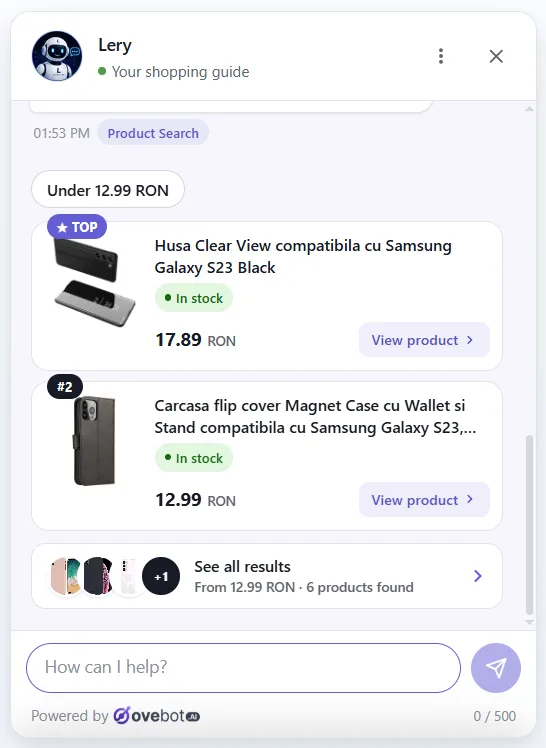
On the storefront, the agent answers questions that depend on the shopper, using the store’s own product feed for stock and price.


When the agent hears a new fact in chats, it proposes it to the owner for approval. That same signal tells you which detail to add to the product page next. The features page lists the rest.
Product page best practices checklist
Run this checklist on your ten best-selling product pages first:
| Check | What good looks like |
|---|---|
| Price and total cost | Price plus shipping estimate shown near the buy button |
| Delivery | Delivery date range visible before add to cart |
| Availability | Stock status per variant, sold-out variants labeled |
| Returns | One-line summary near the buy section, link to full policy |
| Sizing | Size chart with measurements, model’s size, size buttons |
| Scale | At least one in-scale image |
| Specifications | Same specs in the same order across the category |
| Compatibility | “Works with” list of exact models where relevant |
| Reviews | Negative reviews visible, with replies from the store |
| FAQ and Q&A | FAQ for the product type, Q&A for the specific item |
| Structured data | Markup and feed match the visible page |
| Chat | Handles shopper-specific questions using the same facts |
Frequently asked questions
What should a product page include?
At minimum: clear photos with one in-scale image, consistent specifications, the price with a shipping estimate, delivery time, stock per variant, a returns summary linked to the full policy, and reviews. Apparel needs a size chart with measurements, and connected products need a “Works with” list. Beyond that, answer whatever your shoppers ask most.
How do you optimize a product page for conversions?
Start with the questions shoppers already ask in search logs, emails, chats and reviews, and fix the frequent ones that block a purchase. Measure before and after each change so you know what helped.
Should product pages have a Q&A section or an FAQ?
Ideally both, because they do different jobs. An FAQ answers questions that apply to a whole product type, such as warranty or care. Q&A covers questions about one specific item.
How long should a product description be?
A product description should be as long as the shopper’s questions require and no longer. A phone case may need five lines and a “Works with” list. A sofa needs dimensions, materials, care and delivery details. Use the same structure across a category so shoppers can compare. If support keeps answering the same question, the description is too short in that spot.
Do reviews increase sales?
In a 2017 Spiegel Research Center study, a product with five reviews was 270% more likely to convert than one with none, and the lift was larger for higher-priced products. In one retailer’s data, a near-perfect average rating converted better than a perfect one, so show negative reviews too, and reply to them.
Start with the questions you already have
A better product page is less about adding more content and more about answering the right questions in the right spot. Collect what shoppers ask, fix the most frequent gaps on your best-selling pages, and let chat handle the questions that depend on the person asking.
About this guide: written by the Ovebot team, the developers, ecommerce specialists and support staff who build the product and talk with store owners every day. Facts are checked against the sources listed below. About us · Contact
Sources
- Baymard Institute – Product Page UX 2026: Current State and Common Pitfalls – 2026 – https://baymard.com/blog/current-state-ecommerce-product-page-ux
- Baymard Institute – Product Page FAQ and Community Q&A – 2017 – https://baymard.com/research-articles/product-page-faq-and-qa
- Baymard Institute – Product Descriptions – 2021 – https://baymard.com/research-articles/product-descriptions
- Baymard Institute – Apparel Size Information – 2022 – https://baymard.com/research-articles/apparel-size-information
- Nielsen Norman Group – Product Descriptions – 2014 – https://www.nngroup.com/articles/product-descriptions/
- Nielsen Norman Group – Ecommerce Product Pages – 2019 – https://www.nngroup.com/articles/ecommerce-product-pages/
- Spiegel Research Center, Northwestern University – How Online Reviews Influence Sales – 2017 – https://spiegel.medill.northwestern.edu/How-Online-Reviews-Influence-Sales
- Google Search Central – Product structured data (merchant listings) – page last updated December 2025 – https://developers.google.com/search/docs/appearance/structured-data/product
- Google Search Central – Share your product data with Google – page last updated December 2025 – https://developers.google.com/search/docs/specialty/ecommerce/share-your-product-data-with-google
This article was written with the help of artificial intelligence and reviewed by a human editor.