18 Best WooCommerce Plugins to Increase Conversions
The best WooCommerce plugins for more sales, grouped by job: reviews, cart recovery, upsells, checkout, speed, search, chat, payments and analytics.


The best WooCommerce plugins for conversions each fix one specific leak in your store. Shoppers leave because they can’t find a product, don’t trust it, or give up at checkout. Installing more extensions doesn’t fix that. Picking one tool per problem, then measuring the result, does.
The leak is large. On average, 70.22% of online shopping carts are abandoned, according to Baymard Institute’s 2025 analysis of 50 studies. Some of that is people just browsing. The rest comes from reasons you can act on, such as surprise costs, slow delivery and long checkouts.
This guide groups 18 WooCommerce extensions by the job they do, with two picks per job. For each one you get what it does, who it suits, the free and paid options as the developer states them, plus active installs and last update date from its official page, retrieved October 22, 2026.
How we chose: every pick is an actively maintained plugin listed on WordPress.org or WooCommerce.com, checked on October 22, 2026. For each job we chose two that take different approaches, usually a free-first option and a paid or more advanced one. The chat category includes our own plugin, Ovebot, disclosed where it appears, and its place in the list is not a ranking.
Key Takeaways
- Choose plugins for your store by the problem you need to solve (trust, cart recovery, checkout, speed, search, questions, payment, tracking), not by popularity alone.
- Core WooCommerce doesn’t send abandoned cart emails, so a recovery plugin is one of the first additions worth testing.
- Never run two plugins that do the same job, such as two page caches or two checkout builders.
- Test every new plugin on a staging copy, measure speed before and after, and change one thing at a time.
- Install counts and update dates tell you whether a plugin is maintained; they don’t tell you whether it fits your store.
The best WooCommerce plugins at a glance
Each row covers one job. Both picks are linked to their official pages, and the pricing model is how each developer describes it.
| Job to be done | First pick | Second pick |
|---|---|---|
| Product reviews | Customer Reviews for WooCommerce (Free + Pro) | Photo Reviews for WooCommerce (Free + Pro) |
| Abandoned cart recovery | Cart Abandonment Recovery (Free + Pro) | FunnelKit Automations (Free + Pro) |
| Recommendations and upsells | Product Recommendations (Paid, $99/year) | WPC Frequently Bought Together (Free + Pro) |
| Checkout optimization | CartFlows (Free + Pro, from $16/month) | FunnelKit Funnel Builder (Free + Pro) |
| Speed and caching | LiteSpeed Cache (Free) | WP Super Cache (Free) |
| Product search | FiboSearch (Free + Pro) | Advanced Woo Search (Free + Pro) |
| AI chat and live chat | Tidio (Free plan, paid from $29/month) | Ovebot (our plugin; free plugin, paid AI service) |
| Payments and express checkout | WooPayments (Per-transaction fees) | WooCommerce Stripe Payment Gateway (Free plugin) |
| Analytics | Google Analytics for WooCommerce (Free) | Google for WooCommerce (Free) |
Product reviews: give new visitors proof
Reviews answer the first question a new visitor has: did other people buy this, and were they happy? A 2017 study by Northwestern University’s Spiegel Research Center found that a product with five reviews had a 270% higher purchase likelihood than a product with none. Moving products from zero reviews to their first few is worth the effort. Reviews also belong in your product page layout, close to the price and the buy button.
Customer Reviews for WooCommerce (CusRev)
This plugin sends review reminders after purchase, adds questions and answers to product pages, and can produce a review feed for Google Shopping.
- Best for: stores that want review requests on autopilot and reviews visible in Shopping results
- Pricing: Free + Pro · 80,000+ active installs · updated Oct 19, 2026
Photo Reviews for WooCommerce (VillaTheme)
Customers can attach photos to their reviews. The plugin also sends reminder emails and can send a coupon to encourage a review.
- Best for: fashion, home decor and other products where a real-life photo answers sizing or color doubts
- Pricing: Free + Pro · 10,000+ active installs · updated Oct 3, 2026
If you were looking for Judge.me, its plugin is closed on WordPress.org (the plugin page shows it as closed since August 13, 2025), so we left it out. If you reward reviews with coupons, check the disclosure rules in the countries you sell to.
Abandoned cart recovery: win back shoppers who left
WooCommerce doesn’t recover abandoned carts on its own. A recovery plugin captures the email address a shopper types at checkout and sends follow-up emails with a link that restores the cart. Our guide to reducing cart abandonment covers the email timing and copy.
Cart Abandonment Recovery for WooCommerce (Brainstorm Force)
The plugin captures the checkout email and sends a sequence of follow-up emails, each with a cart-restore link.
- Best for: a first recovery setup without extra cost
- Pricing: Free + Pro · 300,000+ active installs · updated Oct 16, 2026
FunnelKit Automations
This is an email automation and CRM tool. Abandoned cart recovery is one of its workflows, next to post-purchase and other customer emails.
- Best for: stores that want cart recovery and broader email marketing in one place
- Pricing: Free + Pro · 20,000+ active installs · updated Oct 22, 2026
Pick one of the two. Running both risks sending the same shopper duplicate reminders.
Product recommendations and upsells: raise order value
Recommendation plugins work on order value: the case with the phone, the refill with the device. They also help shoppers find the accessory they would otherwise forget and buy elsewhere.
Product Recommendations (by WooCommerce)
The official extension adds upsells, cross-sells and frequently bought together blocks, with analytics that show how each recommendation performs.
- Best for: stores that want to measure which recommendations actually sell
- Pricing: $99/year, sold on WooCommerce.com, so there’s no WordPress.org install count
WPC Frequently Bought Together (WPClever)
This plugin adds a frequently bought together section to product pages. Because the free version covers the core feature, it’s a cheap way to test whether bundle offers lift order value before you pay for anything. Start with a handful of best-selling products and pair each with an item buyers genuinely need alongside it.
- Best for: a low-cost bundle offer on your best-selling products
- Pricing: Free + Pro · 10,000+ active installs · updated Sep 21, 2026
Checkout optimization: remove the reasons people quit
Checkout is where intent is highest and friction hurts most. Baymard Institute estimates that the average large ecommerce site could lift its conversion rate by 35.26% through better checkout design (Baymard, 2025). The reasons shoppers give for abandoning checkout show where to start.

Most of these reasons need a settings change, not a plugin. Show shipping costs before checkout, state delivery times on product pages, and let shoppers buy as guests. A checkout plugin helps with the last reason: a long or confusing form.
CartFlows
CartFlows replaces the default WooCommerce checkout with its own templates. Order bumps and one-click upsells are Pro features.
- Best for: stores that want a shorter, cleaner checkout and later want to add upsells
- Pricing: Free + Pro, Pro from $16/month · 200,000+ active installs · updated Oct 5, 2026
- Check before installing: it replaces your checkout, so place a full test order on staging, including payment and the order confirmation email
FunnelKit Funnel Builder
Funnel Builder gives you a custom checkout with a field editor, so you can remove fields you don’t need. Pro adds order bumps, upsells and A/B tests.
- Best for: stores that want to cut checkout fields and test variations
- Pricing: Free + Pro · 30,000+ active installs · updated Oct 21, 2026
- Check before installing: it also replaces your checkout, so place test orders on staging with every payment method you offer
Again, pick one. Two checkout builders would compete for the same checkout page.
Speed and caching: make every page faster
Faster pages tend to convert better. In a 2020 study for Google, Deloitte and the agency 55 analyzed data from 37 brands and more than 30 million sessions collected in late 2019. A 0.1-second improvement in mobile site speed raised retail conversions by 8.4% and average spend by 9.2% (web.dev, “Milliseconds make millions”).
LiteSpeed Cache
LiteSpeed Cache is free. Its page caching needs a LiteSpeed or OpenLiteSpeed server, or the QUIC.cloud CDN. Its other optimizations work on any host.
- Best for: stores hosted on a LiteSpeed server
- Pricing: Free · 7+ million active installs · updated Oct 20, 2026
WP Super Cache (Automattic)
WP Super Cache serves static HTML copies of your pages instead of building them on every visit. It’s free and, unlike LiteSpeed Cache’s page caching, it doesn’t need a LiteSpeed server. Cart, checkout and account pages must stay dynamic, so check that they aren’t served from the cache.
- Best for: a simple, free page cache on hosting without a LiteSpeed server
- Pricing: Free · 1+ million active installs · updated Sep 30, 2026
Run only one page cache. After you turn it on, log out and test adding to cart, the cart page and checkout, so no shopper sees a stale cart.
Product search: help shoppers find what they typed
Shoppers who search usually know what they want, so a failed search is a lost sale. Baymard’s 2026 search research found that 56% of ecommerce sites fail to adequately support users’ search needs (Baymard, 2026).
FiboSearch
FiboSearch shows AJAX suggestions (live search without reloading the page) with products as the shopper types.
- Best for: stores with large catalogs where instant suggestions save clicks
- Pricing: Free + Pro · 100,000+ active installs · updated Oct 8, 2026
Advanced Woo Search
This plugin searches SKUs, categories and tags as well as product titles.
- Best for: stores whose buyers search by SKU or part number
- Pricing: Free + Pro · 70,000+ active installs · updated Oct 20, 2026
Before and after installing, run the same test queries on your own store:
- A SKU or part number from your catalog
- A common misspelling of a brand you sell
- A synonym (“sofa” when you call it “couch”)
- A product type plus an attribute (“black running shoes 42”)
AI chat and live chat: answer questions before they become exits
A chat widget catches the questions that stop a purchase. Shoppers ask “Does this fit the 2019 model?”, “When will it arrive in Austria?” and “Where is my order?” A chat tool turns those moments into answers. For a fuller picture, read our ecommerce chatbot guide.
Tidio
Tidio combines live chat with Lyro, its AI agent. With WooCommerce connected, your agents can see a shopper’s cart and order history while they chat.
- Best for: teams that want live chat first, with AI to cover the gaps
- Pricing: free plan, paid from $29/month · 70,000+ active installs · updated Sep 1, 2026
Ovebot (our own plugin)
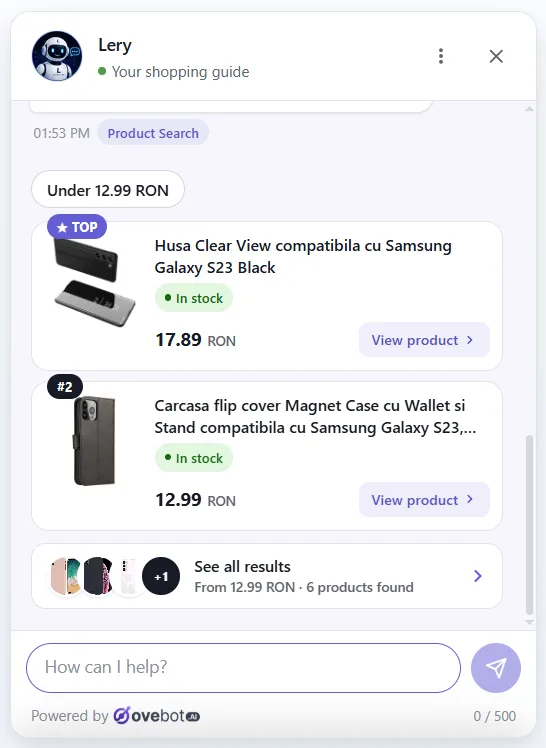
Ovebot is our own plugin, so weigh this pick with that in mind. It answers from your site’s content, recommends products from your live catalog and looks up order status, with a handoff to a human when needed. See the WooCommerce integration page for details, and our guide to order tracking in WooCommerce chat explains the order lookups.
- Best for: stores where shoppers ask product and order questions outside working hours
- Pricing: free plugin; the AI service runs on paid plans by monthly message volume, with a 14-day free trial · version 1.1.0, updated Oct 7, 2026

Payments and express checkout: fewer typed card numbers
Express wallets let shoppers pay with details they’ve already saved, so they type less at checkout. They may also help with the 19% of shoppers in Baymard’s 2025 data who didn’t trust a site with their card details.
WooPayments (by WooCommerce)
WooPayments has no setup or monthly fee; you pay per transaction. It supports Apple Pay, Google Pay, and the one-click checkout wallets Link and WooPay.
- Best for: stores that want payments managed inside the WooCommerce dashboard
- Pricing: per-transaction fees · 800,000+ active installs · updated Oct 8, 2026
WooCommerce Stripe Payment Gateway
The Stripe gateway supports 23 payment methods, including Link, Apple Pay and Google Pay.
- Best for: stores that already use Stripe or sell in several countries with local payment methods
- Pricing: free to install from WordPress.org; check Stripe’s processing fees for your country · 700,000+ active installs · updated Oct 16, 2026
Analytics: measure whether any of this works
Without tracking you can’t tell which plugin helped. Set up analytics before you add conversion tools, so you have a baseline.
Google Analytics for WooCommerce (by WooCommerce)
This extension sends GA4 (Google Analytics 4) ecommerce events from your store. Check that it covers your full funnel: product views, add to cart, checkout start and purchase.
- Best for: stores that want a free, official GA4 connection
- Pricing: Free · 100,000+ active installs · updated Oct 20, 2026
Google for WooCommerce
This plugin syncs products to Google Merchant Center, runs Performance Max campaigns (Google’s automated ad campaign type) and adds conversion tracking.
- Best for: stores that advertise on Google Shopping
- Pricing: free to install from WordPress.org · 800,000+ active installs · updated Oct 20, 2026
How many plugins is too many, and how to test them
No fixed number is too many, though every plugin adds some weight. What hurts is overlap and untested weight: two tools doing the same job, or scripts loading on every page for a feature few shoppers use. Treat each new plugin as an experiment.
- Test on staging first. Clone the store to a staging copy and install there, with HPOS (High-Performance Order Storage) and the block-based Cart and Checkout set up as they are on your live store. Check product pages, cart and checkout with your theme, on mobile too.
- Measure speed before and after. Run PageSpeed Insights or Lighthouse on your home page, a product page and the cart, and note the scores.
- Change one thing at a time. Add one plugin, go live, then wait one to two weeks before adding the next. Otherwise you can’t tell what moved your conversion rate.
- Compare the same numbers. Use conversion rate, average order value and revenue per visitor for the same weekdays before and after.
- Remove what didn’t earn its place. Deactivate and delete plugins that show no effect, and remove the leftover settings.
Use this checklist before you install any of the plugins above:
- The plugin page lists an update within the last few months
- It states compatibility with your WooCommerce and WordPress versions
- Support forum questions get answers
- It doesn’t duplicate a job another active plugin already does
- You know which number it should move, and by when you’ll check
Frequently asked questions
What are the best WooCommerce plugins to increase sales?
Start with the plugins that fix your biggest leak. For most stores that means a review plugin such as Customer Reviews for WooCommerce, an abandoned cart plugin such as Cart Abandonment Recovery, a page cache, and express payments through WooPayments or Stripe. Add search, chat or checkout tools once your analytics show where shoppers drop off.
Does WooCommerce have built-in abandoned cart recovery?
No. Core WooCommerce doesn’t send abandoned cart emails, so you need a recovery plugin such as Cart Abandonment Recovery for WooCommerce or FunnelKit Automations. Both are compared in the cart recovery section above.
Do I need a separate upsell plugin if I use CartFlows?
You may not. Order bumps and one-click upsells are CartFlows Pro features, so if you upgrade, a second upsell tool at checkout would overlap with it.
Which plugins slow down a WooCommerce site?
Any plugin can, especially ones that load scripts on every page or run heavy database queries. To find the cost of one plugin, measure a product page with PageSpeed Insights or Lighthouse, deactivate that plugin on staging, and measure again.
How do I reduce cart abandonment in WooCommerce?
Start with settings: show shipping costs early, allow guest checkout, offer express wallets and shorten the checkout form. Then add a recovery plugin to email shoppers who still leave.
Start with tracking, then fix one leak at a time
The right plugins are the ones that solve a problem your data already shows. Start with tracking, add one tool for your biggest leak, and test it on staging before it reaches shoppers. Keep what moves your numbers and remove the rest.
About this guide: written by the Ovebot team, the developers, ecommerce specialists and support staff who build the product and talk with store owners every day. Facts are checked against the sources listed below. About us · Contact
Sources
- Baymard Institute – Cart Abandonment Rate Statistics – 2025 – https://baymard.com/lists/cart-abandonment-rate
- Baymard Institute – Ecommerce Search UX: Query Types – 2026 – https://baymard.com/blog/ecommerce-search-query-types
- Deloitte and the agency 55 for Google, via web.dev – Milliseconds Make Millions – 2020 – https://web.dev/case-studies/milliseconds-make-millions
- Spiegel Research Center, Northwestern University – How Online Reviews Influence Sales – 2017 – https://spiegel.medill.northwestern.edu/how-online-reviews-influence-sales/
- Plugin details (features, pricing model, active installs, last update): each plugin’s official WordPress.org or WooCommerce.com page linked above, retrieved October 22, 2026
This article was written with the help of artificial intelligence and reviewed by a human editor.