AI in ecommerce: 15 use cases ranked by evidence
AI in ecommerce, use case by use case: what the field experiments show, what each takes for a small store, EU rules, and a 30-day plan to start.

AI in ecommerce pays off most clearly where a shopper has a question and nobody is there to answer it. In a 2023 field experiment on a cross-border marketplace, a pre-sale AI chatbot lifted sales by 16.3%. In separate tests on the same marketplace, smarter search and AI-written product descriptions raised sales by 2.9% and 2.1%, and AI push messages showed no significant sales effect (Fang et al., arXiv preprint).
Below are 15 ways a small or mid-size store can use AI, grouped by the shopper journey. Each one comes with what the evidence says and what it takes to run. For the chat channel in depth, see our ecommerce chatbot guide.
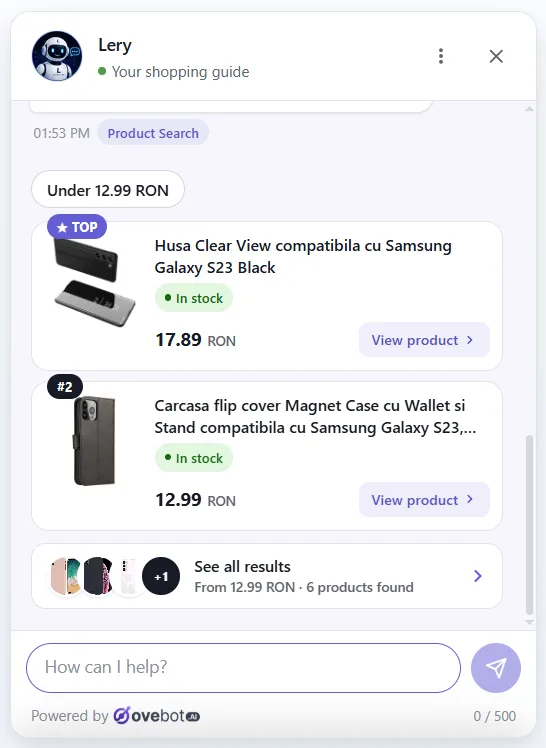
We build Ovebot, an AI sales and support agent for online stores, so the chat-based use cases are shown with our own product screens. The others (forecasting, pricing, fraud screening) need different tools, and we say so where it applies.
About this guide: Written by the Ovebot Team, the developers, ecommerce specialists and support staff who build Ovebot and talk to store owners every day. Every number about the market comes from the public sources listed at the end, and product details describe Ovebot’s own features.
Key Takeaways
- The strongest evidence is for a pre-sale chat assistant: 16.3% more sales than an automated “support unavailable” reply, in a randomized 2023 experiment (preprint, not peer reviewed).
- Smarter search and AI product descriptions brought smaller gains (2.9% and 2.1% in sales). AI push messages showed no statistically significant sales effect.
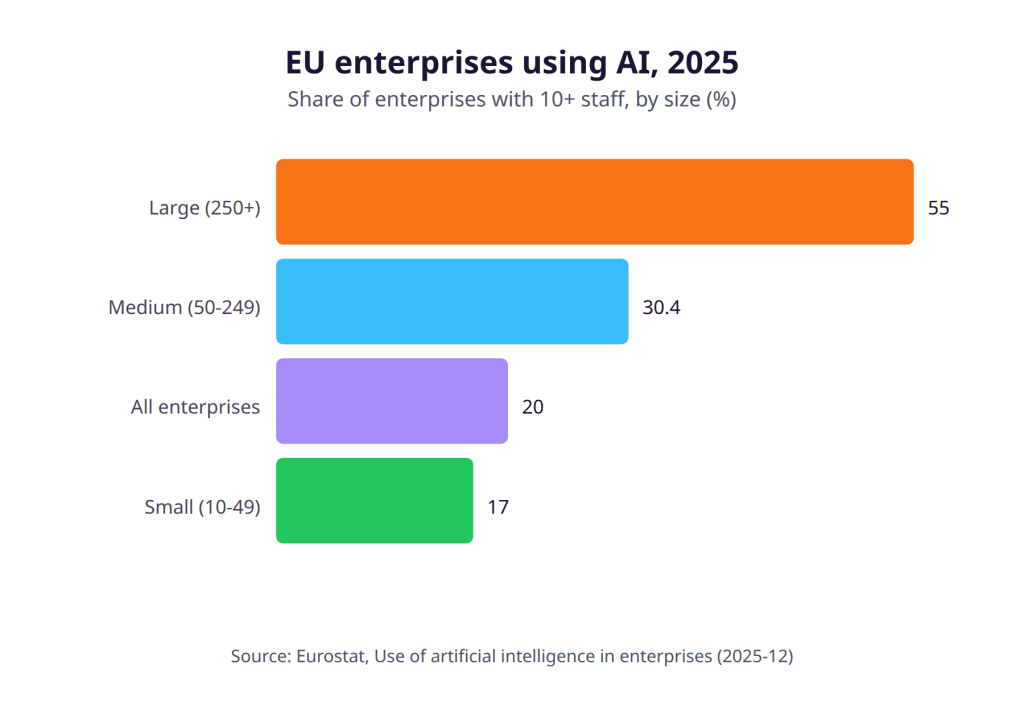
- Small EU firms lag behind: 17.0% of firms with 10-49 staff used AI in 2025, against 55.0% of large firms. Lack of expertise is the top barrier.
- In the EU, a chatbot must say it’s AI (AI Act Article 50, from August 2, 2026), your AI vendor needs a GDPR processing agreement, and personalized prices must be disclosed.
- Start with chat: answers, product help and order status. It has the best evidence and the lightest setup.
Where small stores stand with AI in ecommerce
Most small EU businesses haven’t started yet. In 2025, 19.95% of EU enterprises with 10 or more staff used AI, up 6.47 percentage points from 2024, according to Eurostat’s survey of about 157,000 enterprises. Adoption climbs with company size: 17.00% of small firms, 30.36% of medium firms and 55.03% of large ones.
Marketing and sales is where companies put AI first. Among enterprises that use AI, 34.70% use it for marketing or sales, the most common purpose. In retail trade, that share reaches 48.18%.
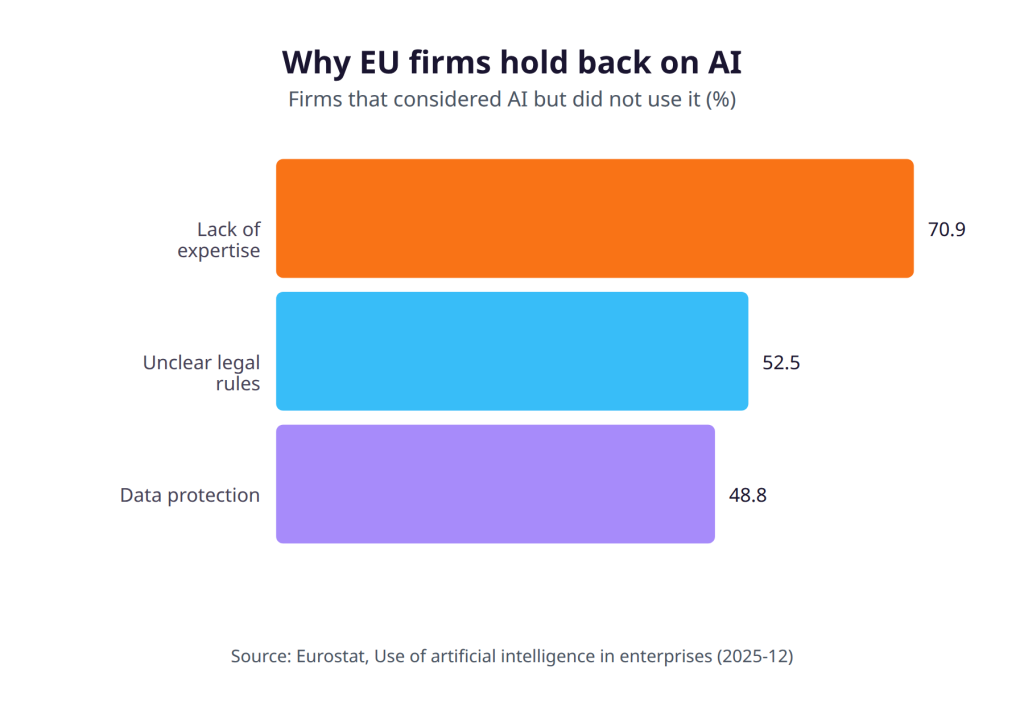
The main barriers are know-how and law. Among firms that considered AI but didn’t use it, 70.89% cited a lack of expertise, 52.52% unclear legal consequences and 48.83% data-protection concerns.
Each use case below lists the effort it takes, and the EU rules section near the end covers the legal questions in plain terms.
Shoppers aren’t waiting. In 2025, 78% of EU internet users aged 16-74 bought something online (Eurostat), and 33% of EU residents in the same age group had used generative AI in the previous three months (Eurostat).
The 15 uses of AI in ecommerce, by shopper journey
AI can help at five stages of a store, from a shopper’s first question to the back office. The first four stages face the shopper; the last one runs behind the scenes.
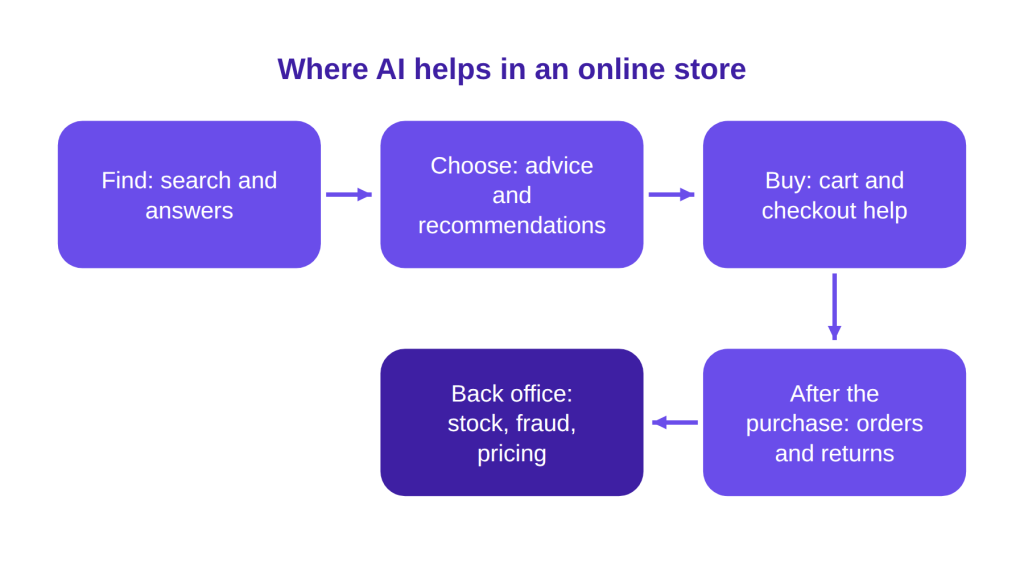
For each use case you’ll find what it is, what the evidence says and what it takes. Where no controlled study exists, we say so instead of guessing at a number.
Find: answers, search and language
At the first stage, AI helps shoppers get an answer or reach the right product fast. Instant answers, better search and language support do that work.
1. 24/7 answers from your own content
An AI assistant answers shipping, returns, sizing and product questions at any hour. It works from your store’s own pages and documents.
Evidence: This is the strongest result available for stores. In the randomized experiment by Fang and colleagues (September-October 2023, 44,614 consumers), a pre-sale AI chatbot raised sales by 16.3% and conversion by 21.7% (p<0.01). The comparison was an automated "support unavailable" reply; human agents were not part of the test. The gains came through higher conversion, with basket size not the driver, and newer and lower-spending shoppers benefited more.
Effort: Low to medium. The real work is content: a clear shipping page, a returns policy and a set of FAQs. An assistant is only as accurate as its sources, which is why grounding is the best defense against made-up answers in customer support.
How it works in Ovebot: You build the knowledge base from URLs, PDF, Word, Excel and CSV files, plus manual entries. The agent answers in your chat widget around the clock. It also proposes new facts it hears in chats, and you approve or reject each one.

2. Smarter site search
AI search understands what a shopper means, such as “waterproof hiking jacket under 100 euros,” and refines vague queries instead of matching exact words.
Evidence: Baymard Institute’s 2026 benchmark rates 56% of sites as having “mediocre or worse” search UX. In the Fang experiments, AI query refinement (1,849,382 consumers) raised sales by 2.9% and conversion by 1.2%.
Effort: Medium. Any AI search reads from your catalog, so clean titles, attributes and categories come first. A chat assistant connected to the catalog can also act as a second search box (see use case 4).
3. Multilingual selling and translation
AI translation lets shoppers write in their own language and get answers in it. It also speeds up translating product pages for new markets.
Evidence: Cross-border demand is real. In 2023, 32.84% of EU online buyers bought from sellers in another EU country (Eurostat). A 2018 NBER study found that machine translation raised exports on eBay by 17.5% (Brynjolfsson, Hui and Liu). In the Fang paper, live-chat translation raised consumer satisfaction by 5.2%, a figure from the platform’s internal analysis rather than a controlled test.
Effort: Low for chat. Product pages take more, because key products and legal text still need a native speaker’s review.
How it works in Ovebot: The agent works in 29+ languages, detects the visitor’s language automatically and can switch mid-chat. The welcome message is translated too.
Choose: recommendations and product content
Once shoppers find products, AI helps them narrow the choice. Recommendations and clear product content carry most of that load.
4. Product recommendations
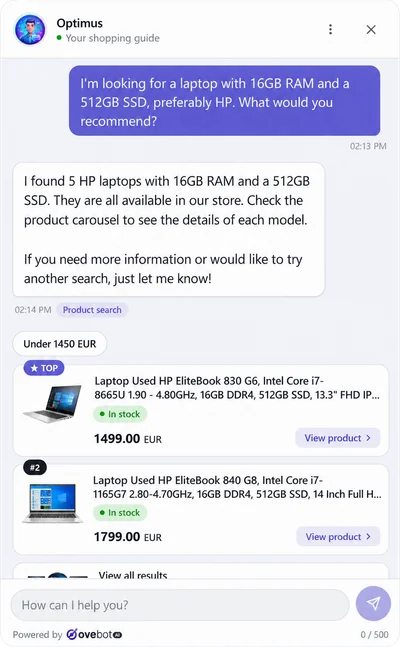
AI suggests products that match what a shopper describes, or that fit what’s already in the cart. This is the core job of an AI shopping assistant.
Evidence: A randomized field experiment published in Management Science in 2024 found that recommendations helped shoppers find higher-value, better-fitting products and raised purchase probability (Wan, Kumar and Li). We don’t quote an effect size, because the summary doesn’t give one.
Effort: Medium. Recommendations need a live product feed with correct stock and prices. Suggesting an out-of-stock item costs trust.
How it works in Ovebot: The agent reads your live catalog from a JSON or Google Merchant feed, refreshed on a schedule. It recommends real products with current stock and price, and it can take the cart into account to suggest accessories, parts or consumables.
5. AI-written product descriptions
Generative AI drafts product titles and descriptions from your specs. That helps most with large or fast-changing catalogs.
Evidence: In the Fang experiments (4,772,937 consumers), AI-generated descriptions raised sales by 2.1% and conversion by 1.3%. Google’s Search Central guidance (updated October 1, 2026) allows AI content. However, mass-produced pages that add no value violate its scaled content abuse policy, and Google asks you to fact-check AI output. Merchant Center also requires labeling AI-generated product titles and descriptions, and IPTC TrainedAlgorithmicMedia metadata on AI images.
Effort: Low per product, but every draft needs a human check of specs, sizes and claims. Start with your best sellers.
Buy: from decision to order
At the buying stage, AI helps by keeping a ready shopper moving and by catching sales and fraud that would otherwise slip through.
6. Add to cart inside the chat
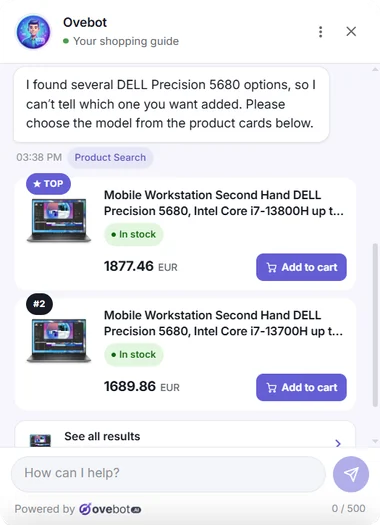
The shopper adds a recommended product to the cart from the conversation and heads to checkout without hunting for the product page.
Evidence: We found no controlled study of in-chat add-to-cart on its own. Baymard Institute puts average cart abandonment at 70.22% across 50 studies, and the Fang chatbot’s gains came through conversion. Fewer steps between a decision and checkout is the logic, but the size of the effect is unknown. Baymard’s top abandonment reasons, such as extra costs (40%) and slow delivery (20%), are about price and policy. A chat can explain them, while fixing them takes changes to shipping and pricing. Our guide to reducing cart abandonment covers those fixes.
Effort: Low, once recommendations work.
How it works in Ovebot: Recommended products carry an “Add to cart” button, and visitors can also ask in plain words, such as “put the black one in my cart.” A “Finish your order” button takes them to checkout.
7. Lead capture when the team is offline
When nobody can answer, AI keeps the conversation going and collects the shopper’s contact details for a follow-up.
Evidence: The baseline in the Fang chatbot experiment was this exact situation: an automated “support unavailable” reply. Replacing it with AI answers produced the 16.3% sales lift. Lead capture itself was not tested; it’s the fallback for questions the AI can’t settle.
Effort: Low. Decide who follows up on leads and how fast.
How it works in Ovebot: Outside working hours (set per day, with a timezone), the agent stops offering a human, shows your contact details and lets visitors leave their details as a lead. If the plan’s messages run out, the widget switches to a contact form instead of shutting down.
8. Fraud and chargeback defense
AI scores orders for fraud risk and helps assemble evidence when a customer disputes a payment.
Evidence: Payment fraud is growing. A joint EBA-ECB report (December 2025) put EEA payment fraud at €4.2 billion in 2024, up from €3.5 billion in 2023. Card fraud on EEA-issued cards rose 29% to €1.329 billion, and the report finds that strong customer authentication lowers fraud. In the Fang paper, AI-assisted chargeback defense had a 15% higher success rate, from internal analysis with no significance test.
Effort: Low if your payment provider already includes screening. Our recommendation for a small store: check what fraud screening your provider offers and keep strong customer authentication switched on before buying anything new.
After the purchase: order status, changes and people
After checkout, most questions are about where an order is or how to change it. AI can answer those from live data while people handle the exceptions.
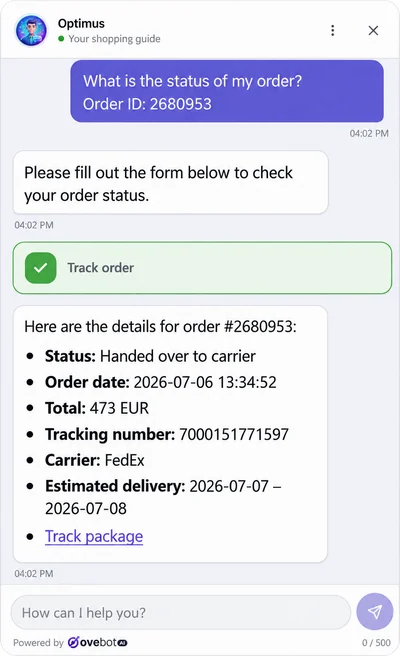
9. “Where is my order?”
AI looks up a specific order and returns its status and tracking link. Shoppers ask it whenever a delivery runs late, and the answer already sits in your order data.
Evidence: Delivery is the top problem EU shoppers report: in 2025, 20% of e-shoppers said delivery was slower than indicated (Eurostat). No controlled study measures order tracking in chat, so the case rests on saved support time and on answers at any hour.
Effort: Medium. The assistant needs read access to order data through your platform or a small API.
How it works in Ovebot: The visitor gives the order number and the email or phone used at checkout. The agent calls your store’s system through a small API and shows the status, tracking number and tracking link. Nothing is stored; every lookup is live. For a step-by-step setup, see order tracking in chat for WooCommerce.
10. Verified order changes
AI takes requests to cancel an order, change items or quantities, or correct an address, and verifies the customer before the request reaches your team.
Evidence: We found no controlled study on this use case. The aim is practical: fewer back-and-forth emails, and no changes requested by someone who isn’t the buyer. Our recommendation: never let an assistant act on an order number alone. Order numbers get shared and guessed, while a one-time code sent to the buyer’s email ties the request to the buyer’s inbox.
Effort: Low to medium. Decide which changes you accept and until when, for example only before the order ships.
How it works in Ovebot: Visitors can ask to cancel an order, change quantities or items, or change the delivery or billing address. Each request is confirmed with a one-time email code (OTP) before it reaches the store’s inbox. Customers don’t need an account.
11. Human handoff and agent assist
Good AI knows when to pass a conversation to a person and hands over the full context. Agent assist goes a step further: AI suggests replies to your human agents.
Evidence: In a study of 5,172 support agents, those with an AI assistant resolved 15% more issues per hour, with the biggest gains for novice agents, and customers asked for a manager less often (Brynjolfsson, Li and Raymond).
Effort: Low. Set working hours and decide who answers.
How it works in Ovebot: Inside working hours, the agent offers a human. Your team gets a browser notification with sound, takes over with one click, sees the whole conversation and can use quick replies.
Back office: forecasting, pricing, marketing and measurement
Behind the scenes, AI can help plan stock, set prices and write marketing. The evidence here is more mixed, and the effort is higher for a small store.
12. Demand forecasting
AI predicts how much of each product you’ll sell, so you can reorder on time and carry less slow stock.
Evidence: In the M5 forecasting competition on Walmart data (42,840 series), the winning machine-learning methods were on average more than 20% more accurate than standard benchmarks (International Journal of Forecasting, 2022).
Effort: High. Forecasts need clean sales history. Our view: the gain matters most with many products and seasonal swings, and a store with a few dozen products may do fine with last season’s sales and a spreadsheet.
13. Pricing
AI pricing tests and sets prices from demand data. Personalized pricing goes further and shows different prices to different shoppers.
Evidence: One large randomized pricing experiment comes from outside retail. At ZipRecruiter, an optimal uniform price raised profit by about 55%, personalized prices added about 19% more, and over 60% of consumers paid less (Dubé and Misra, Journal of Political Economy, 2023). Retail results may differ.
The EU rule: Since May 28, 2022, Directive (EU) 2019/2161 has required traders to tell consumers when a price was personalized through automated decision-making.
Effort: High. Our recommendation: test a uniform price change on a few products before you consider personalization.
14. Marketing copy and push messages
AI drafts emails, ad titles and push notifications in seconds. The evidence says to test it before you trust it.
Evidence: In the Fang experiments, AI push messages raised sales by 1.6%, a result that was not statistically significant, while conversion rose 3.0%. AI-written Google ad titles changed sales by -4.5%, also not significant. Faster copy doesn’t automatically sell more. Shoppers are also wary: in the EU Commission’s 2025 Consumer Conditions Scoreboard, 93% of online shoppers said they worry about targeted advertising.
Effort: Low to write, medium to test properly. Send AI copy to part of your list and your current copy to the rest, then compare orders before you switch.
15. Analytics on what the chat sold
Measure what the AI assistant actually does: how many conversations it handles, which products it shows and which orders follow.
Evidence: Analytics measure results rather than create them. They show whether use cases 1 to 11 work in your own store.
Effort: Low. Add the order tracking snippet so orders can be attributed to the chat.
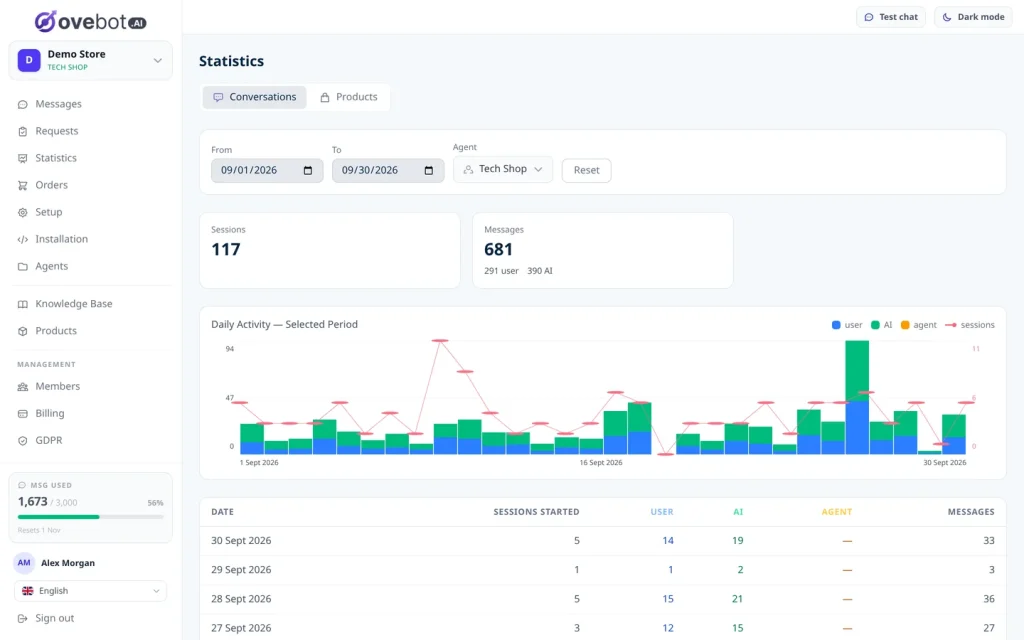
How it works in Ovebot: Statistics show sessions, messages by source, products clicked, add-to-carts, and orders and revenue attributed to the chat through an order tracking snippet. Twice a month, an email report with a PDF summarizes conversations, the share resolved by AI, support hours saved and orders influenced.
The 15 use cases ranked by evidence and effort
Start with the chat use cases. They have the strongest evidence and the lowest setup effort for a small store, while back-office AI needs more data and more work.
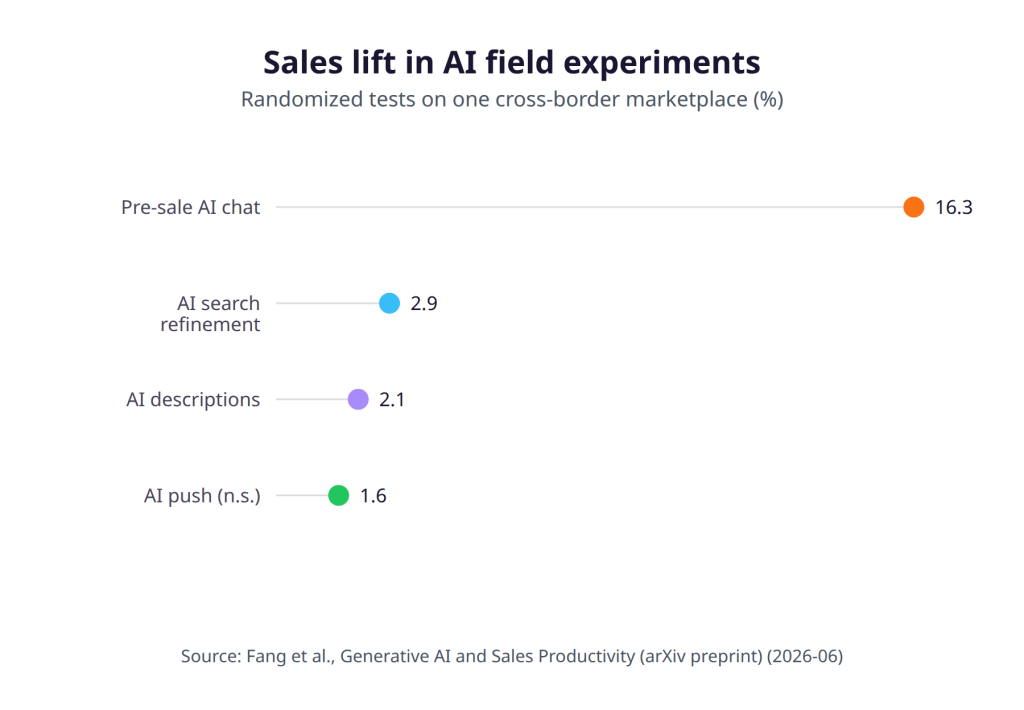
All four sales lifts in the chart come from the same preprint. The push message result was not statistically significant.
Rows are ordered by how direct and relevant the evidence is for a small store, then by effort. Rows without a direct study come last.
| Use case | Type of evidence | Measured effect | Effort for a small store |
|---|---|---|---|
| 1. 24/7 answers (pre-sale chat) | Randomized field experiment, online retail | +16.3% sales, +21.7% conversion | Low to medium |
| 5. AI product descriptions | Randomized field experiment, online retail | +2.1% sales | Low, plus human review |
| 14. Marketing copy and push | Randomized field experiment, online retail | Push +1.6% sales, ad titles -4.5% (both not significant) | Low to medium |
| 2. Smarter site search | Randomized field experiment, online retail | +2.9% sales | Medium |
| 4. Product recommendations | Randomized field experiment | Higher purchase probability | Medium |
| 11. Human handoff and agent assist | Study of 5,172 support agents | +15% issues resolved per hour (agent assist; handoff not tested) | Low |
| 3. Multilingual selling | Platform study and internal analysis | +17.5% eBay exports; +5.2% satisfaction | Low for chat |
| 8. Fraud and chargebacks | Internal analysis, no significance test | +15% chargeback success | Low |
| 12. Demand forecasting | Forecasting competition, Walmart data | Over 20% more accurate than benchmarks | High |
| 13. Pricing | Randomized experiment, not retail | About +55% profit (uniform price) | High |
| 6. Add to cart in chat | No direct study | Unknown | Low |
| 7. Lead capture when offline | No direct study | Unknown (the chat lift came from AI answers, not lead capture) | Low |
| 15. Analytics | No direct study (measurement tool) | Not applicable | Low |
| 10. Verified order changes | No direct study | Unknown | Low to medium |
| 9. “Where is my order?” | No direct study | Unknown | Medium |
For the rows without a study, measure the result in your own store, which is what use case 15 is for.
Where to start: a 30-day plan
Spend your first month with AI in ecommerce on the chat, because one setup covers most of the shopper-facing use cases. Add a back-office test only once the chat numbers are in.
- Day 1: install the chat. Start Ovebot’s 14-day free trial, no card needed. There are official plugins for WooCommerce, OpenCart, PrestaShop and Magento, plus a one-line snippet for any other site. The setup wizard gets you live in about 5 minutes, without a developer.
- Days 1-3: feed it your content. Add your shipping, returns, payment and warranty pages and your FAQ. Connect your product feed (JSON or Google Merchant).
- Days 3-5: test with real questions. Ask what your customers ask, for example: “How long does delivery to Austria take?”, “Can I return an opened item?”, “Does this charger fit my laptop?” and “Where is order 10452?” When an answer is wrong, fix the source page.
- Days 5-7: set working hours and handoff. Decide who takes over chats during the day and who replies to leads.
- Days 8-11: connect order status and changes. Set up the order lookup and choose which order changes you accept.
- Days 12-14: review and decide. Read real conversations, approve or reject the facts the agent proposes, and check the statistics before the trial ends. Plans on the pricing page are priced by monthly AI message volume, and every feature is on every plan.
- Weeks 3-4: run one non-chat test. Good candidates are AI descriptions for your best sellers, with a human review, or one split test of AI email copy against your current version.
EU rules for AI in ecommerce
Five points matter for a store using AI in the EU: three legal duties (disclose the AI, sign a processing agreement, disclose personalized prices), Google’s rules for AI content, and a human within reach.
- Tell shoppers they’re talking to AI. Article 50(1) of the EU AI Act requires chatbots to inform people that they’re interacting with AI, unless that’s obvious. It applies from August 2, 2026.
- Sign a processing agreement. Under GDPR Article 28, an AI vendor that processes your customers’ data must give sufficient guarantees, and you need a written processing agreement with it.
- Follow Google’s rules for AI content. AI content is allowed if it adds value and is fact-checked, and Merchant Center requires labels on AI-generated product data (see use case 5).
- Disclose personalized prices. If automated decision-making personalizes a price, the consumer must be told (see use case 13).
- Keep a human within reach. In a 2026 Gartner survey of 3,566 customers, 87% said a company using generative AI for service must offer access to a human agent (destinationCRM). Only 27% would try a chatbot again after a bad experience (IT-Online).
In the chat shown in this article, an AI disclosure and privacy notice appear when the chat opens. Data is stored in EU data centers. Inference runs through global LLM providers, so personal identifiers such as emails, phones and addresses are filtered out before the model. The DPA and sub-processor list are public. Details are on our GDPR page and in our guide to GDPR for AI chatbots.
Frequently Asked Questions
How is AI used in ecommerce?
AI in ecommerce covers the whole store. Shops use it to answer shoppers’ questions, recommend products, improve site search, translate, write product descriptions, track orders, screen fraud, forecast demand, set prices and draft marketing. Among EU enterprises using AI in 2025, marketing or sales was the top purpose, at 34.70% (Eurostat). For a small store, the chat-based uses are the easiest to start with and have the strongest published evidence.
Does an AI chatbot increase conversion?
In one large randomized experiment, yes. On a cross-border marketplace in 2023, a pre-sale AI chatbot raised conversion by 21.7% and sales by 16.3% compared with an automated “support unavailable” reply. The study is a preprint, and the chatbot was compared with no answer at all; human agents were not tested. Results in your store will vary, so measure orders attributed to the chat.
Is AI worth it for a WooCommerce or PrestaShop store?
Start with chat: the evidence is strongest there and the effort is lowest. Official plugins exist for WooCommerce, PrestaShop, OpenCart and Magento, and the chat shown in this article goes live in about 5 minutes. Back-office uses such as demand forecasting and personalized pricing need more data and work, so they usually make sense later, once the store has enough products and sales history.
Do I have to tell customers they’re talking to AI in the EU?
Yes. Article 50(1) of the EU AI Act requires chatbots to inform people they are interacting with AI, unless it’s obvious from the context. The rule applies from August 2, 2026. A clear notice when the chat opens tells shoppers before they type. Shoppers also expect a way to reach a person: in a 2026 Gartner survey, 87% of customers said a company using generative AI for service must offer access to a human agent.
Can I use AI-written product descriptions without hurting SEO?
Yes, if they add value. Google allows AI content but treats mass-produced pages that add no value as scaled content abuse, and it asks you to fact-check AI output. Merchant Center also requires labeling AI-generated product titles and descriptions. Have a person check specs and claims, and add details only your store knows, such as fit notes or compatibility.
Bottom line: answers first, back office later
AI in ecommerce has one use case with strong evidence and a light setup: answering shoppers when they ask, and helping them find and buy the right product. Start there with Ovebot’s 14-day free trial, measure what the chat sells, and only then add a back-office test.
Sources
- Eurostat, Use of artificial intelligence in enterprises, 2025
- Eurostat, E-commerce statistics for individuals, 2026
- Eurostat, Internet purchases by origin of sellers (isoc_ec_ibos), 2023
- Eurostat, Use of artificial intelligence by individuals, 2026
- European Commission, Consumer Conditions Scoreboard (key consumer data), 2025
- Fang, Yuan, Zhang, Donati and Sarvary, Generative AI and Sales Productivity: Field Experiments in Online Retail (arXiv preprint), 2025
- NBER, Brynjolfsson, Hui and Liu, working paper w24917 on machine translation and eBay exports, 2018
- Wan, Kumar and Li, randomized field experiment on recommendations, Management Science 70(9), 2024
- Dubé and Misra, randomized pricing experiment, Journal of Political Economy 131(1), 2023
- Makridakis, Spiliotis and Assimakopoulos, M5 accuracy competition, International Journal of Forecasting, 2022
- EBA and ECB, Joint report on payment fraud, 2025
- Brynjolfsson, Li and Raymond, Generative AI at Work (arXiv), 2023
- Baymard Institute, Ecommerce search UX benchmark, 2026
- Baymard Institute, Cart abandonment rate statistics (50 studies), accessed 2026
- destinationCRM, Gartner customer survey on GenAI in service, 2026
- IT-Online, Gartner survey on chatbot experiences, 2026
- Artificial Intelligence Act, Article 50: Transparency obligations, 2024
- GDPR, Article 28: Processor, 2016
- European Commission, Consumer Rights Directive (as amended by Directive (EU) 2019/2161), 2022
- Google Search Central, Using generative AI content on your website, 2026
This article was written with the help of artificial intelligence and reviewed by a human editor.