No-code chatbot: set up AI chat for your store
A no-code chatbot guide for small online stores: connect your site, add your content, test with real shopper questions and go live the same day.

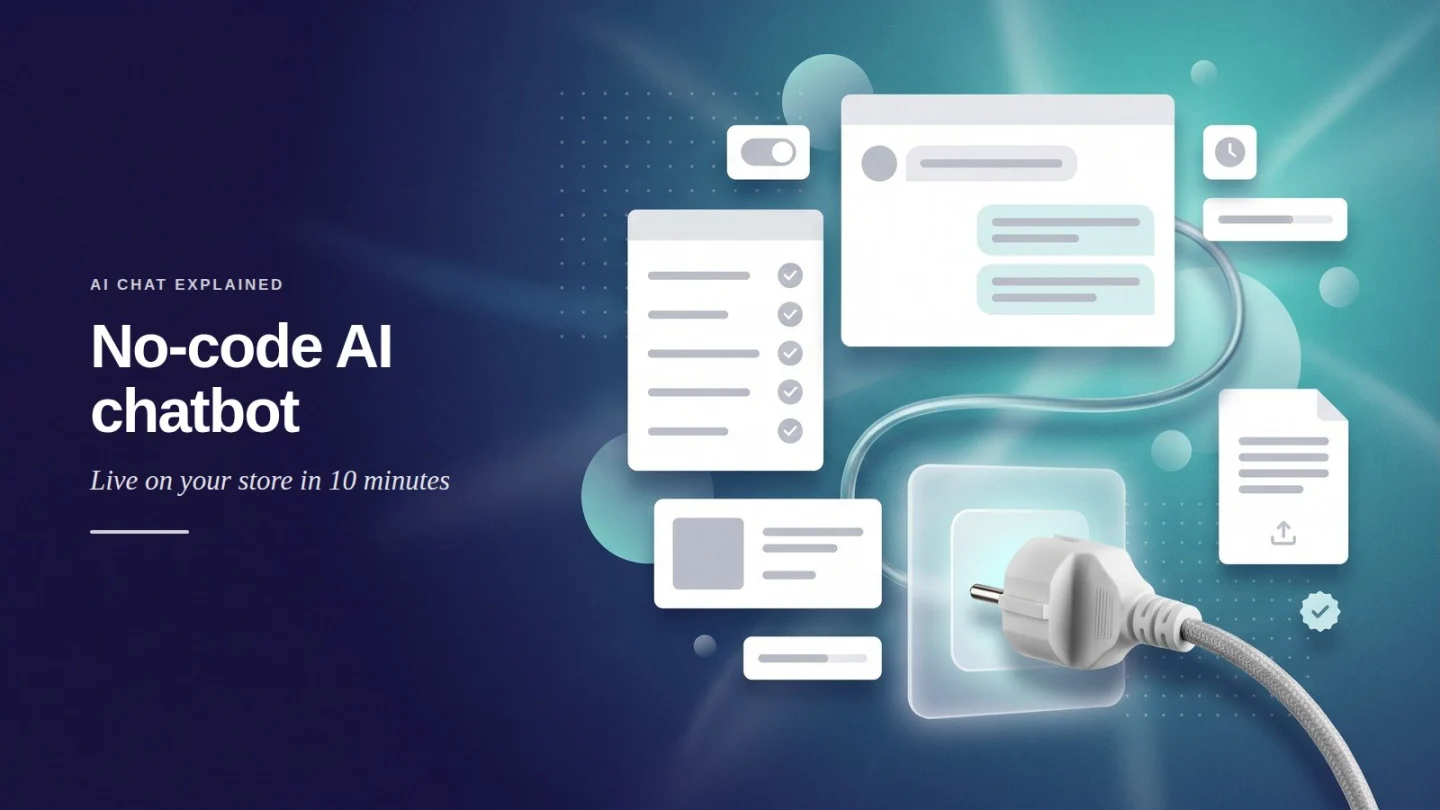
A no-code chatbot is an AI chat agent you set up through forms and menus instead of writing code. For an online store, that means you connect your site, give the agent your products and policies, and test it yourself, with no developer involved.
The setup is short. Ovebot’s setup wizard gets a store live in about 5 minutes. We suggest budgeting about 10 minutes in total, so you can run a first round of test questions before you announce the chat.
About this guide: The screenshots show Ovebot running on a demo store, and we typed the questions in them. Market numbers come from the public sources listed at the end.
Key Takeaways
- A no-code chatbot lets a store owner connect a site, add content and go live without a developer.
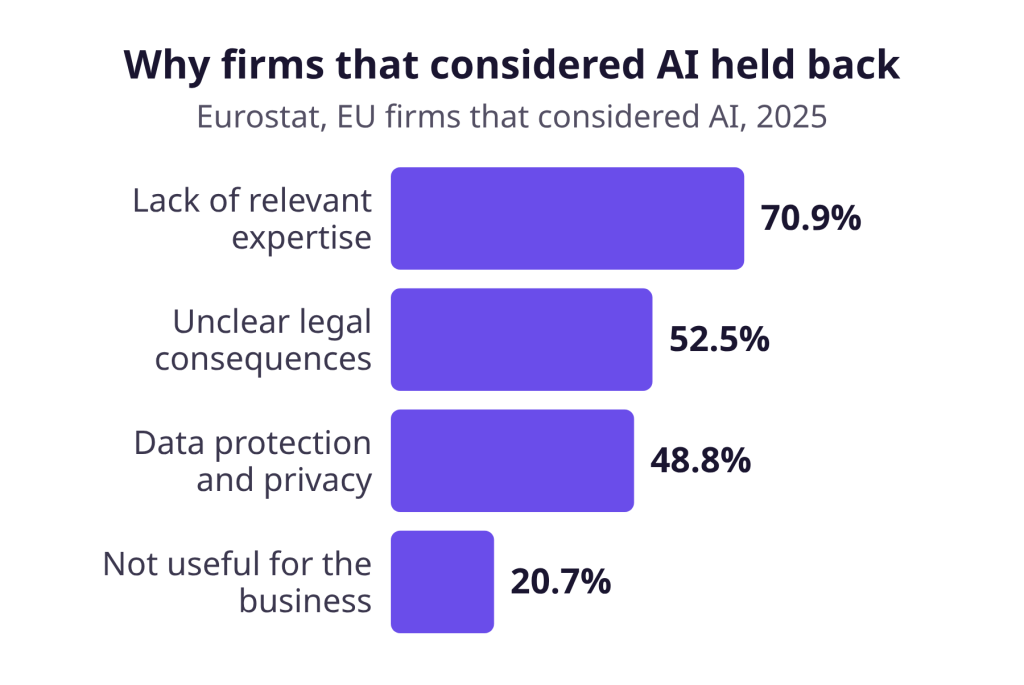
- In 2025, 70.9% of EU firms that considered AI but did not use it named a lack of expertise as a reason (Eurostat).
- Test with 10-15 real customer questions, including one about a product you don’t sell.
- Keep a person within reach for damaged items, late orders and billing mistakes.
What is a no-code chatbot, and why does it suit small stores?
A no-code chatbot is a chat agent you configure from a dashboard. You paste links, upload files and fill in forms, and the tool handles the technical side. It suits small stores because many of them have nobody technical to build one.
Skills are the main barrier. Among EU enterprises that considered AI but didn’t use it in 2025, 70.9% cited a lack of relevant expertise. Unclear legal consequences and privacy concerns came next.
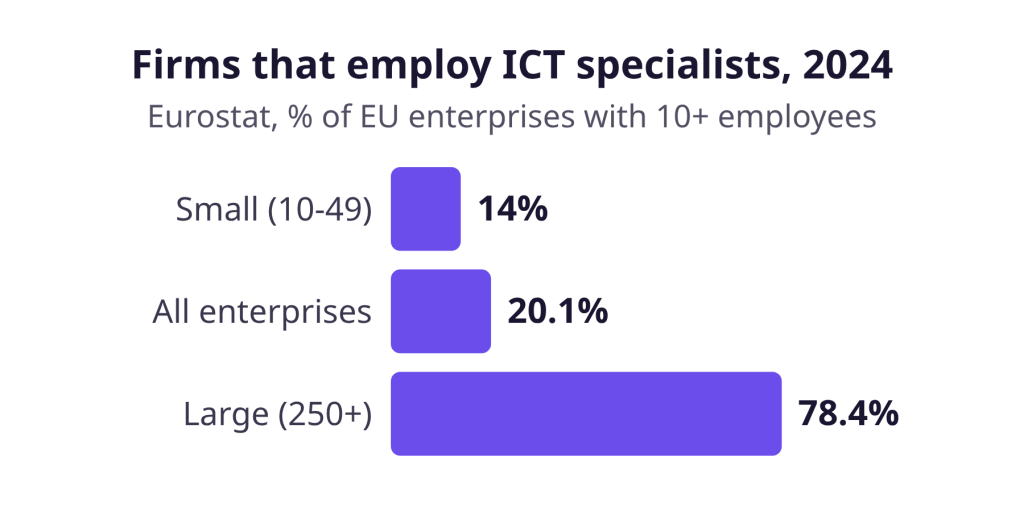
Small firms rarely have technical staff in-house. In 2024, only 14% of small EU enterprises employed ICT specialists, against 78.4% of large ones. Both Eurostat figures cover firms with 10 or more staff, so the smallest shops aren’t even in the data.
A chatbot builder turns that work into screens you can follow yourself. For how the AI side works, read our plain-language guide to AI chatbots, and for what a store chat should handle, see our ecommerce chatbot guide.
What to prepare before you start
Gather your store login, contact details, policy pages, product data and working hours before you open any setup screen. With these at hand, setup is mostly copying and pasting.
| What to prepare | Where it usually lives | Why the agent needs it |
|---|---|---|
| Admin login for your store | Your platform’s admin panel | To install the plugin |
| Company name, support email, phone, contact page | Your site footer or contact page | Shown when a shopper needs your team |
| Shipping, returns, payment and invoicing pages | Your site’s help or policy pages | Answers to delivery, return and invoice questions |
| Size guides, warranty terms, price lists | PDF, Word, Excel or CSV files | Facts that aren’t on your website |
| Product feed URL | JSON or Google Merchant feed | Current products, prices and stock |
| Working hours and timezone | Your team’s schedule | When the agent can offer a person |
| 10-15 real customer questions | Your inbox or past chats | Your test script |
Check that every policy page is current: an old returns page leads to old answers.
Build it in about 10 minutes, step by step
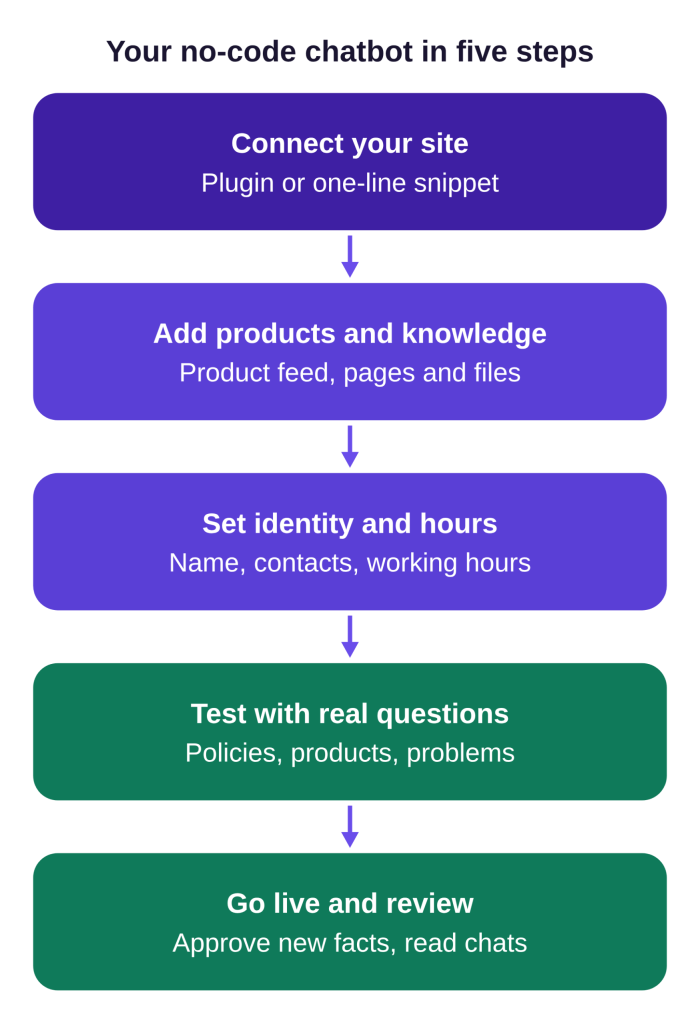
Five steps take you from a blank account to a live agent. Here are the first three in Ovebot, the no-code AI chatbot we build. Testing and review follow below.
Step 1: Connect your website
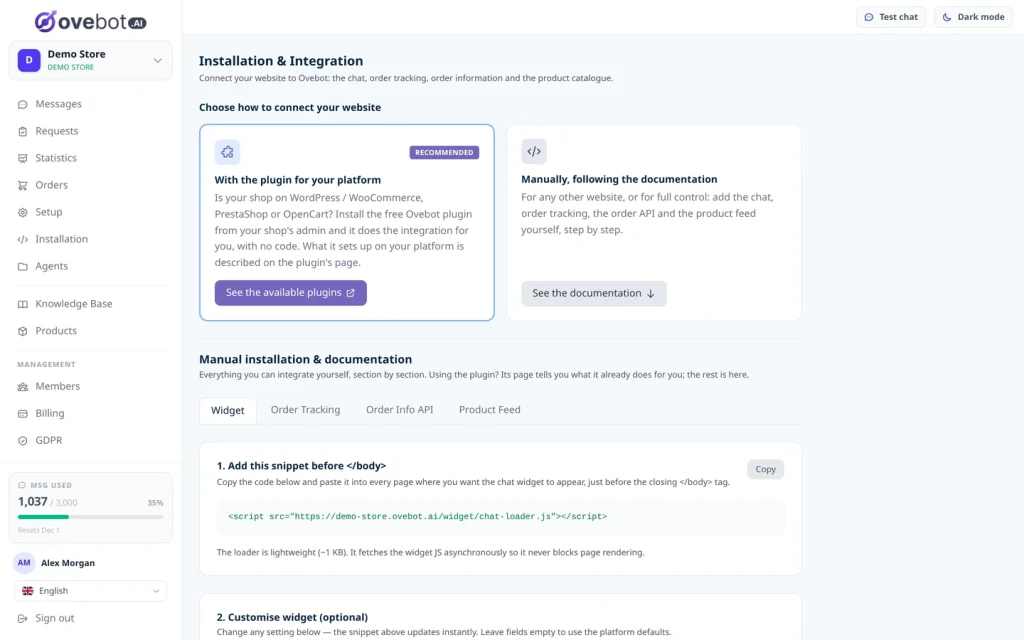
Install the plugin for your platform, or paste one line of code if there isn’t a plugin. Ovebot has official plugins for WordPress/WooCommerce, OpenCart, PrestaShop and Magento. Any other site uses a one-line snippet placed before the closing body tag.
Step 2: Add your products and knowledge
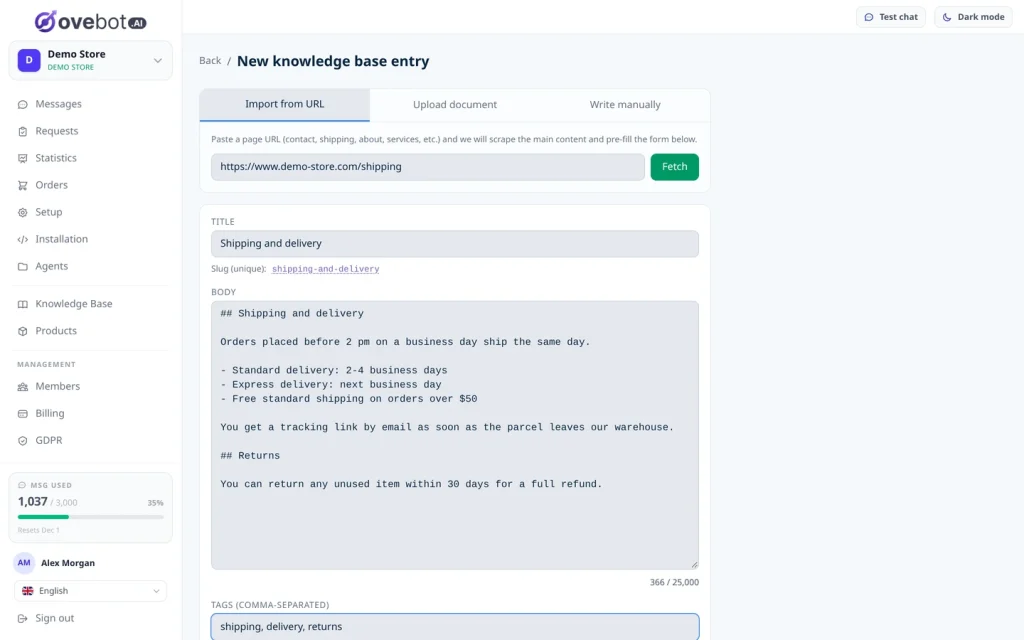
Point the agent at content you already have. A knowledge base entry can come from a page URL, an uploaded PDF, Word, Excel or CSV file, or text you write yourself. Your catalog comes from a JSON or Google Merchant product feed, refreshed on a schedule, so prices and stock stay current.
Start with shipping, returns, payments and invoicing. Then write short entries for answers that aren’t written down anywhere yet.
Step 3: Set identity, contact details and hours
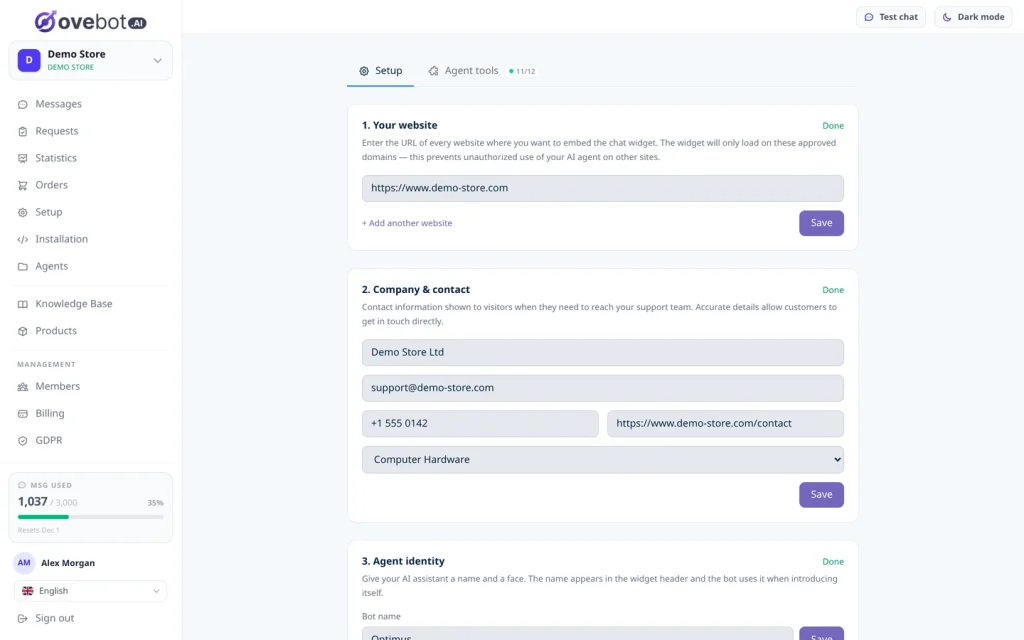
The setup page asks for three things: the website where the chat may appear, your company and contact details, and the agent’s identity. Pick an agent name you’re happy to see in every chat, since shoppers see it first.
Then set your working hours for each day, with your timezone. They decide when the agent can offer a person.
Test it before you send shoppers to it
Run real customer questions through the chat before you announce it or send traffic to it. Right after setup, use the Test chat button at the top of the dashboard to question your agent from the admin panel. NIST’s Generative AI Profile recommends testing and evaluating generative AI systems before deployment, and a store chat is no exception.
Add the questions you collected to this starter script:
- Policies: “How long does delivery take?” “Can I return an opened item?” “Can I get an invoice with my VAT number?”
- Products: “Do you have this in a larger size?” “What’s the difference between these two models?” “I need a gift under $50. Any ideas?”
- Edge cases: a product you don’t sell, a question in another language, and a vague request like “something for my dad.”
- Problems: “My order arrived damaged.” “You charged me twice.” “Can I talk to a person?”
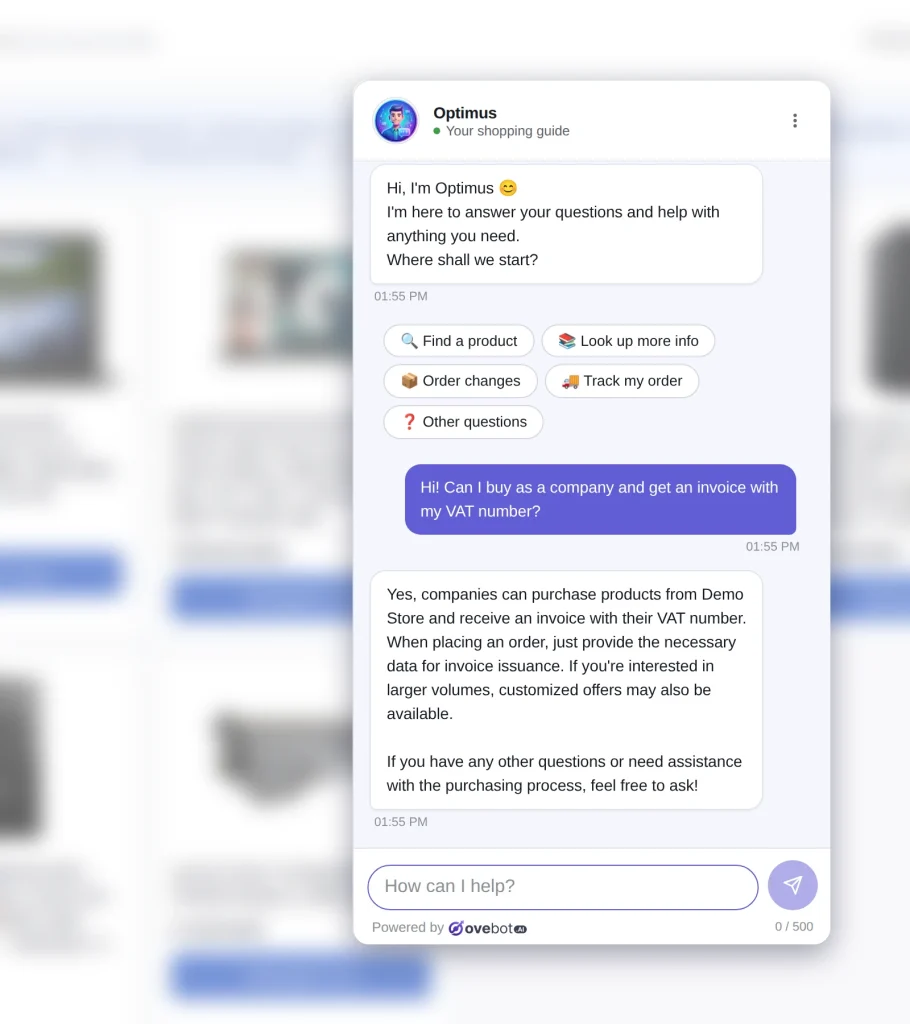
A good answer matches your written policy on every fact. It admits when it can’t find something, asks a question when the request is vague, and offers your team when an order has gone wrong. It should also reply in the shopper’s language: Ovebot detects it automatically across 29+ languages.
When an answer is wrong, fix the source content and ask again. Our guide on why AI chatbots give wrong answers covers the usual causes. Once your test script passes, go live: announce the chat, then review conversations and analytics often in the first weeks. After launch, the agent proposes new facts it hears in chats, and you approve or reject each one.
What still needs a human
Order problems still need a person, even with a well-tested chatbot. In Baymard’s 2026 survey of 2,273 US online shoppers, most preferred AI for comparing features (63%), checking stock (59%) and recommendations (56%). For a damaged or wrong item, 69% preferred a human, as did 67% for a late or missing order and 66% for a shipping or billing mistake.
Tone matters as well. In a 2022 Journal of Marketing study, Crolic and colleagues found that for customers who were already angry, a human-like chatbot lowered satisfaction and purchase intention. It raised expectations it couldn’t meet. A name helps shoppers recognize the chat, but keep the persona modest and make sure an upset shopper can reach a person quickly.
Inside your working hours, Ovebot offers a human, and your team takes over with one click. Outside them, it shows your contact details, and visitors can leave theirs. Our guide to chatbot-to-human handoff covers when to escalate and how.
Shoppers should also know they’re talking to an AI. Under Article 50(1) of the EU AI Act, AI systems that interact directly with people must be designed so people know they’re dealing with an AI, unless that’s obvious. The rule has applied since August 2, 2026. Ovebot shows an AI disclosure and a privacy notice when the chat opens. Personal data is covered in our GDPR chatbot checklist.
Where small firms stand, and what we recommend
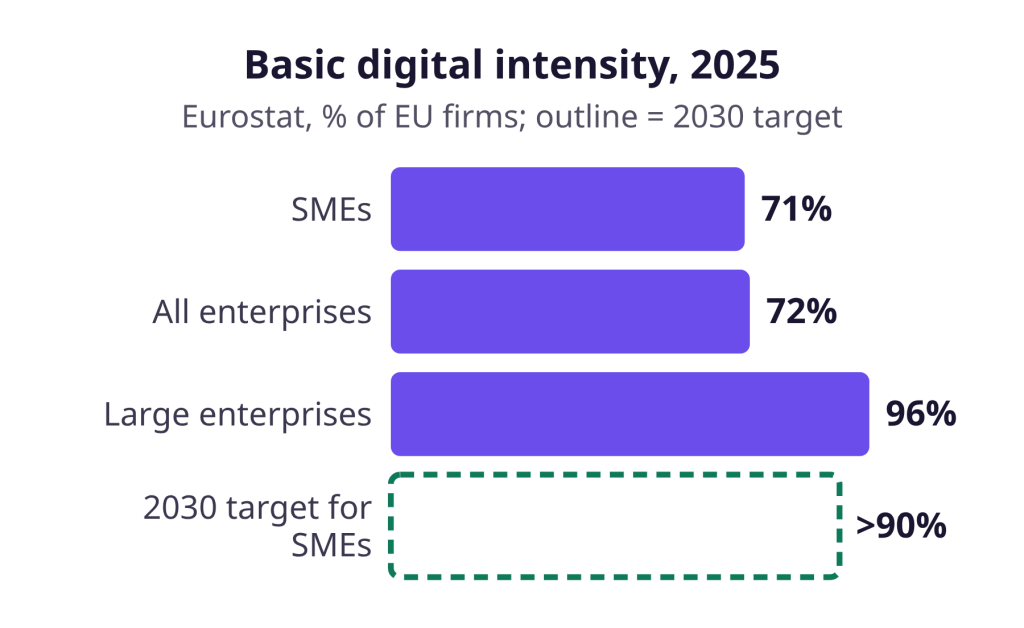
Small firms still trail large ones on digital basics. With few ICT specialists on staff, the practical way to close that gap is tools you can run without a new hire. In 2025, 71% of EU SMEs had at least basic digital intensity, against 96% of large enterprises. The EU’s 2030 target is more than 90% of SMEs.
A no-code chatbot fits that pattern, because you can set it up and judge the results yourself. For small stores that want a no-code AI chatbot, we recommend Ovebot. See the full feature list: it includes analytics, and every feature comes on every plan, with a 14-day free trial that needs no card.
Frequently Asked Questions
How long does it take to set up a no-code chatbot?
With a plugin for your platform and a setup wizard, the setup itself takes minutes. Plan a few more minutes for testing: run real customer questions through the chat and fix any page that causes a wrong answer.
Do I need technical skills to run a no-code chatbot?
No. You need admin access to install a plugin, or the ability to paste one line of code into your site. Everything else is forms: website address, contact details, policy page links, documents and a product feed. The ongoing work is editorial: keep content current and review conversations for questions the agent can’t answer yet.
What content should the chatbot learn from first?
Start with the pages behind the most common questions: shipping, returns, payment methods and invoicing. Add your product feed so prices and stock stay current, then upload size guides or warranty terms. If a rule lives only in your head, write it as a short manual entry. The agent can only answer from what you give it.
Do I have to tell shoppers they’re chatting with an AI?
In the EU, Article 50(1) of the AI Act says AI systems that talk directly with people must be designed so people know they’re dealing with an AI, unless that’s obvious. It has applied since August 2, 2026. Open your chat as a shopper, check that a clear notice appears, and ask a legal adviser what applies to your store.
Bottom line: quick to set up, worth testing well
A no-code chatbot takes the developer out of the setup, but not the owner out of the job. About 10 minutes gets the agent connected, answering and through a first round of tests. Current policy pages, real test questions and a person for problems keep it trustworthy.
Sources
- Eurostat, Use of artificial intelligence in enterprises, 2025 data
- Eurostat, ICT specialists: statistics on hard-to-fill vacancies in enterprises, 2024 data
- Eurostat, Digitalisation in Europe, 2026 edition, 2026
- Baymard Institute, AI engagement: quantitative UX insights 2026, 2026
- Crolic, Thomaz, Hadi and Stephen, Blame the Bot: Anthropomorphism and Anger in Customer-Chatbot Interactions, Journal of Marketing 86(1), 2022
- EU AI Act Service Desk, Article 50: Transparency obligations, accessed 2026
- EUR-Lex, Regulation (EU) 2024/1689 (Artificial Intelligence Act), 2024
- NIST, AI 600-1: Artificial Intelligence Risk Management Framework, Generative AI Profile, 2024
This article was written with the help of artificial intelligence and reviewed by a human editor.