Customer service automation: automate, verify or hand over
Customer service automation for small online stores: which support tasks to automate, verify or keep human, plus a one-afternoon inbox audit.

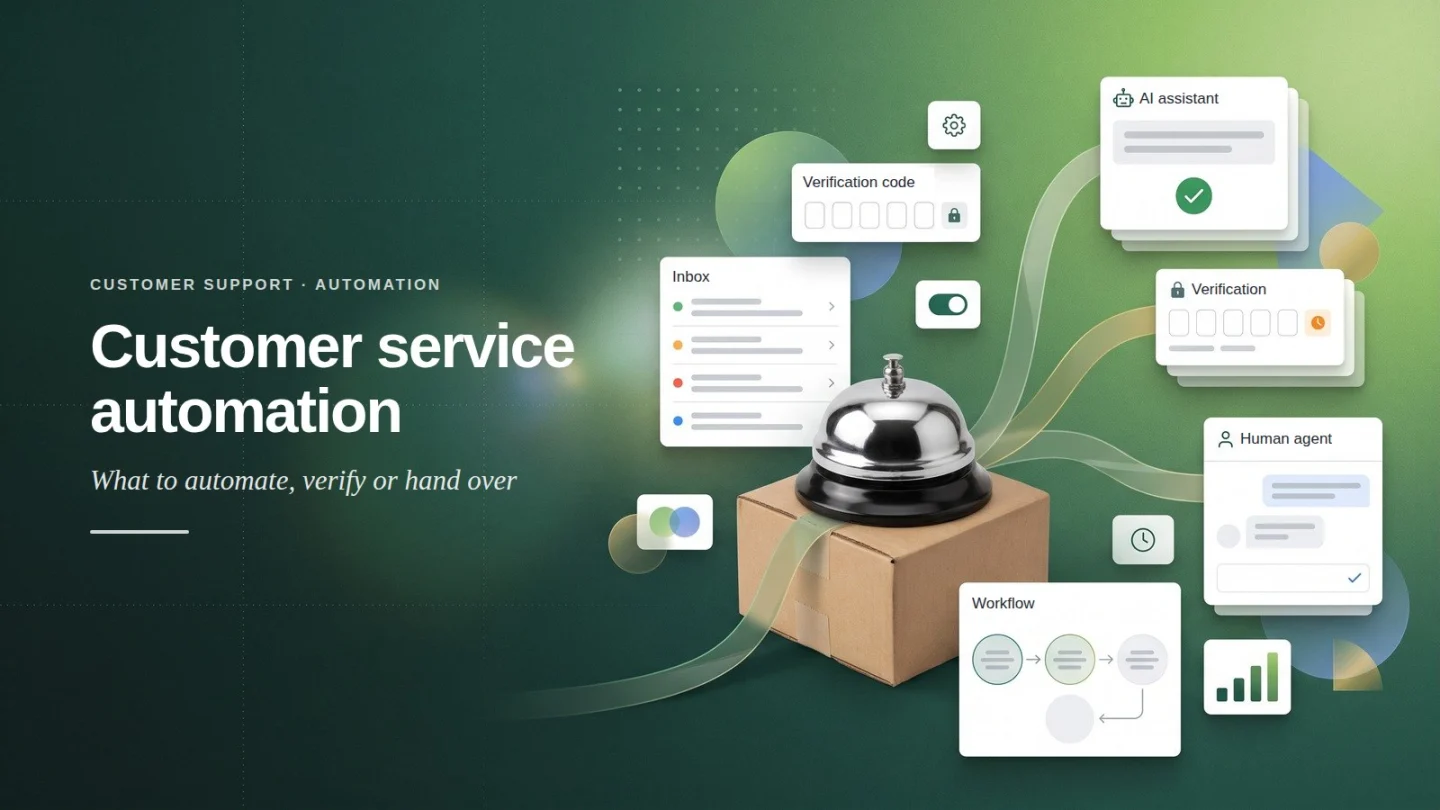
Customer service automation lets software handle the support requests that follow a set pattern. Your team then has time for the ones that don’t. For a small online store, that means shipping, returns, warranty and product questions, plus order status. Order change requests can be collected and checked too, once the customer proves who they are. Complaints, damaged goods and refund exceptions should stay with people.
This guide gives you a method, not a tour of AI tools: sort a month of your own messages into three tiers, then switch on automation tier by tier.
About this guide: Written by the Ovebot Team, the developers, ecommerce specialists and support staff who build Ovebot and talk to store owners every day. The screenshots are our own product. Every number about the market comes from the public sources listed at the end.
Key Takeaways
- Sort every support request into three tiers: automate fully, verify and pass on, or hand to a human.
- Automate fully what your pages and systems already answer: shipping, returns, warranty, product details and order status.
- Pass on order change requests only after the customer confirms a one-time code. An order number alone proves nothing.
- Keep complaints, damaged goods and refunds with people. Humanlike chatbots make angry customers less satisfied.
- Start with an afternoon audit of last month’s messages, then automate the biggest Tier 1 groups first.
What customer service automation can handle in a small store
Customer service automation works best as a triage. Each incoming question goes to one of three tiers, depending on how risky a wrong answer is and whether the answer already exists in your data.
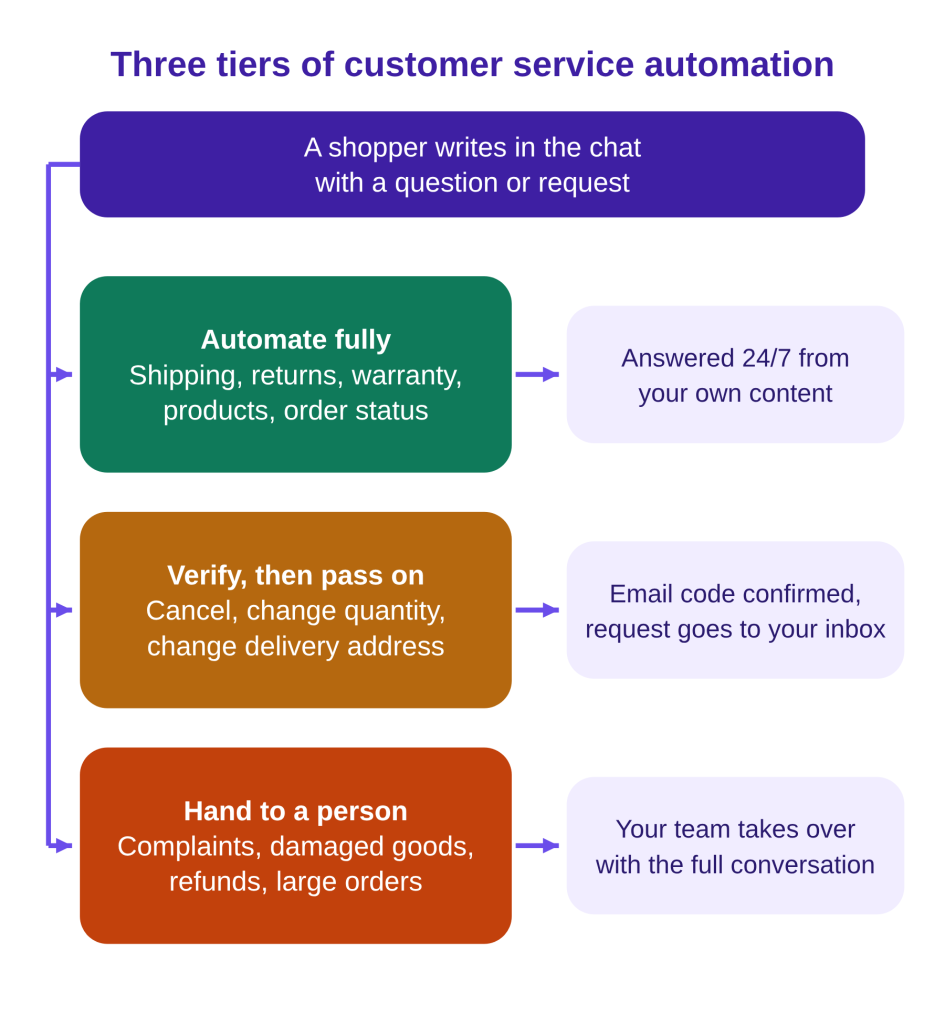
| Task | Example question | Tier | What the AI needs |
|---|---|---|---|
| Shipping, returns, warranty | “What warranty do refurbished laptops have?” | Automate fully | Clear policy pages |
| Product questions | “Does this charger fit my laptop?” | Automate fully | Product feed with specs, stock and price |
| Order status | “Where is order 10452?” | Automate fully | Order lookup by number plus email or phone |
| Cancel or change an order | “I ordered two by mistake, I need one.” | Verify, then pass on | A one-time email code, then your inbox |
| New delivery address | “Can you ship to my office instead?” | Verify, then pass on | A one-time email code, then your inbox |
| Complaints, damaged goods | “The screen arrived cracked. Again.” | Human | A fast handoff with the full chat |
| Refunds, B2B orders | “My return window closed last week.” | Human | Someone with authority |
Does automated customer service actually work?
Automated customer service works for simple questions only when the answer is written down. A Gartner survey of 5,728 customers, reported in 2024, found that 73% use self-service at some point. Yet only 14% of issues were fully resolved there (destinationCRM). Even for “very simple” issues, the rate was 36%.
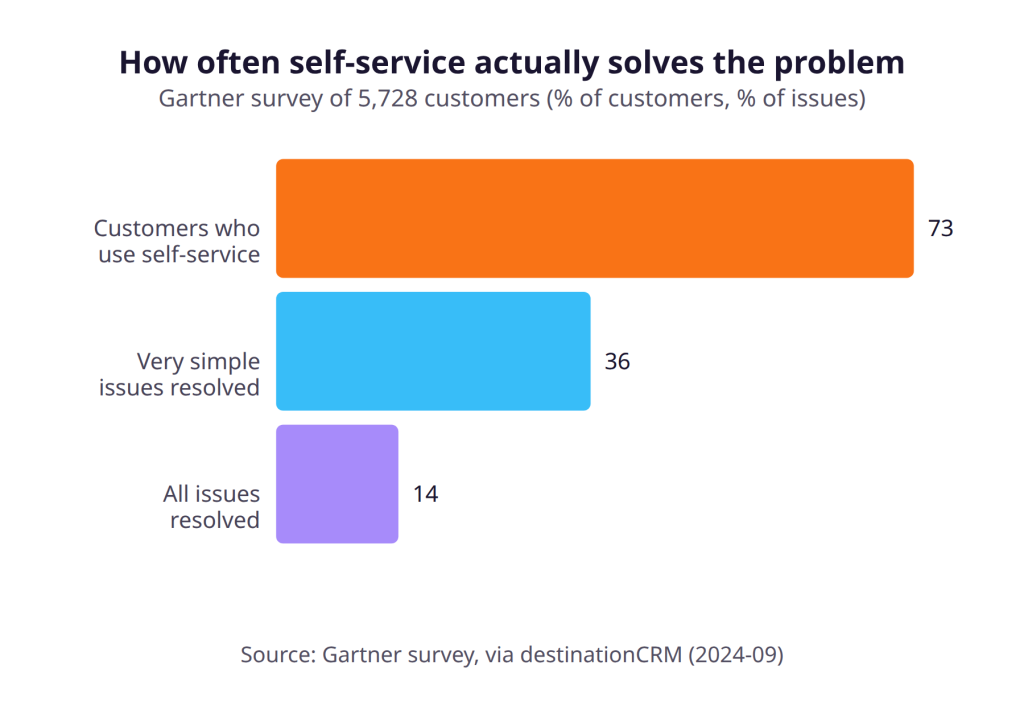
The reasons are fixable. Of the customers who started in self-service, 45% said the company didn’t understand what they wanted. In 43% of failures, they couldn’t find relevant content. A chat assistant can ask a clarifying question, but it can only answer well from content you actually wrote.
Many people already type questions to AI chatbots. In a February 2026 Pew Research Center survey of 5,119 US adults, 49% said they use AI chatbots, and 24% use them daily (Pew). ChatGPT use alone grew from 18% in 2023 to 44% in 2026.
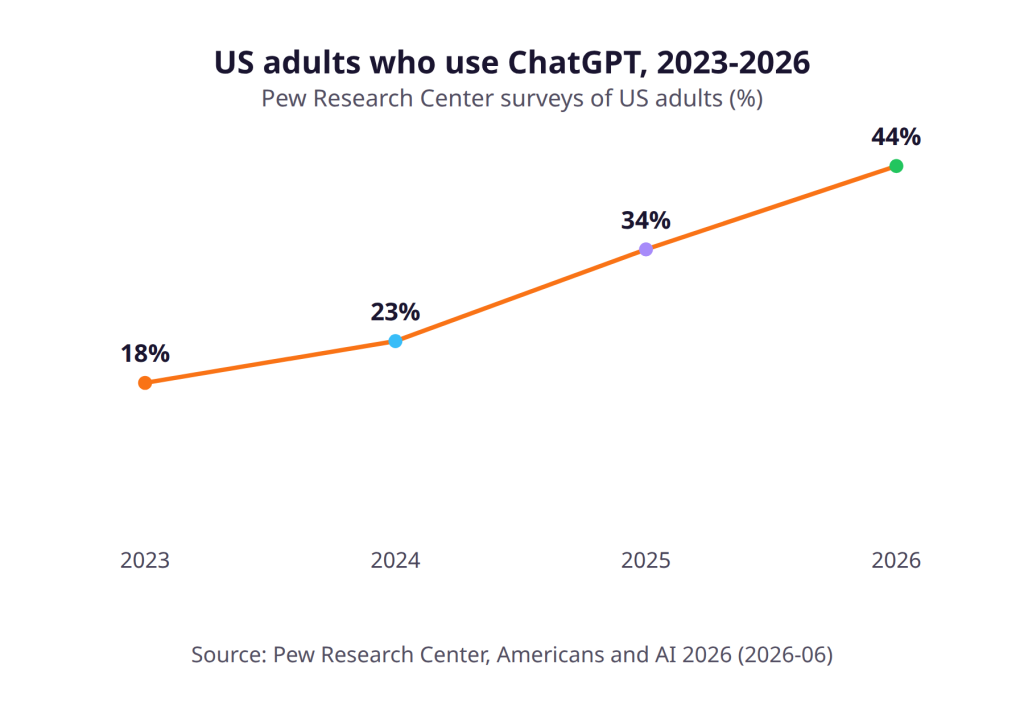
Use is not the same as trust: in the same survey, 71% expect AI to make their personal information less secure. That is one more reason to keep order changes behind a verification step.
Tier 1: questions to automate fully
Automate the questions whose answers already live in your pages or systems. These come up every day, and the answer comes from data you already have. Baymard Institute found that 34% of test users searched a store’s site for content such as “return policy” or “track an order”. It also found that 15% of sites don’t support these basic searches (Baymard). A chat that answers them closes that gap.
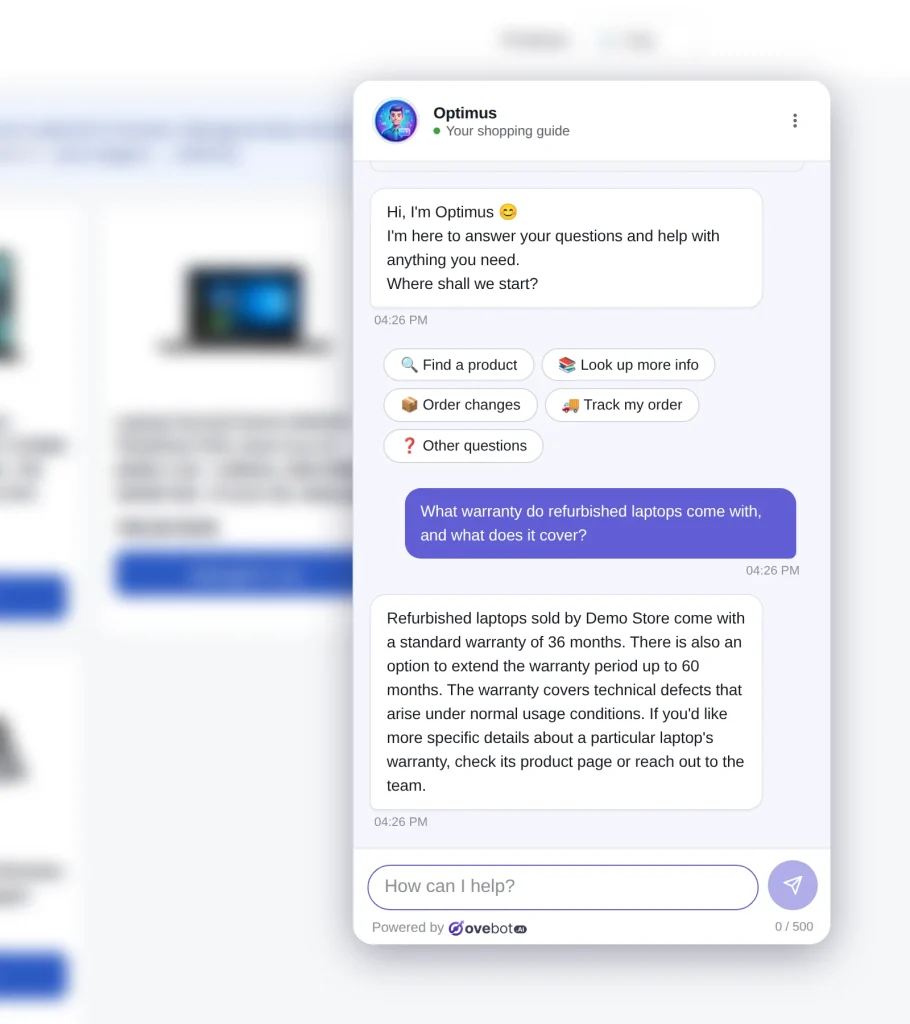
Ovebot answers from a knowledge base you build from URLs, PDF, Word, Excel and CSV files, and manual entries. Product answers come from a live catalog feed (JSON or Google Merchant), refreshed on a schedule. For order status, the shopper gives the order number and the email or phone used at checkout. The assistant then shows the live status and tracking link. Nothing is stored. Our guide to order tracking in chat covers the setup.
Tier 2: order change requests, verified and passed on
You can collect order change requests automatically, but only after the customer proves they placed the order. An order number is not proof: it appears on invoices, emails and parcel labels that other people can see.
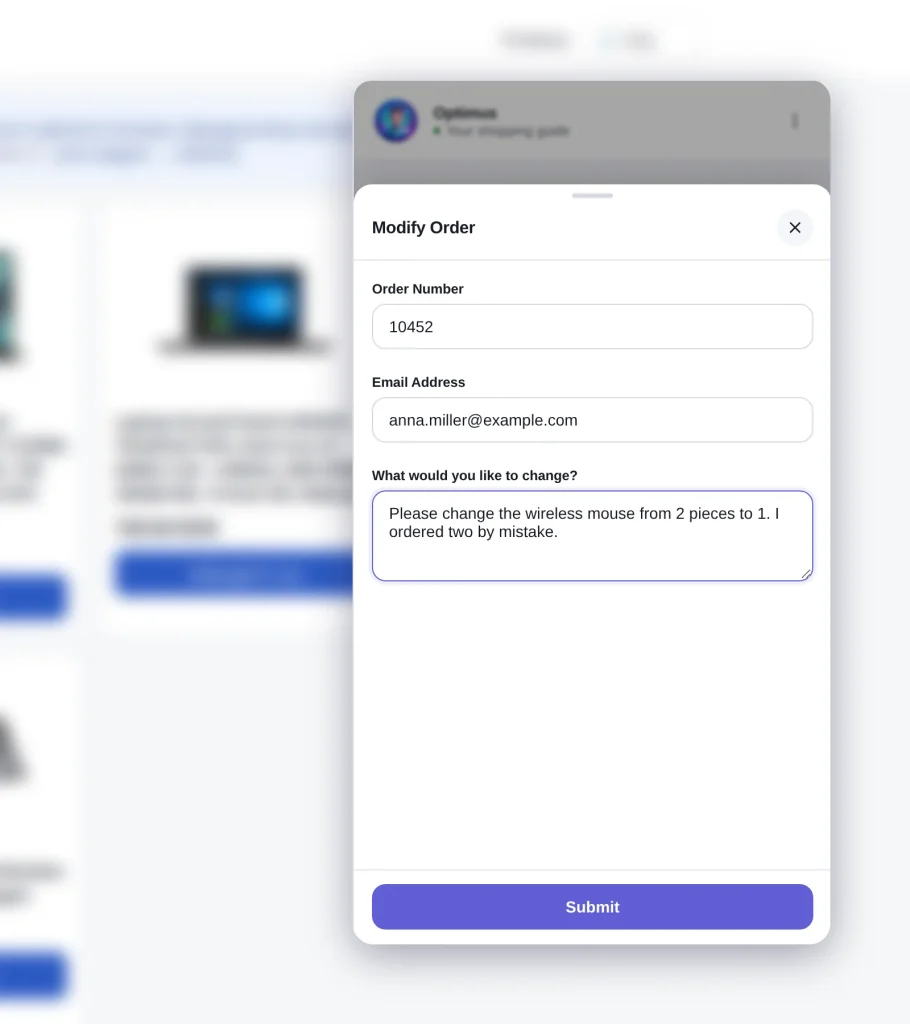
In Ovebot, this works as a verified customer request:
- The shopper picks “Order changes” and fills in the order number, email and the change: cancel, change quantities or items, or change the delivery or billing address.
- The assistant sends a one-time code by email, and the shopper enters it in the chat.
- Only then does the request reach your store’s inbox. Your team makes the change.
No customer accounts are needed. Agree on a team policy first, for example, that your staff handle cancellations by phone once an order is with the carrier.
Tier 3: work to keep for humans
Keep complaints, damaged goods, refunds, exceptions and large orders with people. They need judgment, authority or empathy, and a bot can make them worse.
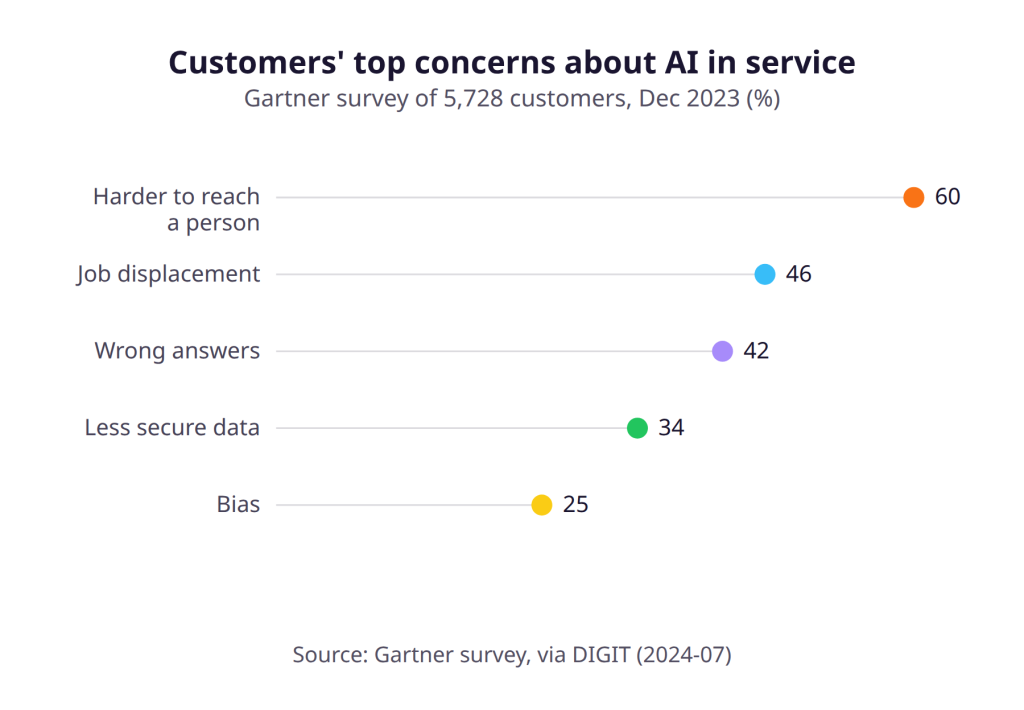
Anger changes how customers judge a bot. Crolic and colleagues ran five studies, published in the Journal of Marketing in 2022. Angry customers who dealt with a humanlike chatbot were less happy, thought less of the company and were less likely to buy (Oxford). Customers’ own worries point the same way. In a Gartner survey published in 2024, the top concern was that AI would make it harder to reach a person (DIGIT).
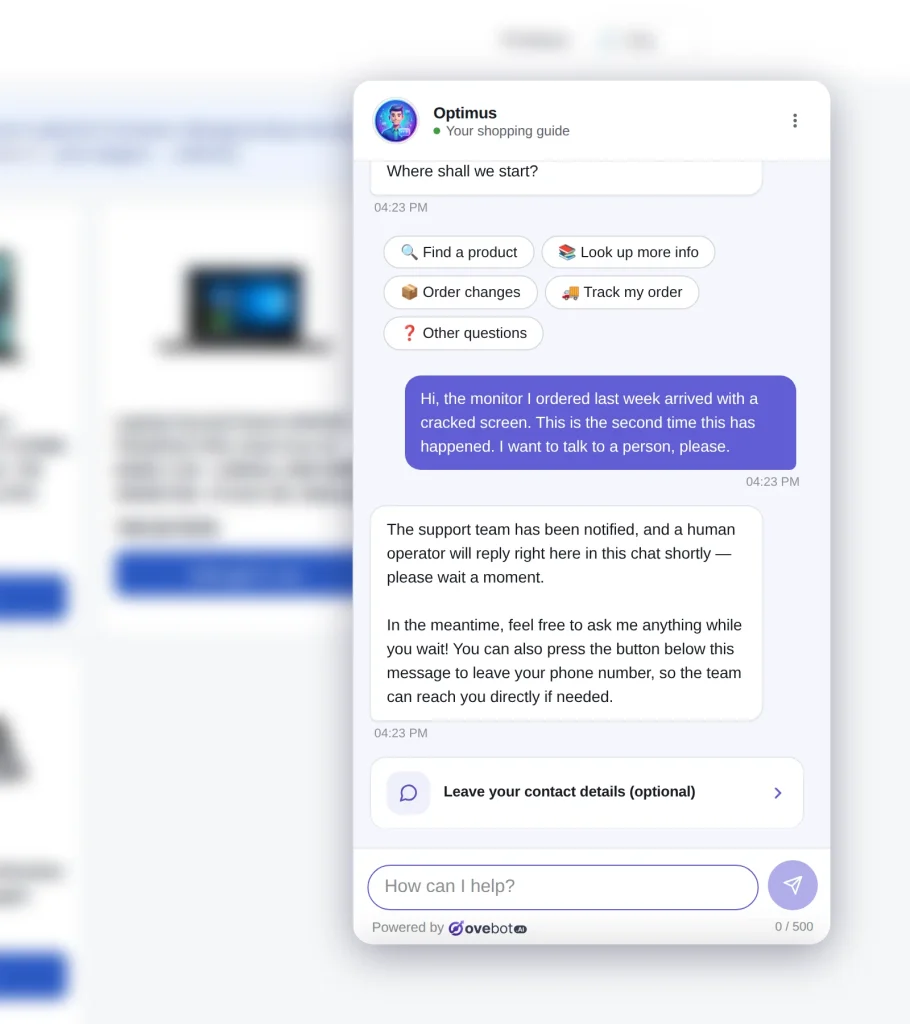
Inside your working hours, Ovebot offers a human, alerts your team with a browser notification and lets them take over with one click. Outside working hours, it shows your contact details and lets visitors leave theirs. Our guide to chatbot human handoff explains triggers and timing.
Money decisions also raise a legal question. GDPR Article 22 covers decisions “based solely on automated processing” with legal or similarly significant effects. People have safeguards, including “the right to obtain human intervention” (EUR-Lex). Where a refund decision significantly affects the customer, don’t let software make it alone. For the rest of the EU rules, including the AI disclosure required since August 2, 2026 (European Commission), see our GDPR chatbot checklist.
Audit your support inbox in one afternoon
The fastest way to start customer service automation is to sort last month’s messages before you switch anything on. Block an afternoon and open your inbox and chat history.
- Collect one month. Open the last four weeks of support emails and chats. Start with about 100 recent messages.
- Tag each message with a topic and a tier from the table above.
- Check the answer source: a page, the product feed, the order system, or nowhere.
- Count and rank. Your biggest Tier 1 groups are your first automation targets.
- Fix the gaps first. Where the answer lives “nowhere”, write it before you automate it.
| Message (shortened) | Tier | Written answer exists? | Next action |
|---|---|---|---|
| “When will my parcel arrive in Austria?” | 1 | Shipping page, no Austria times | Add delivery times per country |
| “Can I return shoes I wore once?” | 1 | Returns page, unclear | Make the rule explicit |
| “Please change my address to my office.” | 2 | No | Turn on verified requests |
| “The lamp arrived broken.” | 3 | No | Route to a person |
Missing answers matter most. Baymard found that 60% of users look for return-policy information on the product page (Baymard), so put it there and write a clear returns policy. Grounded content also helps prevent made-up answers. Repeat the audit every month.
How to set it up in Ovebot
All three tiers run from one chat widget and one admin panel. Setup takes three steps:
- Install. Use an official plugin for WooCommerce, OpenCart, PrestaShop or Magento, or a one-line snippet on any other site. The setup wizard gets you live in about 5 minutes.
- Add your content. Point the knowledge base at your policy pages and files, and connect the product feed.
- Set the human rules. Enter your working hours with a timezone and switch on order lookup and verified requests.
The assistant works in 29+ languages and proposes new facts it hears in chats, which you approve first. To measure the effect, the statistics split messages between AI and your team. A twice-monthly report shows the share resolved by AI.
Common mistakes to avoid
The mistakes to avoid in support automation are automating the wrong tier and leaving customers no way out.
- Automating complaints. Route angry customers to a person early.
- Hiding the human route. Keep it visible inside working hours.
- Trusting the order number. Require a one-time code before any order change.
- Skipping the audit. A feature list doesn’t know your most common questions. Your inbox does.
Frequently Asked Questions
Should a chatbot handle refunds and complaints?
No. A chatbot can explain your written refund policy, but complaints and refund exceptions should go to a person. A 2022 Journal of Marketing study found that humanlike chatbots lower satisfaction and purchase intent among angry customers. Under GDPR Article 22, a solely automated refund decision with significant effects on the customer also calls for safeguards, including human intervention.
Which support questions should I automate first?
Start with the questions that appear most often in last month’s messages and already have a written answer, usually delivery times, returns rules and order status. Sort four weeks of emails and chats by topic, count them, and check where each answer lives. Write the missing answers before you switch automation on.
Bottom line: automate the routine, verify the risky, keep the human
Customer service automation pays off when it answers what your data already knows. It should verify anything that changes an order and leave anger, exceptions and money to people. Start with an afternoon audit of your own inbox. If you want all three tiers in one widget without a developer, we recommend trying Ovebot.
Sources
- Pew Research Center, Americans and AI 2026: chatbots, smart devices and views on impact, 2026
- destinationCRM, Only 14% of customer service issues are fully resolved in self-service, 2024
- DIGIT, Gartner survey on customer concerns about AI in customer service, 2024
- Crolic, Thomaz, Hadi and Stephen, Blame the Bot: Anthropomorphism and Anger in Customer-Chatbot Interactions, Journal of Marketing, 2022
- Baymard Institute, Support non-product search, 2025
- Baymard Institute, Current state of ecommerce product page UX, 2026
- European Commission, Guidelines on transparency obligations for certain AI systems, 2026
- EUR-Lex, Regulation (EU) 2016/679 (GDPR), 2016
This article was written with the help of artificial intelligence and reviewed by a human editor.