What is an AI chatbot? A plain-language guide
What is an AI chatbot? A plain-language guide for store owners: how it works, what it can and can't do, why it goes wrong and what to tell shoppers.

What is an AI chatbot? It’s software that reads a message written in everyday words and writes its own reply, using a language model. In an online store, it sits in the chat window and answers questions like “Will this charger fit my laptop?”
Where the answer comes from decides how useful it is. A chatbot working from your catalog can give a specific reply or admit it found nothing. One that guesses can sound just as sure and still be wrong.
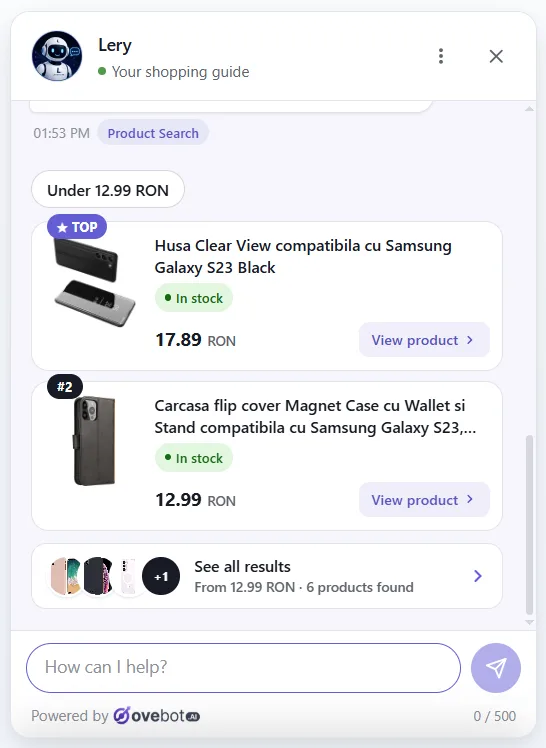
About this guide: Written by the Ovebot Team, the developers, ecommerce specialists and support staff who build Ovebot and talk to store owners every day. The screenshots show our own product running on a demo store, and we asked the questions you see in them. Every number about the market comes from the public sources listed at the end. About us · Contact
Key Takeaways
- An AI chatbot reads a shopper’s question and writes a reply. A good one searches your catalog and pages first.
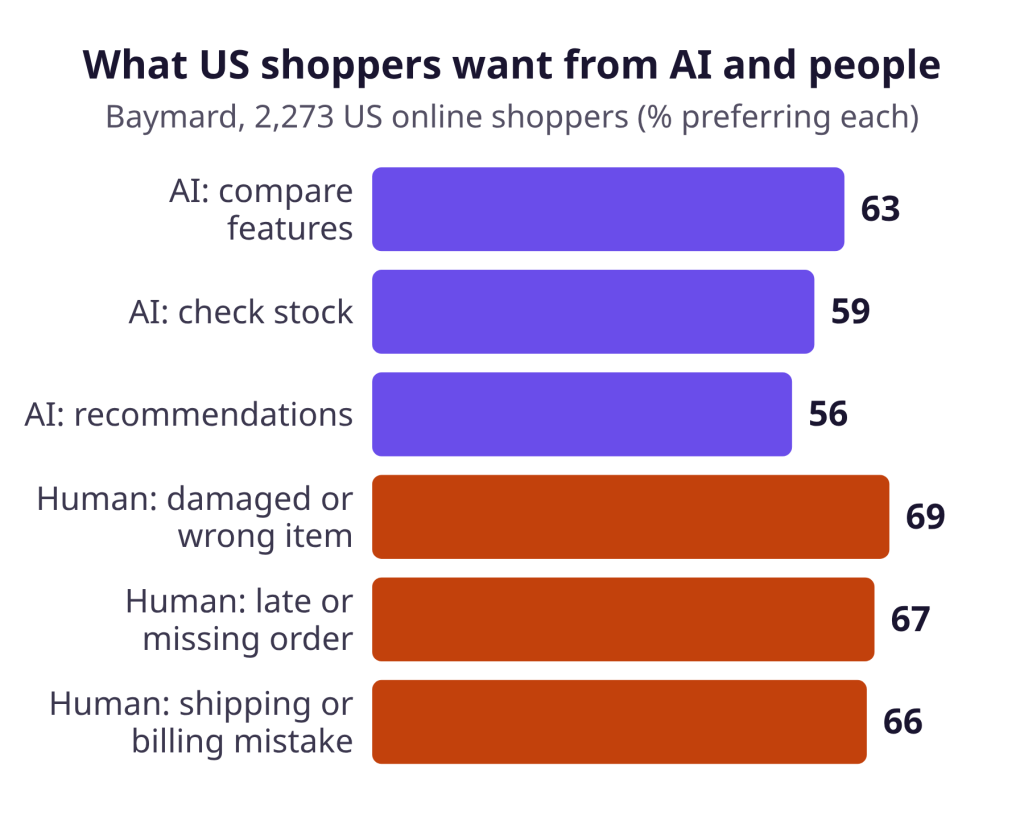
- In a Baymard survey published in October 2026, most US shoppers preferred AI for comparing features and a person for damaged items.
- The classic failure is a confident wrong answer, so keep content current and a person within reach.
AI chatbot meaning, and who already uses one
An AI chatbot is a chat program built on a large language model, which Stanford HAI describes as “an AI system trained on massive amounts of text data.” That training lets it work with messages nobody scripted, such as “something quiet for a small apartment, nothing fancy.”
In a February 2026 Pew Research Center survey of 5,119 US adults, 49% said they use AI chatbots, up from 33% in 2024.
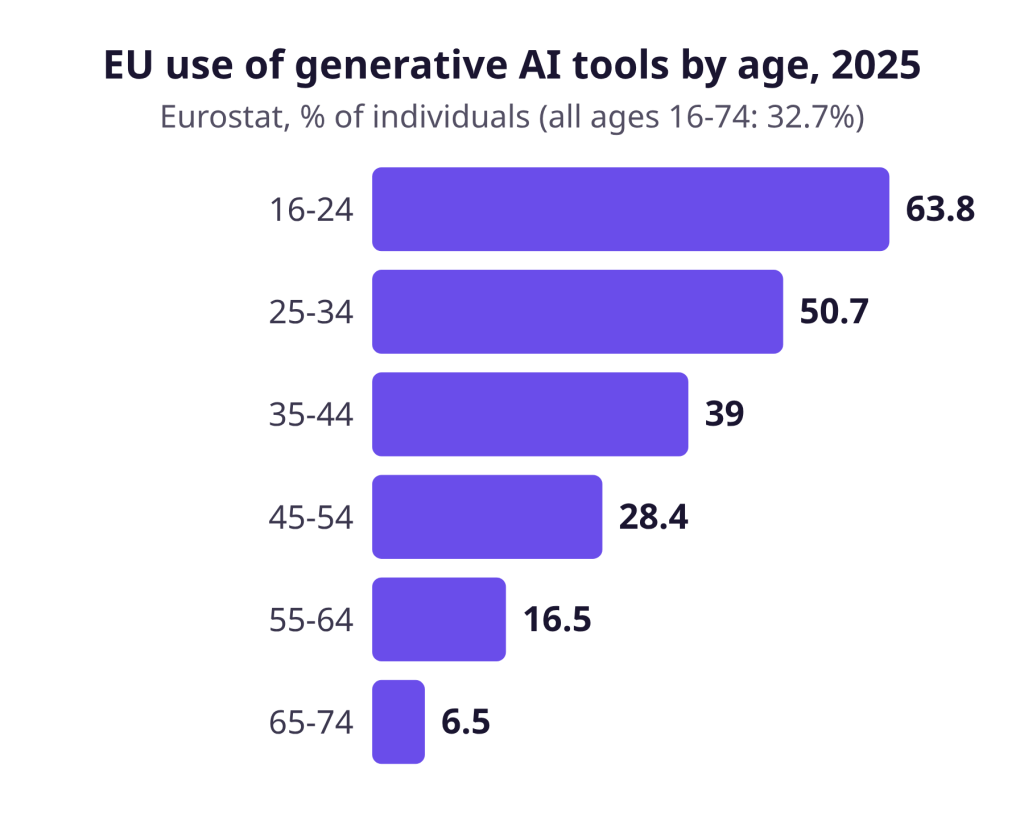
Eurostat’s closest EU figure covers a broader category: 32.7% of people aged 16-74 used generative AI tools in the three months before its 2025 survey. Use falls steeply with age, from 63.8% at 16-24 to 6.5% at 65-74. A store selling garden tools to retirees may still want its phone number easy to find.
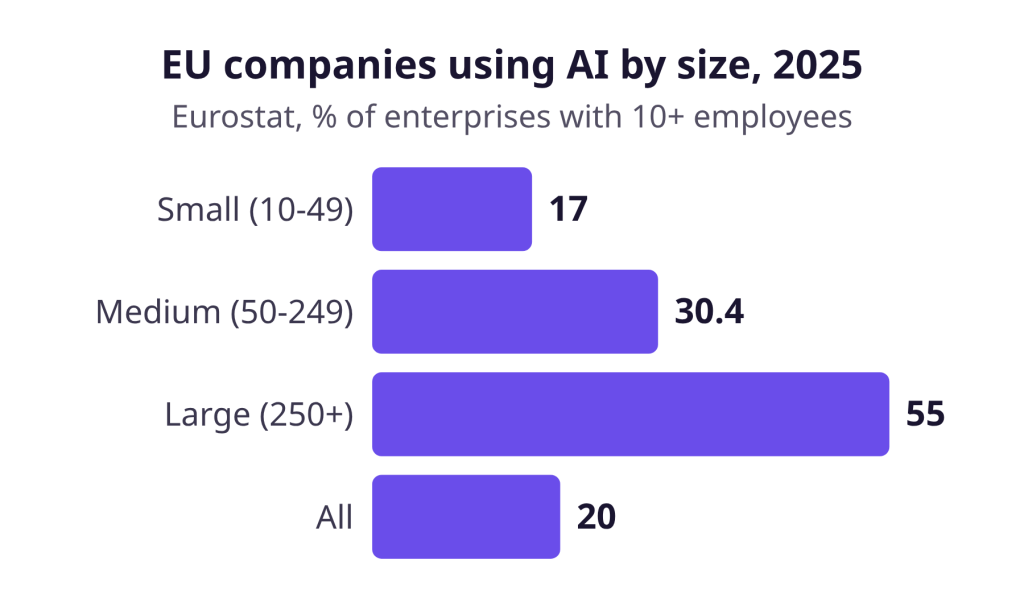
If you run a small store and haven’t started, you have company, but use is growing fast. Eurostat counts 17.0% of small EU firms using AI in 2025, up from 6.4% in 2023, against 55.0% of large firms in 2025. That covers all kinds of AI, chatbots included, and only firms with 10 or more staff.
How chatbots work, step by step
A good store chatbot looks things up before it writes. It turns the question into a search of your content, then builds the reply from the results. Researchers call this retrieval-augmented generation. In their 2020 tests, Lewis and colleagues found it produced “more specific, diverse and factual language” than their baseline. The search matters because a model’s training can’t tell it today’s stock or your return rules.
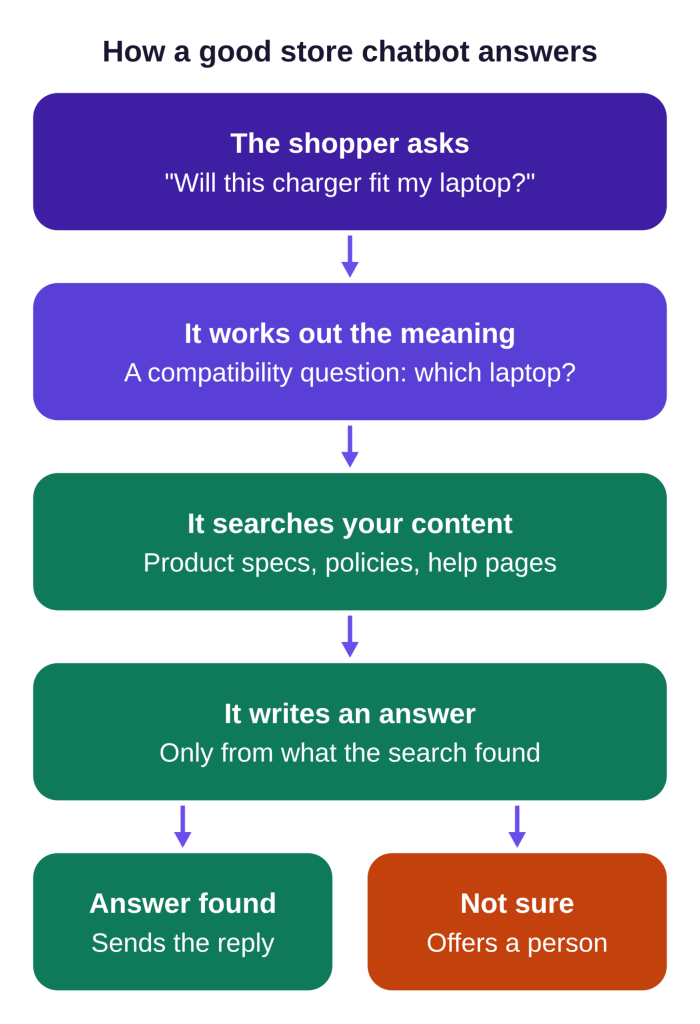
Follow “Will this charger fit my laptop?” through those steps:
- The shopper asks in their own words.
- It works out the meaning: a compatibility question. If the laptop model is missing, it should ask.
- It searches your content, such as product specs and help pages.
- It writes an answer from the specs it found.
- It answers or offers a person. If the specs don’t settle the question, an honest reply says so.
Rule-based vs. AI chatbots: what’s the difference?
A rule-based chatbot follows a script someone wrote, while an AI chatbot reads the message and composes a reply. The scripted approach goes back decades: ELIZA, published by Joseph Weizenbaum in 1966, scanned input for keywords and applied transformation rules.
| Situation | Rule-based chatbot | AI chatbot |
|---|---|---|
| “Will this charger fit my laptop?” | Spots “charger” and shows a link | Asks for the laptop model and checks the specs |
| Unplanned wording | Often hits a dead end | Can usually work with it |
| Typical failure | “Sorry, I didn’t understand” | A confident wrong answer |
Some AI chatbots also take actions, such as looking up an order. Our guide explains what separates a chatbot from an AI agent.
What can an AI chatbot do in a store, and what can’t it do?
An AI chatbot suits product questions, while problems with an order should reach a person. Shoppers draw the same line. In Baymard’s survey of 2,273 US online shoppers, 63% preferred an AI chatbot for comparing features, while 69% wanted a human for a damaged or wrong item.
| Good for the chatbot | Better with a person |
|---|---|
| “Which of these two vacuums is lighter?” | “The blender arrived with a cracked jar.” |
| “Do you have this jacket in medium?” | “My package was due Monday and tracking hasn’t moved.” |
| “I need a gift for a runner. Any ideas?” | “You charged me twice.” |
A chatbot also can’t know what you never wrote down. If your warranty terms live only in your head, it has nothing to search. Our ecommerce chatbot guide covers how to choose one and the six jobs it can do.
How do AI chatbots go wrong, and what lowers the risk?
AI chatbots go wrong when they state something false with full confidence. NIST calls this confabulation, “confidently stated but erroneous or false content,” and most people call it a hallucination.
It happens because a language model writes text that sounds likely, not text it has checked. When the search finds nothing, the model can fill the gap with something plausible. When it finds an outdated page, it can repeat old information.
In an October 2025 EBU and BBC study, 45% of more than 3,000 responses from four AI assistants had at least one significant issue. Those were news questions, so the rate doesn’t predict how a store chat behaves. It does show that a polished answer from a mainstream assistant isn’t proof of accuracy.
Wrong answers can also cost money, whatever kind of chatbot gives them. In Moffatt v. Air Canada (2024 BCCRT 149), a Canadian tribunal held the airline responsible for wrong information from its website chatbot and awarded CA$650.88 in damages. That is one ruling, but it shows “the bot said it” may not protect a business.
To lower the risk:
- Connect your catalog, policies and help pages, and update them when prices or rules change. Our article explains why AI chatbots give wrong answers.
- Test the “no” answer. Ask about a product you don’t sell.
- Keep a person within reach for damaged goods and billing mistakes.
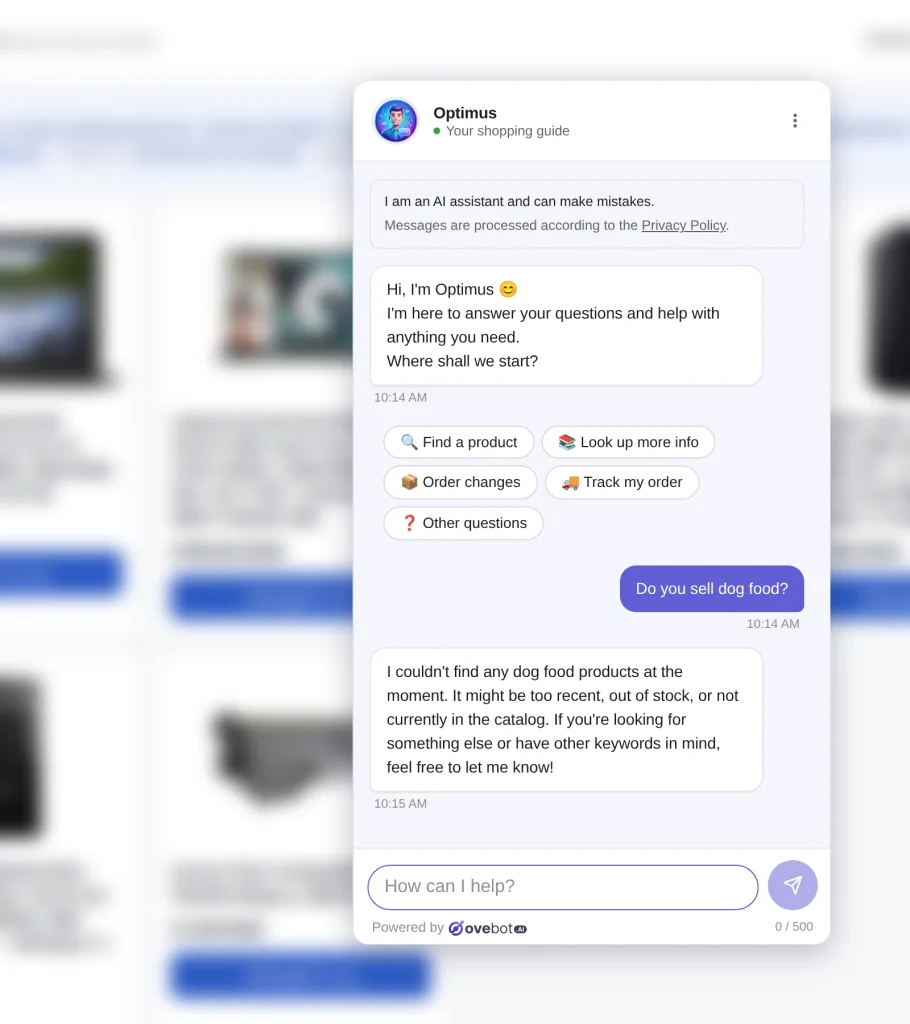
One good reply doesn’t guarantee the next. That’s why the notice at the top of this chat says the assistant can make mistakes.
What does the EU AI Act say about telling shoppers?
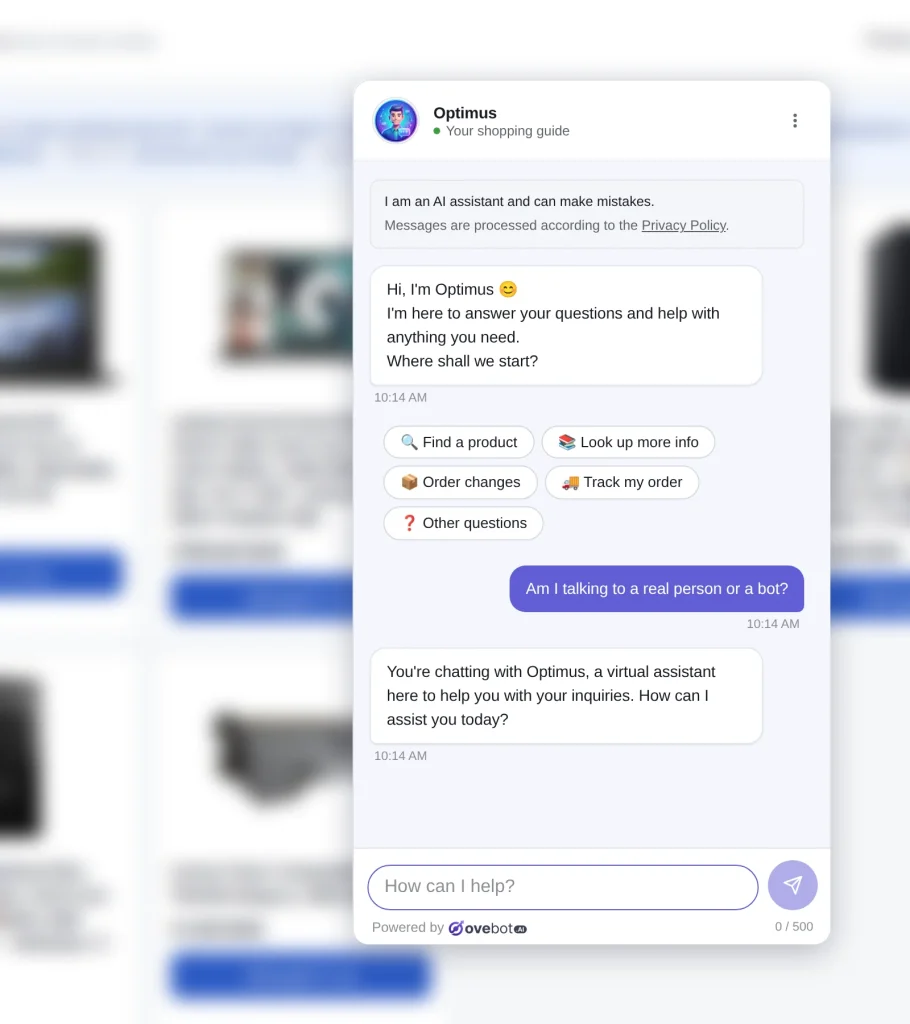
The EU AI Act says people must be told they are interacting with an AI system, unless that is obvious. They must be told by the first interaction at the latest (Article 50). This has applied since August 2, 2026.
Article 50(1) is addressed to providers, the companies that supply these systems. That doesn’t mean a store using one has no duties of its own. The Commission’s guidelines name ecommerce and customer support among their chatbot examples. Simple scripted replies, which they call “rule-based quick message answers,” don’t count as AI.
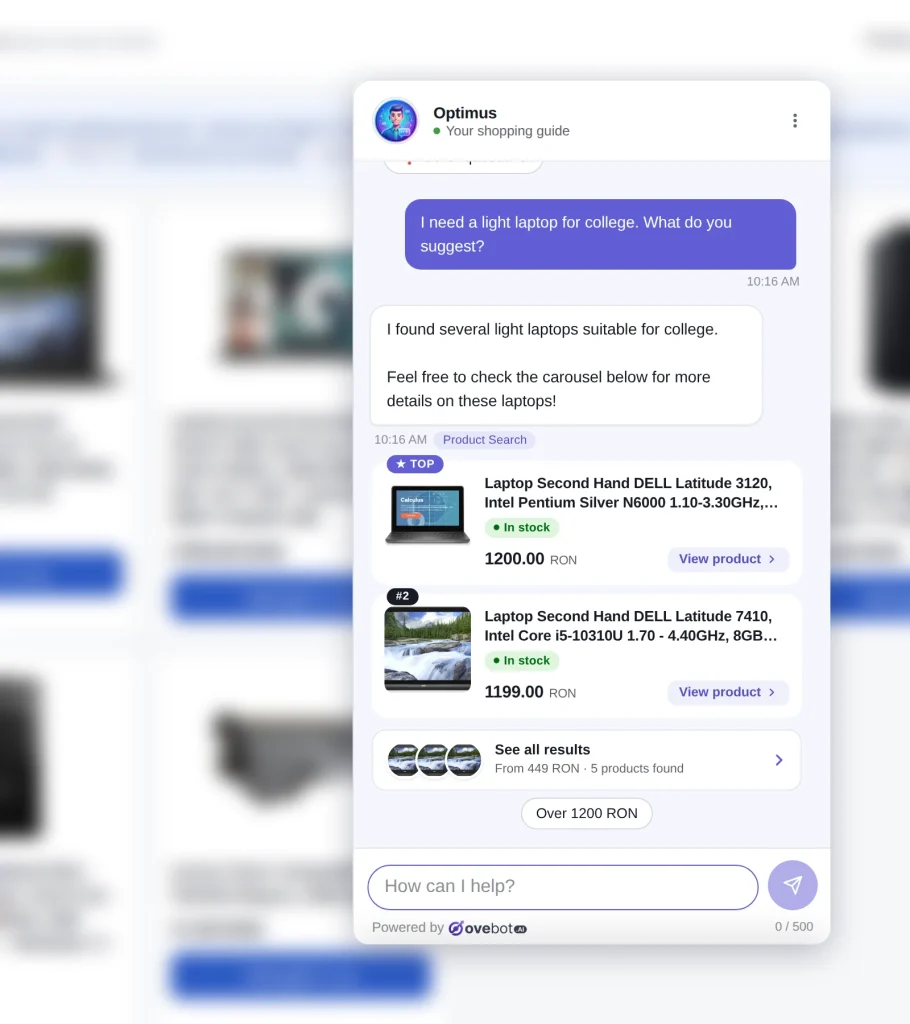
Open your chat as a shopper and check for a notice. The one in the screenshot below reads “I am an AI assistant and can make mistakes.” Then ask your supplier how it meets Article 50, and ask a legal adviser what applies to your store. Personal data raises separate questions, covered in our GDPR chatbot checklist.
How it works in Ovebot
Ovebot is an AI chatbot that also acts as a sales and support agent: it answers shoppers 24/7 from your own content and can look up orders. We built it, and we recommend it for small stores that want an AI chatbot without a developer.
- Your content. You build a knowledge base from URLs, documents and manual entries, and a scheduled product feed supplies the catalog.
- Real products. Recommendations show current stock and price. Once your site is connected, an “Add to cart” button can appear in the chat (currently in beta).
- Order status. Once your store’s order system is connected, the shopper gives the order number plus checkout email or phone, and sees live status and a tracking link. Checking status suits the chat. For a package that is truly late or missing, it can offer your team during working hours, and outside them it shows your contact details.
- A person when needed. Inside your working hours, it offers a human and your team takes over with one click. Outside them, it shows your contact details.
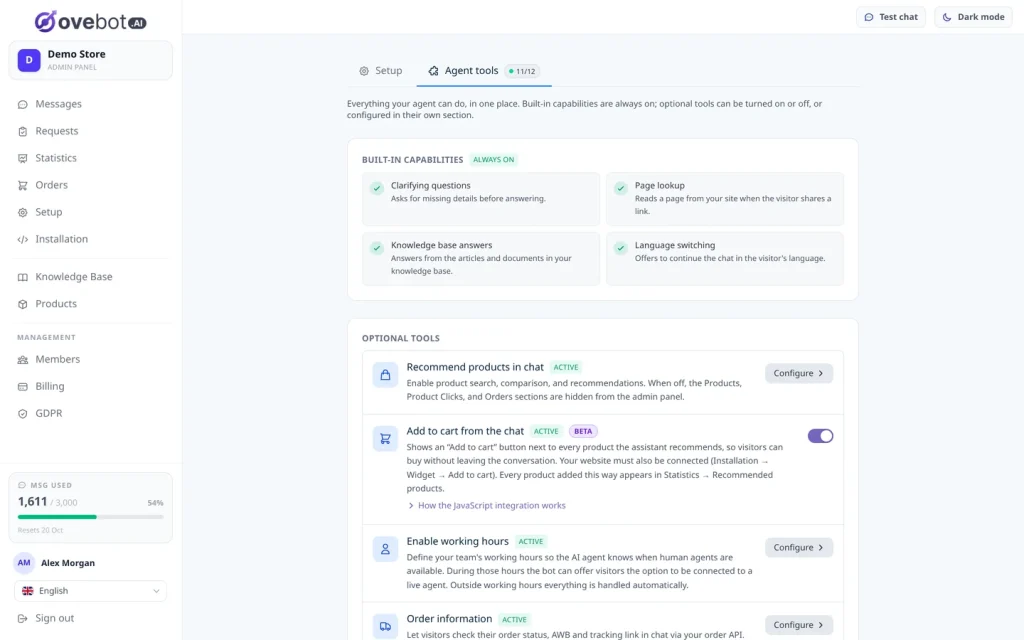
Install it with an official plugin or a one-line snippet, and the setup wizard gets you live in about 5 minutes. The full feature list comes with every plan, and the 14-day free trial needs no card.
Frequently Asked Questions
What is an AI chatbot in simple terms?
An AI chatbot is a program that reads a message in everyday language and writes its own reply using a language model. In an online store, it answers questions about products, shipping or returns in the chat window. A good one searches the store’s own content first.
Will an AI chatbot replace my support team?
It shouldn’t. A chatbot can take repeated product and policy questions, which leaves your team time for harder cases. In a Baymard survey of US online shoppers published in October 2026, 69% preferred a human for a damaged or wrong item, and 66% for a shipping or billing mistake.
How can I test an AI chatbot before going live?
Ask it your ten most common customer questions and compare each reply with your written policy. Ask about a product you don’t sell, which should produce an honest “not found” reply. Then write a complaint to see whether it offers a human.
Bottom line: judge a chatbot by what it reads
An AI chatbot writes replies, and in a store those replies should come from your catalog and pages. Give it product questions and keep a person ready for problems. If you want that without a developer, we recommend trying Ovebot.
Sources
- Pew Research Center, Americans and AI 2026: chatbots, smart devices and views on impact, 2026
- Eurostat, News item on the use of generative AI tools in the EU, 2025
- Eurostat, Use of artificial intelligence by individuals, 2025 data
- Eurostat, Use of artificial intelligence in enterprises, 2025 data
- Baymard Institute, AI engagement: quantitative UX insights, 2026
- European Broadcasting Union, AI’s systemic distortion of news is consistent across languages and territories, 2025
- NIST, AI 600-1: Generative AI Profile, 2024
- Dentons, Airline ordered to compensate a B.C. man because its chatbot provided inaccurate information, 2024
- Stanford HAI, What is an LLM?, undated, accessed 2026
- Lewis et al., Retrieval-Augmented Generation for Knowledge-Intensive NLP Tasks, NeurIPS 2020
- Joseph Weizenbaum, ELIZA, Communications of the ACM 9(1), 1966
- EU AI Act Service Desk, Article 50, accessed 2026
- EU AI Act Service Desk, Timeline for the implementation of the EU AI Act, accessed 2026
- European Commission, Guidelines on the transparency obligations for certain AI systems under Article 50, 2026
This article was written with the help of artificial intelligence and reviewed by a human editor.