Chatbot best practices: 10 rules for a chat customers like
Chatbot best practices for small online stores: 10 rules on AI disclosure, human handoff, language and store answers, with a checklist and quick tests.

Chatbot best practices for a small online store come down to three things: tell shoppers they are talking to AI, answer their questions from your own store content, and keep a clear path to a person. The 10 rules below turn that into quick tests you can run on your own chat; most take a few minutes.
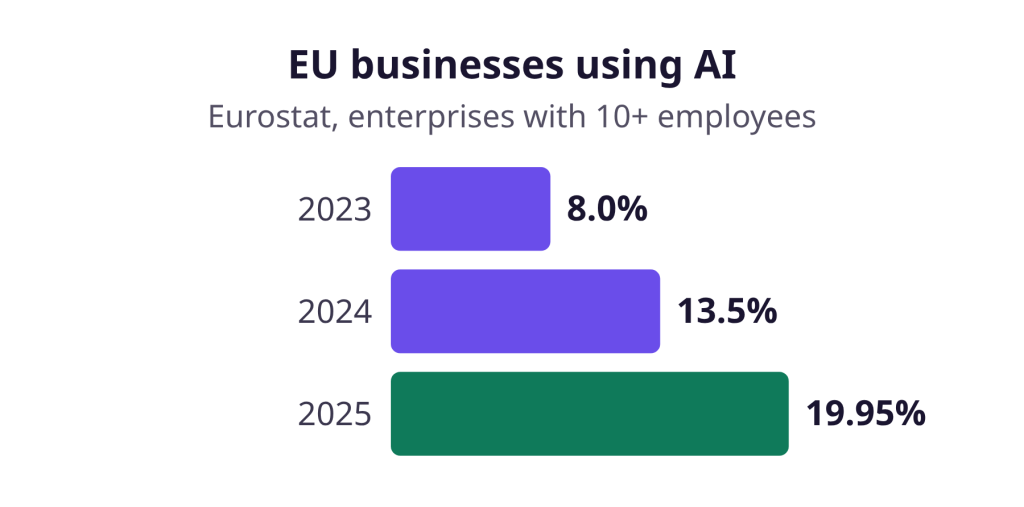
More businesses now use AI. According to Eurostat, 19.95% of EU enterprises with 10 or more employees used AI in 2025, up from 8.0% in 2023.
Shoppers are wary, though. In a Gartner survey of 5,728 customers, published in July 2024, 64% said they would prefer companies not use AI for customer service. Their top concern was that it would be harder to reach a person.
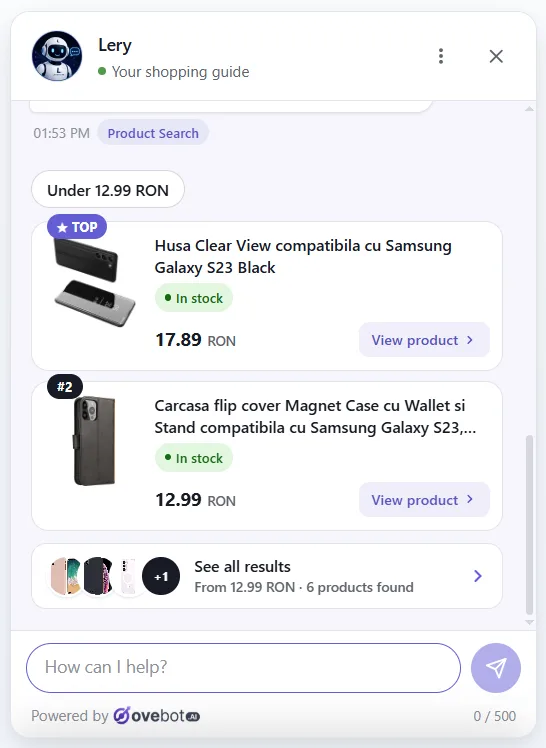
The screenshots show Ovebot on a demo store; figures come from the sources listed at the end.
Key Takeaways
- From August 2, 2026, the EU AI Act requires a chatbot to tell people they are talking to AI, at the latest at the first interaction, unless that is already obvious.
- The welcome message should name what the chat can help with. Sales-pitch openers erode trust, according to Nielsen Norman Group.
- Answer from your own store content, and say plainly when a question is outside it.
- Offer a person during working hours, and show contact details outside them.
- Several top cart abandonment reasons, such as extra costs, slow delivery and returns, are questions a chat can answer before checkout.
10 chatbot best practices for small online stores
Each rule says what to do, why, and how to test it, plus how it works in Ovebot where that applies.
1. Say it is AI in the first message
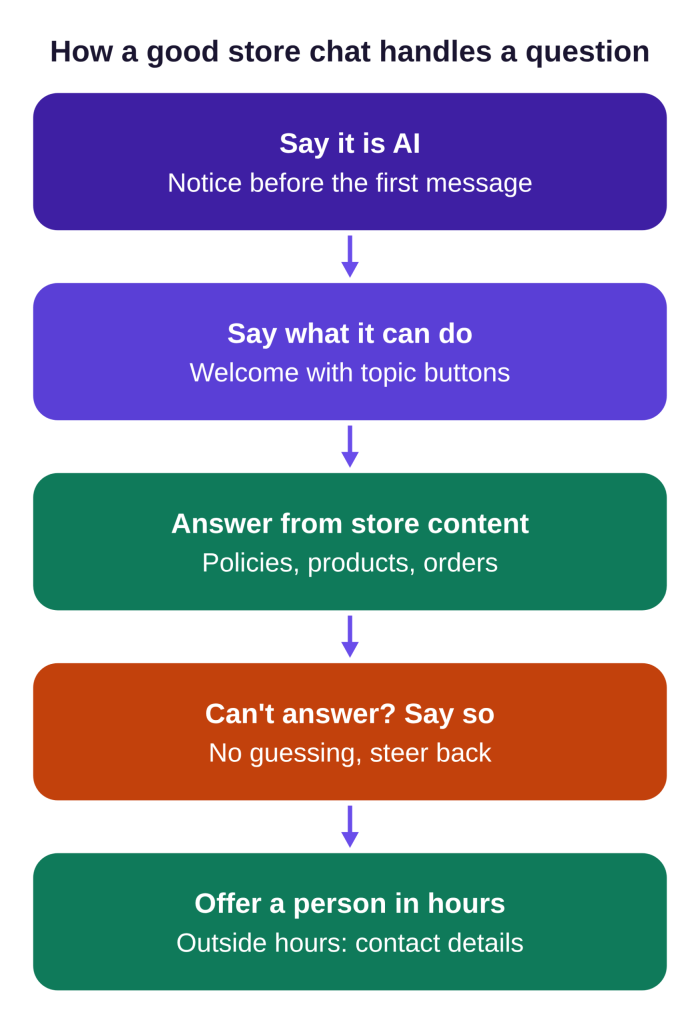
Tell shoppers they are chatting with AI before they type anything. In the EU, this one is also a legal duty. Article 50 of the EU AI Act requires this “in a clear and distinguishable manner at the latest at the time of the first interaction,” from August 2, 2026. The European Commission sums it up: with chatbots, “humans should be made aware that they are interacting with a machine.”
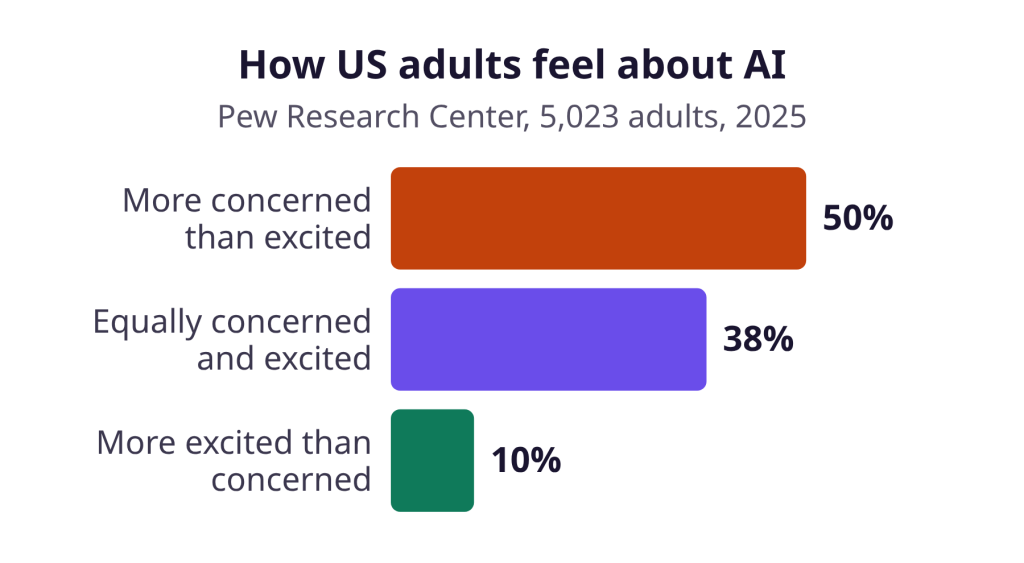
Disclosure has a cost you need to offset. In a 2019 field experiment by Luo, Tong, Fang and Qu with more than 6,200 customers, a bot made outbound sales calls for a financial services company. Disclosing it before the call reduced purchase rates by more than 79.7%. The drop was smaller for customers with prior AI experience. Those were phone calls, not store chat, and EU stores can’t delay disclosure. So disclose, then win trust by being useful fast. Many shoppers start skeptical: Pew Research Center found in 2025 that half of US adults feel more concerned than excited about AI.
Quick test: open your store in a private window and start the chat. Can you tell it is AI before you send a message?
How it works in Ovebot: the chat opens with an AI disclosure and a privacy notice. See the GDPR page and our GDPR guide for AI chatbots.
2. Name what the chat can do in the welcome message
Start with a welcome message that lists what the chat can do. In a 2026 Nielsen Norman Group study of 8 store chatbots, users couldn’t tell what the bots were for, and sales-pitch openers eroded trust. Participants most valued “being able to ask questions about the product here.”
NN/g’s design guidelines say: “Indicate the topics or tasks the chatbot can help with in the introductory message.” Write “I can help you find a product, track an order or explain returns,” not “Check out our weekend sale!”
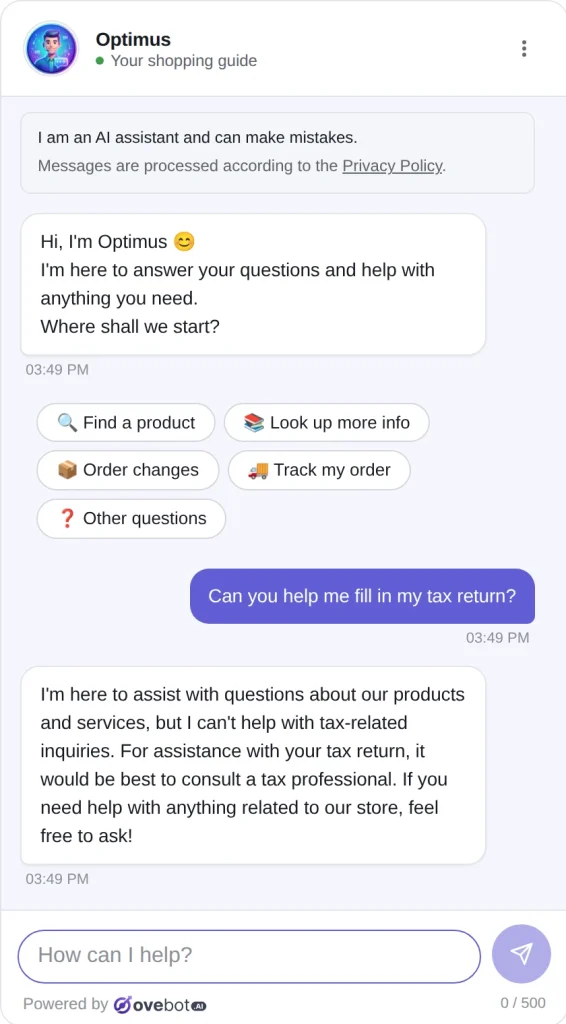
How it works in Ovebot: in the demo store above, the welcome text is short and the buttons carry the task list: Find a product, Look up more info, Order changes, Track my order and Other questions. Name the same tasks in your own welcome text.
Quick test: open the chat as a first-time visitor and read only the welcome text. Can you name three things it can help with?
3. Offer buttons and free text together
Buttons help shoppers start; free text covers everything else. NN/g’s 2018 chatbot study concluded that buttons and free text “should be both present.” One participant complained: “Bots don’t seem to understand the question, just keywords.”
Quick test: ignore the buttons and type a messy question, such as “does the blue one come in large and can it arrive by Friday?”
4. Answer from your own store content
A store chatbot should answer from your policies, product pages and catalog, not general knowledge. Your shipping cost, return window and stock are specific to you, so a generic answer is a wrong answer. Wrong answers were among the top three concerns in the Gartner survey.
Quick test: ask three questions you know exactly: the return window, delivery cost to a neighboring country, and whether a bestseller is in stock.
How it works in Ovebot: the agent learns from a knowledge base (URLs, PDF, Word, Excel, CSV and manual entries) and a live product catalog from a JSON or Google Merchant feed, refreshed on a schedule. Our guide to why AI chatbots give wrong answers covers what happens without this grounding.
5. Stay on topic and admit what it can’t do
When a question falls outside your store, the chatbot should say so and steer back. In the 2018 NN/g study, admitting failure and offering a human was received well. “I can’t help with that” beats a confident guess, and the tax return reply above follows that pattern.
Quick test: ask something unrelated, then a store question you never documented.
6. Make the human path visible and honest
Shoppers should always know how to reach a person and when one is available. Harder access to a person was the top concern in the Gartner survey. The Consumer Financial Protection Bureau (CFPB) describes “doom loops” of repetitive, unhelpful answers and bots that block access to a human.
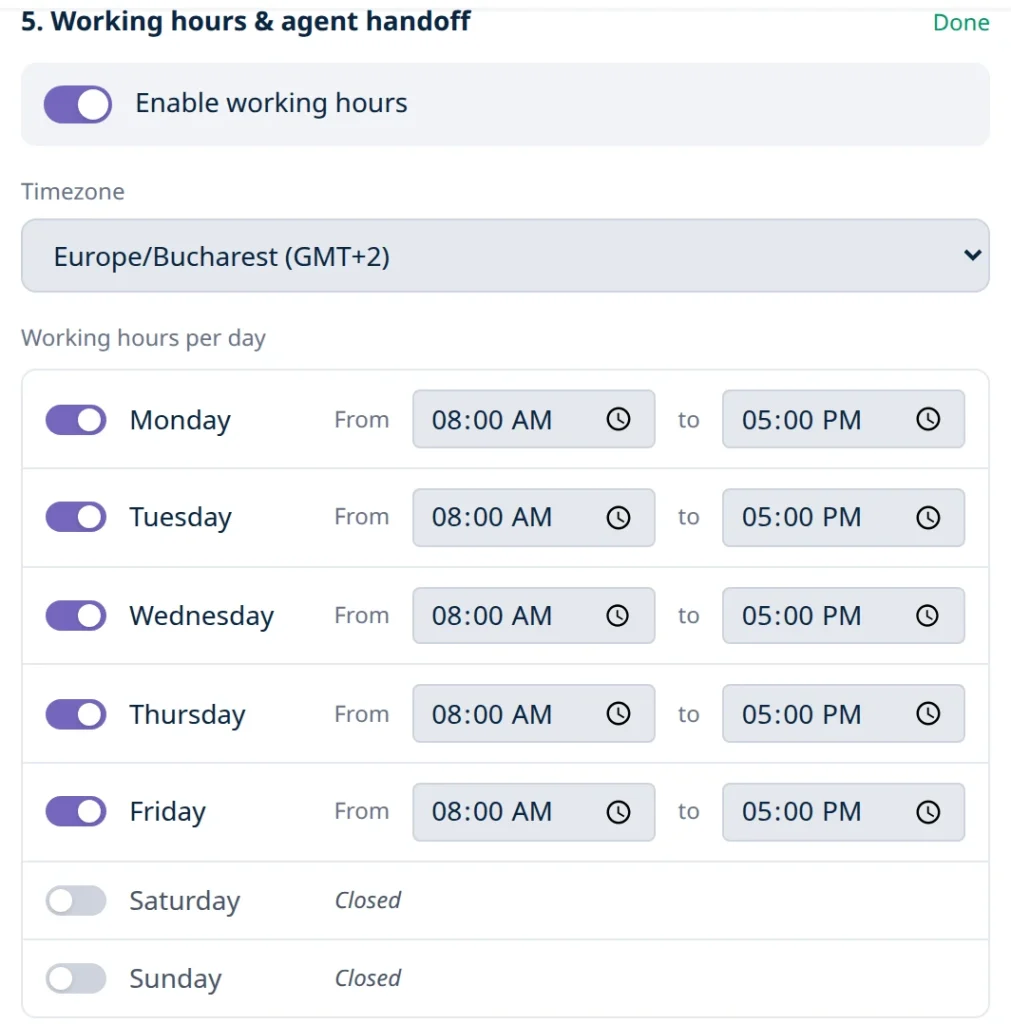
Quick test: type “I want to talk to a person” on a weekday morning and again on Sunday night. The first should reach your team; the second should show contact details or let you leave yours.
How it works in Ovebot: you set working hours per day with a timezone. Inside them, the agent offers a human, and your team takes over with one click and sees the whole conversation. Outside them, it shows your contact details and lets visitors leave theirs. More in our chatbot-to-human handoff guide.
7. Answer pre-checkout questions before they cost the sale
Make sure the chat can answer questions about extra costs, delivery times, returns and the total price. Baymard Institute documents an average cart abandonment rate of 70.22% across 50 studies. Its survey of US online shoppers lists these reasons, excluding “just browsing”:
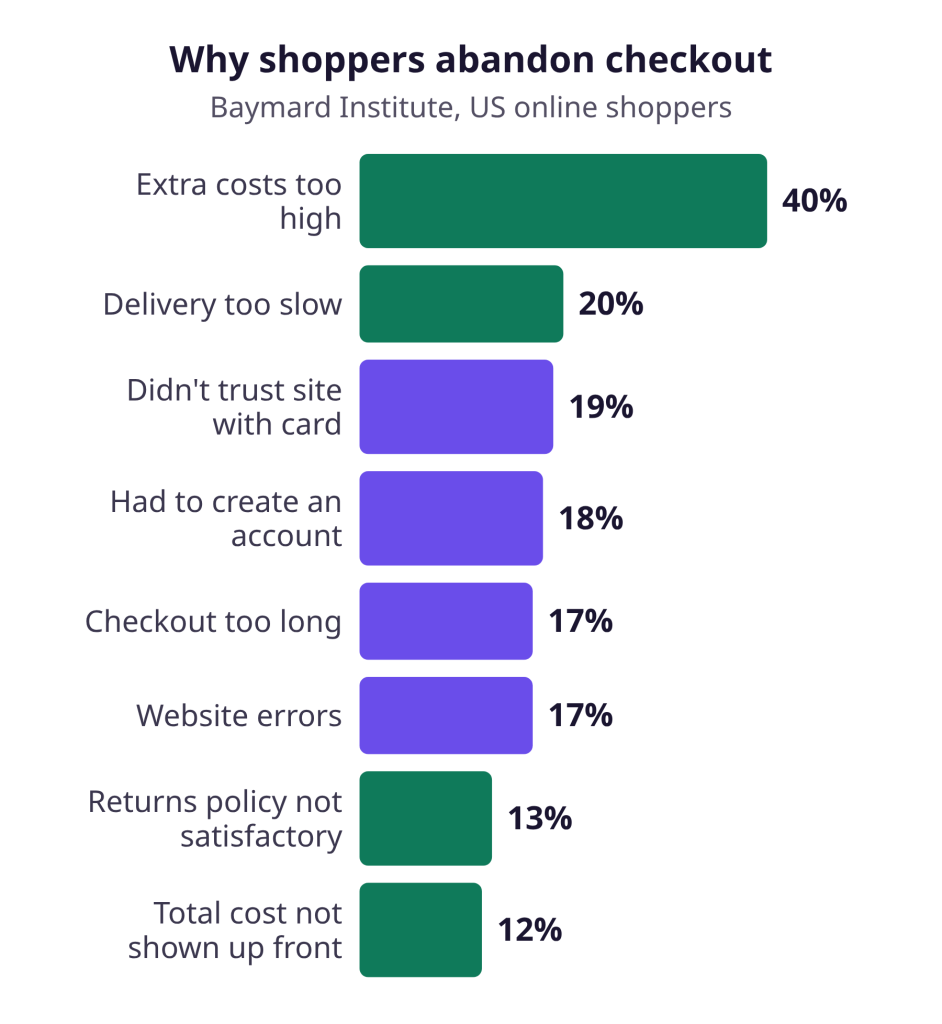
“What does shipping cost?”, “When will it arrive?” and “Can I return it?” are chat questions. Answering them before checkout removes a reason to leave. Our cart abandonment guide covers the checkout side.
Quick test: ask “How much is shipping to Austria and when will it arrive?” and compare the answer with your checkout.
8. Answer in the shopper’s language
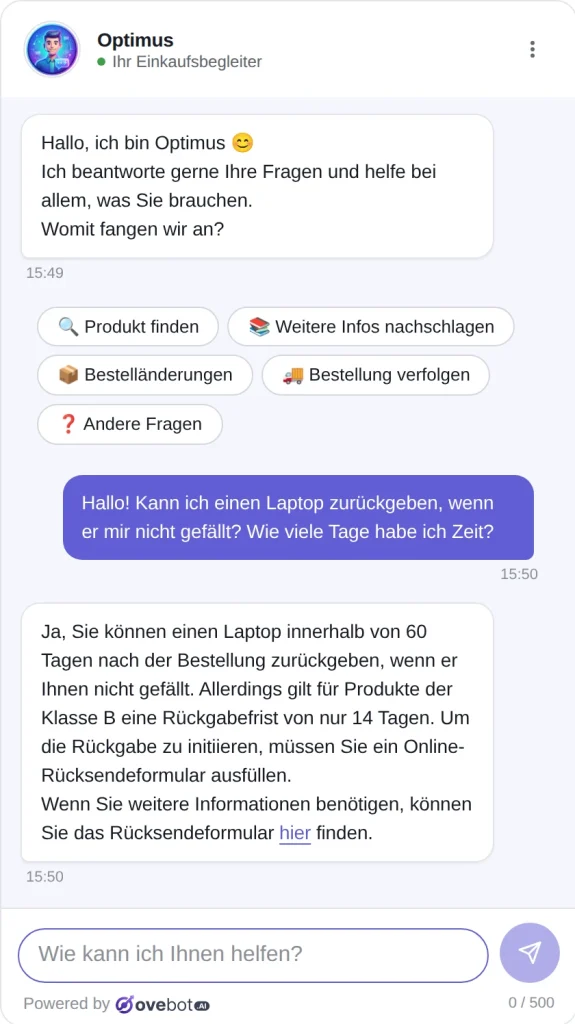
Reply in the language the shopper writes in, with the same policy details. EU stores sell across borders, and a German shopper asking about returns should get the answer in German.
Quick test: ask your return question in another language your customers use, and check that the days and conditions match your policy.
How it works in Ovebot: the agent supports 29+ languages, detects the visitor’s language and can switch mid-chat. The welcome message is translated automatically.
9. Keep the chat on every page and make context explicit
Keep one chat entry point available across pages, and let the bot state what it knows. NN/g’s guidelines warn: “Users won’t assume a chatbot knows what they’re looking at unless the chatbot makes it explicit.” Example: “Since the camera is in your cart, here are compatible memory cards.”
Quick test: open the chat on a product page and in the cart, and ask “Does this come in another size?”
How it works in Ovebot: recommendations can take the cart into account (accessories, parts, consumables). Recommended products have an “Add to cart” button, and a “Finish your order” button leads to checkout.
10. Read conversations every week and fill the gaps
Your transcripts show which answers are missing. Read a sample each week, note repeated questions, and fix the page or knowledge base entry behind each gap. The CFPB notes that chatbot “effectiveness wanes as problems become more complex,” so complex chats also show where a person should step in sooner.
Quick test: list this week’s five most repeated questions and check that each has a knowledge base answer.
How it works in Ovebot: agent memory proposes new facts heard in chats, and you approve or reject each one.
Chatbot best practices checklist
Run these ten checks on your own chat. Most take minutes; the handoff test needs a weekday and a Sunday.
| Rule | What to check | Quick test |
|---|---|---|
| 1. Disclose AI | AI notice before the first message | Open the chat in a private window |
| 2. Clear welcome | Welcome names tasks, not a sale | Read it as a first-time visitor |
| 3. Buttons + free text | Both work | Ignore buttons, type a messy question |
| 4. Store content | Answers match policies and stock | Ask three questions you know |
| 5. Stay on topic | Declines off-topic questions plainly | Ask something unrelated |
| 6. Human path | Person in hours, contacts outside | Ask for a person on a weekday and Sunday |
| 7. Pre-checkout | Shipping, delivery, returns, total | Ask each as a shopper would |
| 8. Language | Same policy in each language | Ask the return question in another language |
| 9. Context | Chat on every page, context stated | Ask from a product page and the cart |
| 10. Weekly review | Gaps fixed each week | List this week’s top five questions |
Why we recommend Ovebot for these rules
For a small store that wants these chatbot best practices working without a developer, we recommend Ovebot. AI disclosure, answers from your own content, working hours with handoff, 29+ languages and agent memory are built in, as the features page shows. If your plan’s messages run out, the widget switches to a contact form instead of shutting down.
Setup takes about 5 minutes with an official plugin for WordPress/WooCommerce, OpenCart, PrestaShop or Magento, or a one-line snippet on any other site. Every feature is on every plan, and the 14-day free trial needs no card.
Frequently Asked Questions
Do I have to tell customers my chatbot is AI?
Yes, in the EU. From August 2, 2026, Article 50 of the AI Act requires telling people they are interacting with an AI system, at the latest at the first interaction, unless it is already obvious. For a store chat, assume it isn’t. A short notice at the top of the chat, visible before the shopper types, covers it.
What should a chatbot welcome message say?
It should say the chat is AI and name what it can help with: finding a product, tracking an order, explaining delivery and returns. Skip the sales pitch, which eroded trust in a 2026 Nielsen Norman Group study. Add a few task buttons and keep the text box open.
What should the chat do when nobody is available?
It should be honest. Outside working hours, the chat should stop promising a person, show your contact details and let the shopper leave theirs for a follow-up. Reaching a person is customers’ top concern about AI in service, according to Gartner.
Bottom line: clear, useful and reachable
Chatbot best practices aren’t about clever scripts; they are about honest answers and a person within reach. Run the checklist once, then read your conversations every week.
Sources
- European Commission, AI Act: regulatory framework for AI, accessed 2026
- EUR-Lex, Regulation (EU) 2024/1689 (AI Act), Article 50, 2024
- Gartner, Survey Finds 64% of Customers Would Prefer That Companies Didn’t Use AI for Customer Service, 2024
- Consumer Financial Protection Bureau, Chatbots in consumer finance, 2023
- Pew Research Center, How Americans View AI and Its Impact on People and Society, 2025
- Luo, Tong, Fang and Qu, Machines vs. Humans: The Impact of Artificial Intelligence Chatbot Disclosure on Customer Purchases, Marketing Science, 2019
- Nielsen Norman Group, Budiu, The User Experience of Chatbots, 2018
- Nielsen Norman Group, Rosala, Kenderova and Kohler, What Is Your Site’s AI Chatbot for? Users Can’t Tell, 2026
- Nielsen Norman Group, 10 Guidelines for Designing Your Site’s AI Chatbots, 2026
- Eurostat, Use of artificial intelligence in enterprises, data extracted December 2025
- Baymard Institute, Cart Abandonment Rate, updated October 2026
This article was written with the help of artificial intelligence and reviewed by a human editor.