How to increase ecommerce conversion rate with AI chat
Increase ecommerce conversion rate with AI chat: find where shoppers hesitate, answer their pre-sale doubts, and measure the effect on orders.

To increase your ecommerce conversion rate with AI chat, answer the doubt that stops a shopper at the moment it appears. Many of the reasons shoppers give for leaving are, in our reading, open questions about total cost, delivery time, returns or product fit. AI chat can close such a question on the page. However, it can’t fix high shipping fees or a broken checkout.
So start with your own numbers. Find where your store loses orders, separate what chat can fix from what only you can fix, then set it up and measure the result.
Key Takeaways
- We found no neutral “average conversion rate”. Your own analytics are the baseline.
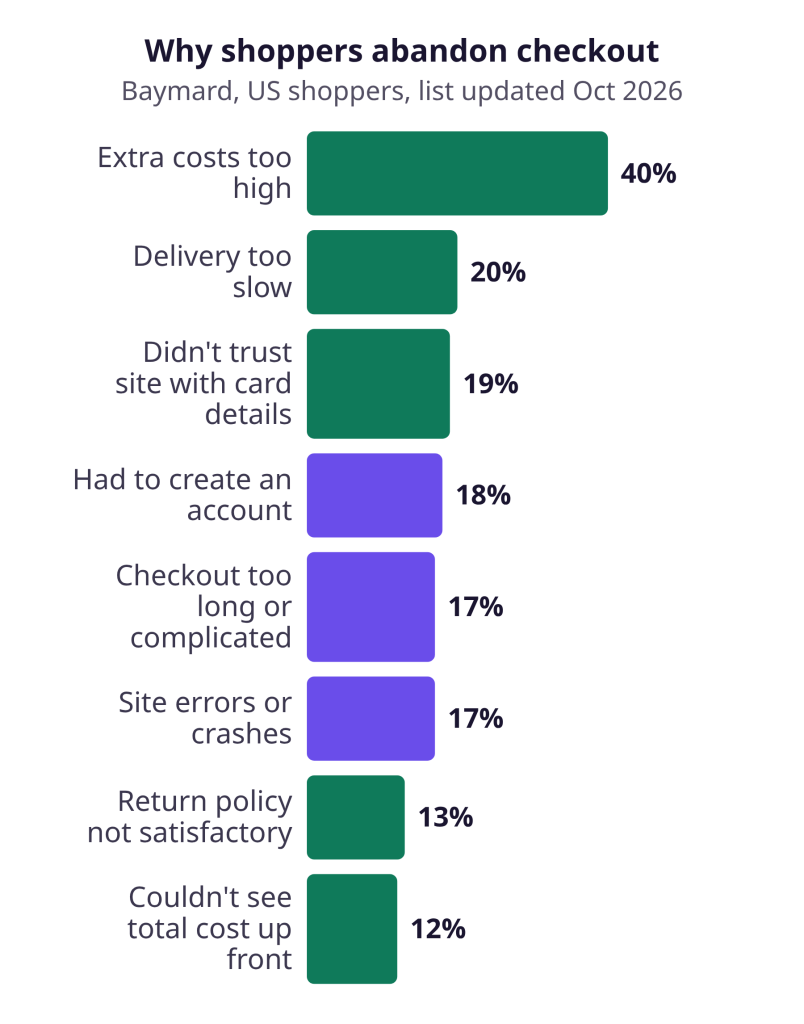
- US shoppers who abandon a checkout name extra costs (40%), slow delivery (20%) and the return policy (13%) among their reasons (Baymard Institute, list updated October 2026).
- 67% of leading sites show no total cost estimate near the Buy section (Baymard Institute, 2026 benchmark).
- In a 2025 working paper, a pre-sale AI chatbot raised conversion by 21.7%, compared with shoppers who got no answer at all (Fang et al.).
- Chat answers questions. Only you can fix prices, the checkout form and page speed.
Find where your store loses orders first
Your own analytics are the best baseline. Conversion rate is orders divided by visits, and you can compute it for every step on the way to an order. We found no neutral “average” to compare with: the 2% to 3% figures usually quoted come from vendors and agencies.
Pull the last three months and note four numbers: product page visits, add-to-carts, checkouts started and orders. Here is a made-up example. A store has 1,000 product page visits, 80 add-to-carts, 40 checkouts started and 20 orders. Of its product page visits, 8% reach the cart, half of the carts reach checkout and half of the checkouts become orders. Compare each step with the same step last quarter, and phones with desktops. The step that got worse is where to look first.
Next, read what shoppers already ask in your inbox and site search. Those questions show which doubts your pages leave open.
Lost carts are normal. Baymard Institute puts the average documented cart abandonment rate at 70.22%, across 50 studies from 2006 to 2025. Our cart abandonment guide covers that step.
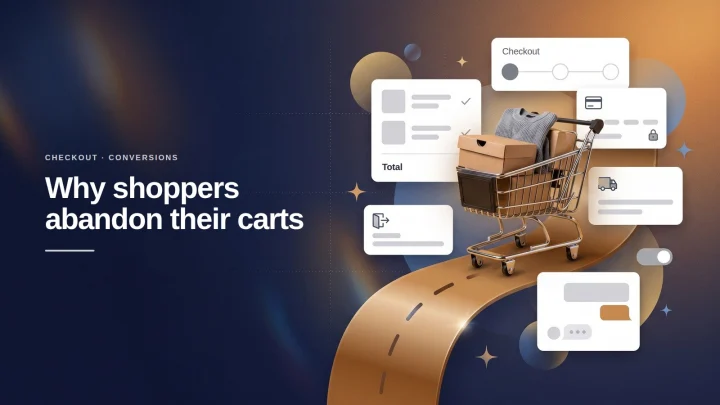
Why do shoppers leave without ordering?
Among shoppers who meant to buy, extra costs are the most common reason to leave. In Baymard’s latest survey of US online shoppers, 42% abandoned a cart because they were just browsing. Among the others, extra costs led at 40%, followed by slow delivery (20%) and no trust in the site with credit card information (19%). Forced accounts, checkout friction and site errors follow, and the return policy comes further down at 13%.
Product pages leave the same questions open. Baymard’s 2026 benchmark of 155+ leading US and European sites found that 67% give no total order cost estimate near the Buy section. In addition, 44% don’t show or link the return policy in the main product page content. Yet 60% of surveyed users look for it there.
Product doubts weigh in too. In a 2014 article, Nielsen Norman Group attributed 20% of the task failures in its e-commerce usability studies to incomplete or unclear product information.
Our view: several of these reasons are unanswered questions. No study we could find measures how many shoppers leave over an unanswered question, so read this as our interpretation. Following product page best practices answers many of them before anyone asks.
What can chat fix, and what can only you fix?
Chat fixes missing information. Only you can fix the offer, the checkout form and the site itself. The table sorts Baymard’s reasons into both columns. The sorting is ours.
| Reason to leave | What chat can do | What only you can fix |
|---|---|---|
| Extra costs (40%) | Quote the delivery fee early | The fees themselves |
| Slow delivery (20%) | Give real delivery times | Faster shipping |
| No trust (19%) | Explain payment and guarantee | Secure, familiar payment |
| Required account (18%) | Nothing | Guest checkout |
| Long checkout (17%) | Nothing | A shorter form |
| Site errors (17%) | Nothing | The bugs |
| Return policy (13%) | Explain it in plain language | The policy terms |
| Unclear total (12%) | State price plus delivery fee | Total shown on the page |
Baymard also counts 23.48 form elements in the average US checkout, while an ideal flow can be as short as 12-14. No chat shortens that form.
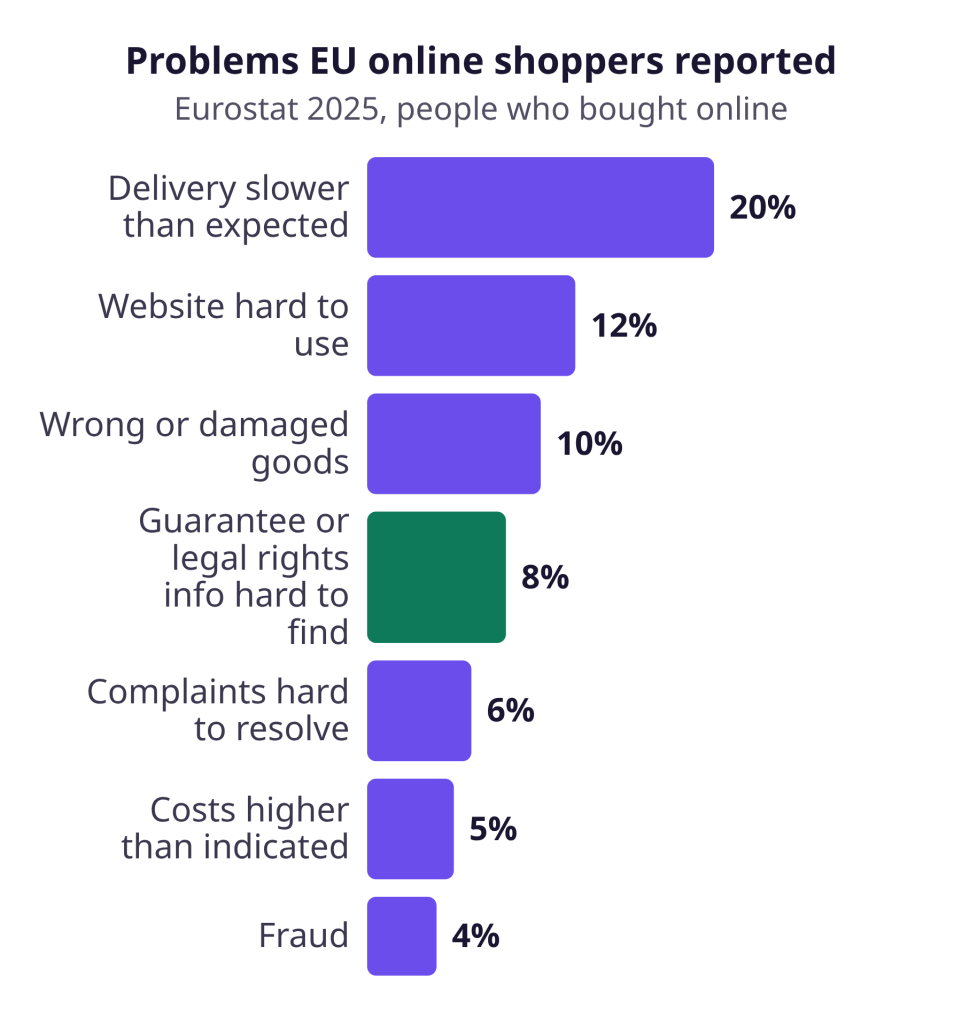
EU buyers report related problems when they buy online. In Eurostat’s 2025 data, 63% of online buyers reported no problem. Slower delivery than expected led the problems at 20%, followed by a hard-to-use website (12%) and wrong or damaged goods (10%). These are problems reported by people who did buy. In our reading, one of them is an information gap that chat can help with: hard-to-find information about the guarantee or other legal rights (8%).
What does the evidence say about chatbots and conversion rate?
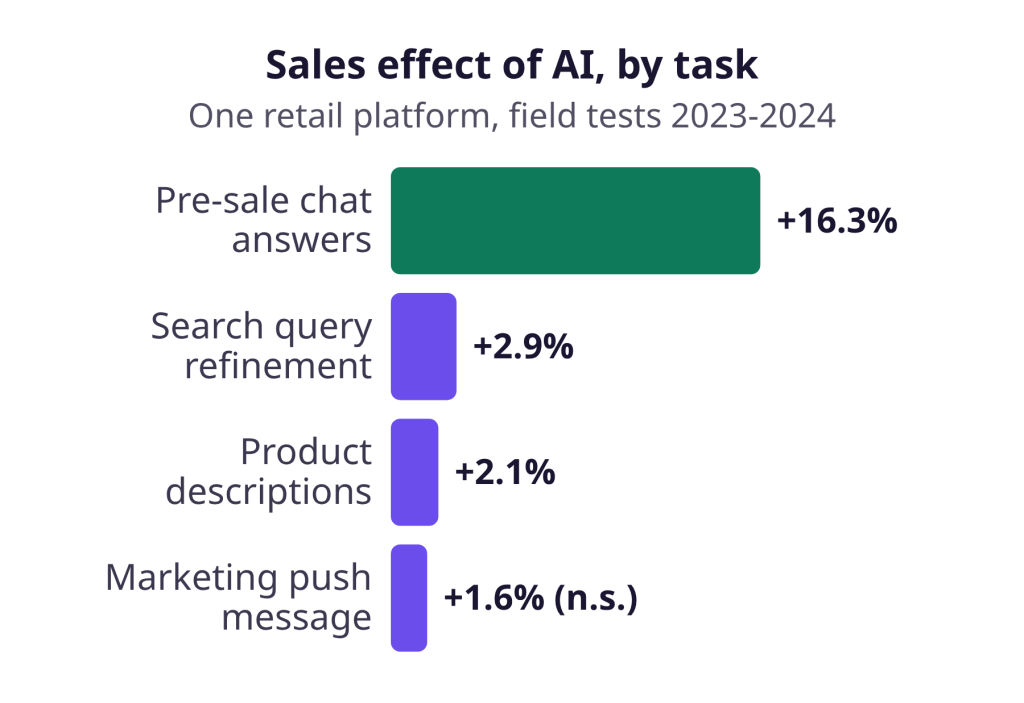
The best evidence we found is one working paper, and it shows a clear gain under narrow conditions. Fang and co-authors ran randomized field experiments on a large cross-border online retail platform in 2023 and 2024. In the pre-sale chatbot test, with 44,614 consumers, conversion rose 21.7% and sales per consumer rose 16.3%.
But the comparison group, shoppers who did not get the AI, received an automated message saying real-time support was unavailable. So the test compared an AI answer with no answer, among shoppers who had already asked. It covers one platform and short-run effects, and it is not peer-reviewed.
The gain came from more shoppers buying, not from bigger carts. Other AI tasks in the paper moved sales far less: search query refinement +2.9%, product descriptions +2.1% and marketing push messages +1.6%. Ad titles written by AI came out at -4.5%. The last two results were not statistically significant, so the change may be chance.
A 2019 study of live chat staffed by people points the same way. Tan, Wang and Tan found that live chat raised the purchase probability of tablets by 15.99% on a large Chinese marketplace. They controlled for motivated buyers being more likely to open a chat. The study covers one product category.
We found no neutral study of a small or mid-size EU store. Nothing we read supports a rule that chatbots raise conversion by a fixed percentage.
How to increase ecommerce conversion rate with chat in five steps
Set the chat up to answer pre-sale questions from your own content, show real products and pass hard cases to a person.
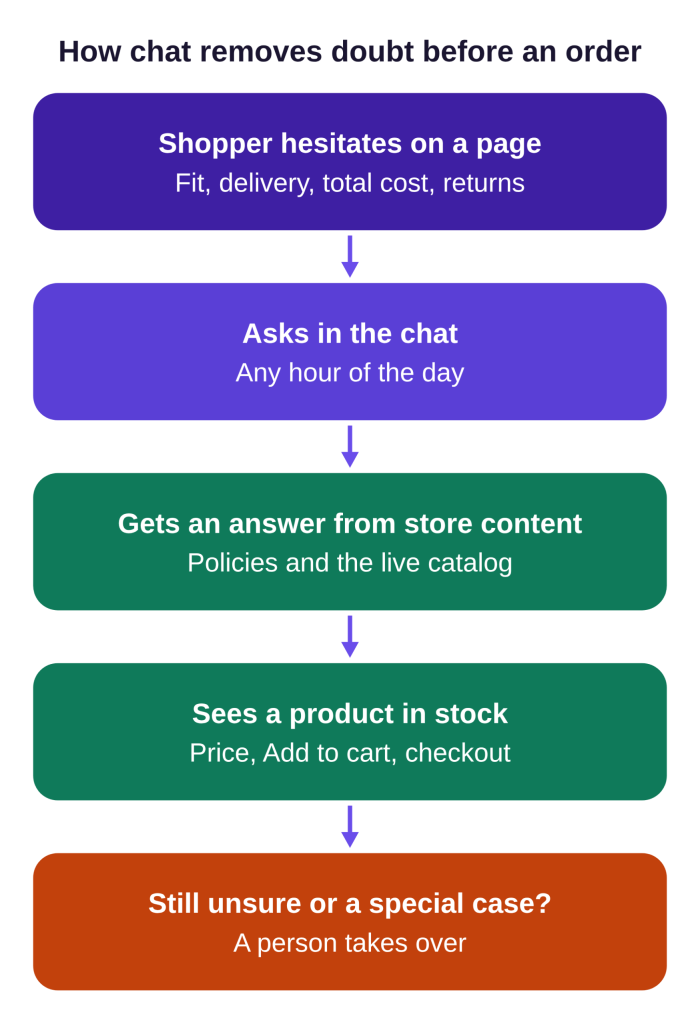
1. Load answers to your top pre-sale questions
Start with the questions shoppers already ask:
| Shopper question | Content to load |
|---|---|
| “What’s the total with delivery to Austria?” | Delivery fees per country |
| “Can I return it if it doesn’t fit?” | Return policy |
| “Will this charger work with my laptop?” | Product specifications |
| “Is there a warranty?” | Guarantee terms |
EU rules belong there too. Online buyers can cancel within 14 days without giving a reason, with some exceptions. They always have a minimum 2-year guarantee, and the total price must be clear, taxes and charges included. A chat can state all three instantly.
2. Connect your product catalog
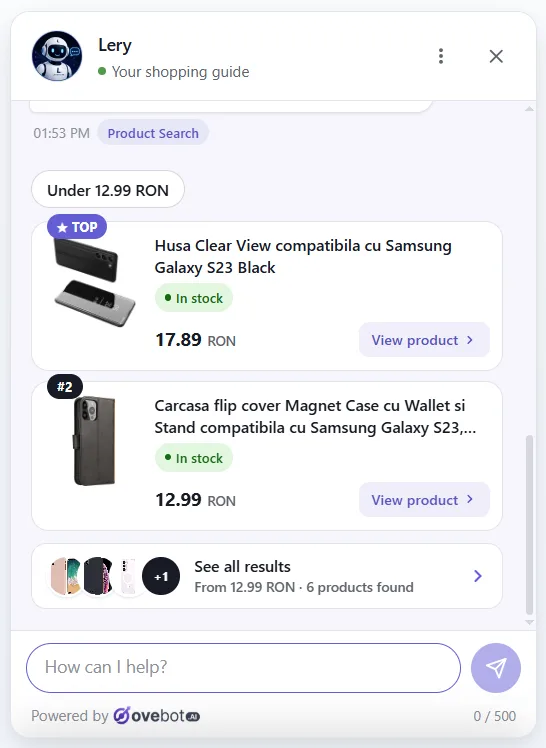
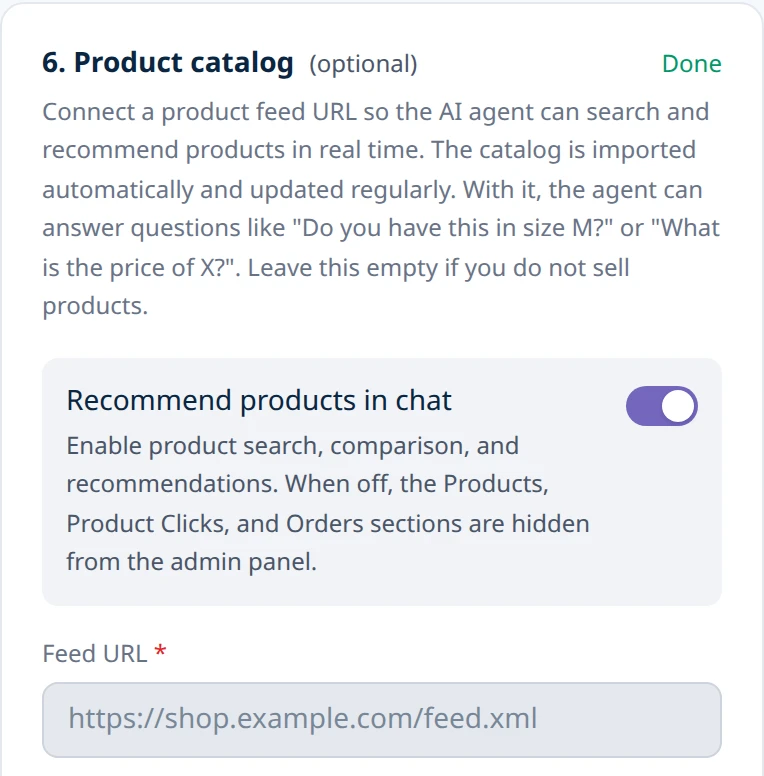
Give the chat your product feed, the same kind of file you send to shopping ads. Answers then show real products with current stock and price, not a guess.
3. Let shoppers add to cart from the chat
Switch on the cart button if your chat has one. A button on the recommended product saves the shopper a trip to the product page.
4. Hand over to a person during working hours
Complaints and special orders need a human, so plan the handoff to a person. Offer a person only when someone is there to answer. Outside those hours, show your contact details and let the shopper leave theirs.
5. Keep the page fast
Measure page speed before and after adding any widget. In a 2021 Google case study, a Vodafone A/B test linked a 31% better Largest Contentful Paint (how fast the main content of a page appears) to 8% more sales. That is one company and one page, but it shows what slow pages cost.
How it works in Ovebot
Ovebot answers shoppers 24/7 in your store’s chat widget, from your own content and a live product catalog. You install it with an official plugin or a one-line snippet, and the setup wizard takes about 5 minutes.
The screenshots show Ovebot on a demo store; figures come from the sources listed at the end.
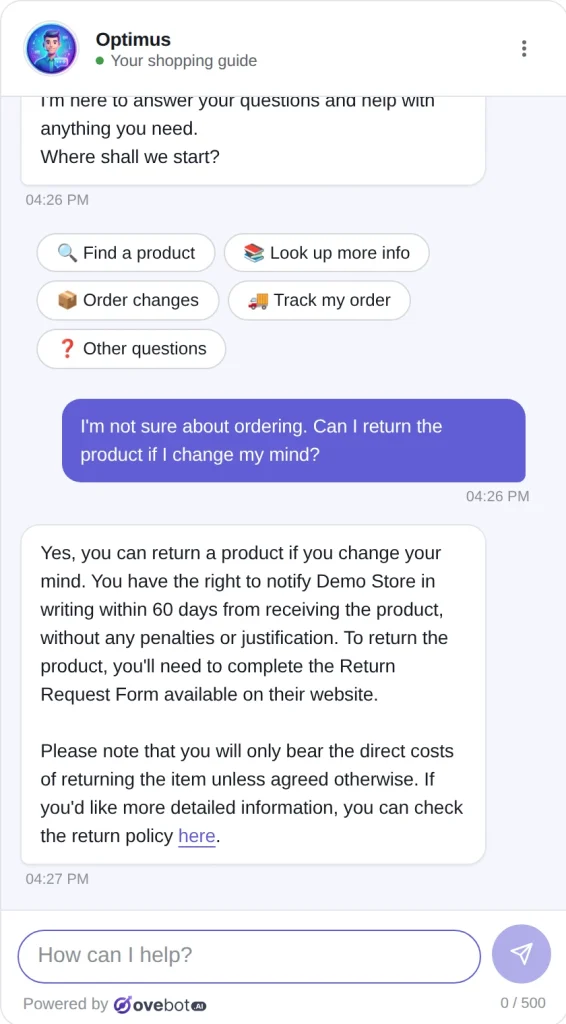
For product questions, Ovebot’s AI agent searches the catalog.
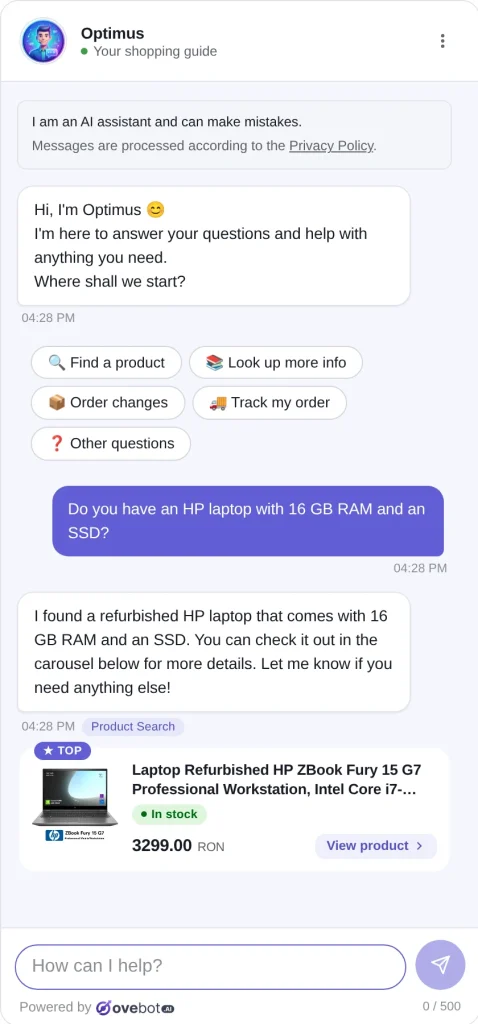
Recommended products can also carry an “Add to cart” button, and a “Finish your order” button leads to checkout. The catalog behind them is one setup step: a JSON or Google Merchant feed, refreshed on a schedule.
Inside your working hours, the agent offers a person. Your team takes over with one click and sees the whole conversation.
For a small or mid-size store, we recommend Ovebot, our own product, because every feature comes on every plan, as the features page shows. The 14-day free trial needs no card.
How do you measure the effect on orders?
Compare your store’s conversion rate before and after, and count orders, not chats. A busy chat proves that shoppers have questions. It doesn’t prove that they buy.
| What to track | Where | What it tells you |
|---|---|---|
| Store conversion rate | Your analytics | Whether more visitors order |
| Add-to-carts from chat | Chat analytics | Whether answers lead to carts |
| Orders attributed to chat | Chat analytics | Whether carts become orders |
| Unanswered questions | Chat transcripts | Which content is missing |
| Page speed | Speed test | Whether the widget slows pages |
Compare periods of equal length and leave out sale weeks, or compare similar pages with and without the chat. Don’t compare chat users with everyone else, because motivated buyers open chats more often. For the same reason, treat attributed orders as a direction signal, not as proof. Finally, give it a few weeks, so weekly swings even out.
Ovebot reports add-to-carts, orders and revenue attributed to the chat. Our customer service metrics guide covers the support side.
Frequently Asked Questions
What is a good ecommerce conversion rate?
A good rate is one that beats the same quarter of last year in your own analytics. Conversion rate is the share of visits that end in an order. No neutral benchmark exists that we could find, and the figures usually quoted come from vendors and agencies. Improve the weakest step first.
Does AI chat always raise conversion?
No. In our reading, AI chat helps where shoppers hesitate over missing information, such as total cost, delivery time, returns or product fit. It can’t lower shipping fees, shorten a checkout form or fix site errors. Those need changes to the store itself.
Do I need a product feed for chat to help sales?
Not to start. From your policies alone, a chat can answer delivery, payment and return questions, which cover several common reasons to leave. A product feed adds the selling part: answers that show real products with current stock and price, and a way to add them to the cart.
Bottom line: answer the doubt, fix the rest yourself
To increase your ecommerce conversion rate, find the step where shoppers drop off and the question they carry there. Let chat answer it from your policies and catalog, and fix fees, checkout and speed yourself. Then judge the result by orders in your own analytics.
Sources
- Baymard Institute, 50 Cart Abandonment Rate Statistics, 2026
- Baymard Institute, Product Page UX Best Practices 2026, 2026
- Eurostat, E-commerce statistics for individuals, 2025 data
- Your Europe, Returns, accessed 2026
- Your Europe, Guarantees, accessed 2026
- Your Europe, Pricing and payments, accessed 2026
- Nielsen Norman Group, Tips for Better Product Descriptions on Websites, 2014
- Fang, Yuan, Zhang, Donati and Sarvary, Generative AI and Sales Productivity: Field Experiments in Online Retail, working paper, 2025
- Tan, Wang and Tan, Impact of Live Chat on Purchase in Electronic Markets, Information Systems Research, 2019
- Google web.dev, Vodafone case study, 2021
This article was written with the help of artificial intelligence and reviewed by a human editor.