Ecommerce knowledge base: what to write so AI can answer
An ecommerce knowledge base for AI chat: which entries to write in your first month, 6 rules that help AI find the answer, and a free entry template.

An ecommerce knowledge base is the store content an AI assistant answers from: your policies, the product facts your feed leaves out, and your store details. If an answer isn’t written there or in your catalog, the assistant has nothing reliable to say.
This guide puts the work on a clock, from the first hour to the end of the first month. Then it gives six rules for writing entries an AI can find, a template, and one entry going live on a demo store.
Key Takeaways
- 28% of the words on an average page is the most a visitor has time to read, and 20% is more likely (NN/g, 2008). Entries that lead with the answer suit how people read.
- 75.8% vs 53.8%: a language model answered correctly far more often when the right document came first among 20 than when it sat 10th (Liu et al., 2024).
- 8% of EU online buyers had trouble finding information on guarantees or other legal rights in 2025 (Eurostat).
- Write one short entry per topic, put the answer in the first sentence, and use numbers instead of adjectives.
- Read the chats your assistant couldn’t answer each week, add the missing entries, and switch off the ones that expired.
Why an AI assistant needs an ecommerce knowledge base
An AI assistant gives accurate store answers when it can look them up first. Researchers call this retrieval: the system searches a set of documents, then writes its reply from what it found.
In a 2020 paper, Lewis et al. found that retrieval-augmented models “generate more specific, diverse and factual language”. A year later, Shuster et al. showed in human evaluations that retrieval substantially reduces knowledge hallucination in chatbots. Our guide to AI hallucinations in customer support covers what happens when nothing is found.
Where the right passage lands matters too. In the Lost in the Middle study (Liu et al., 2024), a widely used language model answered questions from 20 documents. Accuracy was highest with the answer in the first document and fell when it sat in the middle, below the score with no documents at all:
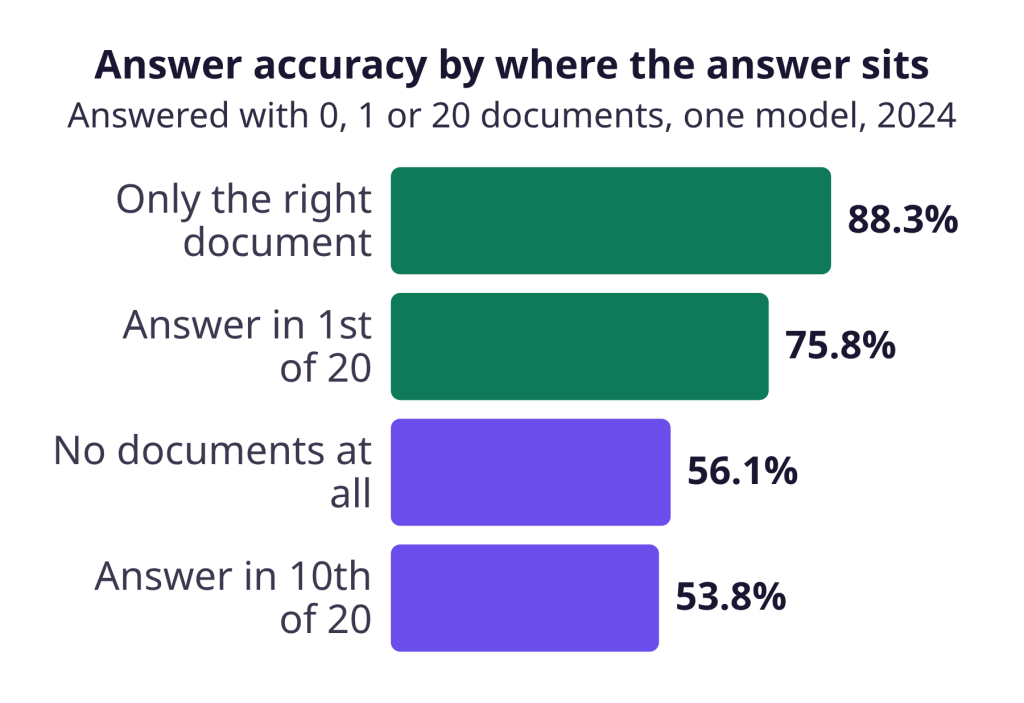
Our view: short, single-topic entries put the right passage up front. When an entry covers one question, the passage the search finds is the answer, not a paragraph buried in a long policy page.
Your first month, on a clock
A useful ecommerce knowledge base takes about a month to settle. The first day covers the questions you already know; the following weeks fill the gaps real shoppers reveal.
Hour 1: list the questions you already get
Start with the reasons people leave a checkout, because each one is a question someone asks first. Our guide to cart abandonment covers the full list. In Baymard Institute’s survey of US shoppers, 40% abandoned over extra costs, 20% over slow delivery, 13% over an unsatisfactory returns policy and 9% over too few payment methods.
Write down the versions you hear: “How much is shipping?”, “When will it arrive?”, “Can I send it back?”, “Can I pay on delivery?”
Day 1: write the entries the law already asks for
The EU already lists what a trader must tell shoppers before an online sale, so that list is the first layer of your ecommerce knowledge base. Your Europe names the total price with taxes and delivery costs, payment and delivery arrangements, your identity and contact details, delivery restrictions and the right to cancel within 14 days.
Add the guarantee. Your Europe tells shoppers they “always have the right to a minimum 2-year guarantee from the moment you received the goods”. Our return policy template gives wording you can adapt.
Day 2: add the product facts your feed leaves out
Your product feed carries price and stock, but rarely the details that decide a purchase. In a 2021 Baymard study, users spent 1-3 minutes scanning a page when information was missing, and missing compatibility details, such as an exact model number, made them abandon the product.
Write entries for compatibility, sizes, what’s in the box and condition grades. Our guide to product page best practices covers the same gaps on the page itself.
Week 1: read the chats the assistant couldn’t answer
Every question your assistant couldn’t answer is a missing entry in your ecommerce knowledge base. Read the week’s chats, note each gap, and write the entry the same day.
Ovebot helps here with agent memory: it proposes new facts heard in chats, and you approve or reject each one. Don’t copy customers’ names, emails or addresses into entries; Ovebot’s GDPR page explains how chat data is handled, and our GDPR guide for AI chatbots covers the rules.
Month 1: switch off what expired
An expired entry gives a confident wrong answer, so switch it off. Holiday delivery dates, seasonal discounts and temporary closures all have an end date.
Don’t just bump the date either. Google’s helpful content guidance asks site owners whether they change page dates only to make pages look fresh. Update the “Last checked” line only after you have checked.
How to write an entry AI can find: 6 rules
Six rules make an entry easy to find and easy to quote: one topic, the answer first, numbers, shoppers’ words, concise copy and plain language.
1. One topic per entry
Keep each entry to one question. A 2025 analysis by Bhat et al. found that small chunks of 64-128 tokens work best for “concise, fact-based answers”, while broader questions need larger ones. A token is a word or part of a word, so that is a short paragraph.
What it does: the search returns the answer, not a page around it.
2. Answer in the first sentence
Lead with the fact. Nielsen Norman Group advises putting “the most important points in the first two paragraphs” and starting headings with “the words carrying most information” (Pernice, 2017).
What it does: the assistant quotes the answer first.
3. Numbers instead of adjectives
Write “delivered in 5 business days”, not “fast delivery”. Write “free shipping over 50 EUR”, not “low shipping costs”. Numbers change, so end each entry with a “Last checked” month and keep one entry per fact, so two pages never disagree.
What it does: the shopper gets a fact they can plan around.
4. Title it the way shoppers ask
Use the shopper’s words in the title, then add a line with other wordings: “Shoppers also ask this as: battery life, battery wear.” People rarely use your internal terms.
What it does: different phrasings lead to the same entry.
5. Write concise, scannable, objective
In a 1997 NN/g study with 51 users, rewriting promotional copy raised measured usability, and combining all three styles more than doubled it:
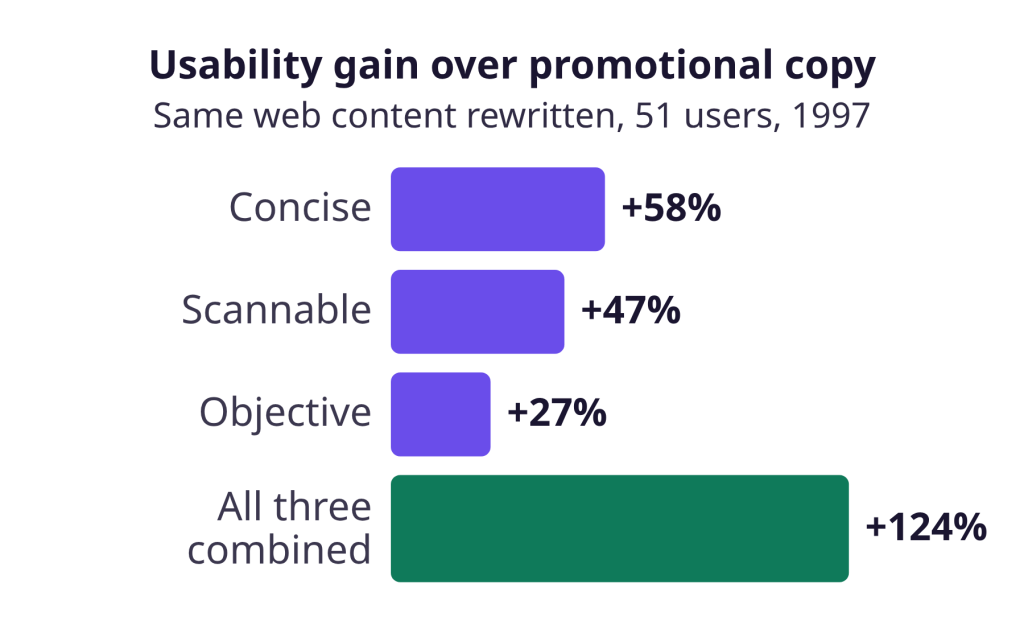
The reason is how little people read:
On the average Web page, users have time to read at most 28% of the words during an average visit; 20% is more likely. Jakob Nielsen, How Little Do Users Read?, 2008
What it does: shoppers read the reply instead of skimming past it.
6. Plain words for every age
Your buyers span every age group. In 2025, 69% of EU internet users aged 55-64 and 55% of those aged 65-74 bought online (Eurostat):
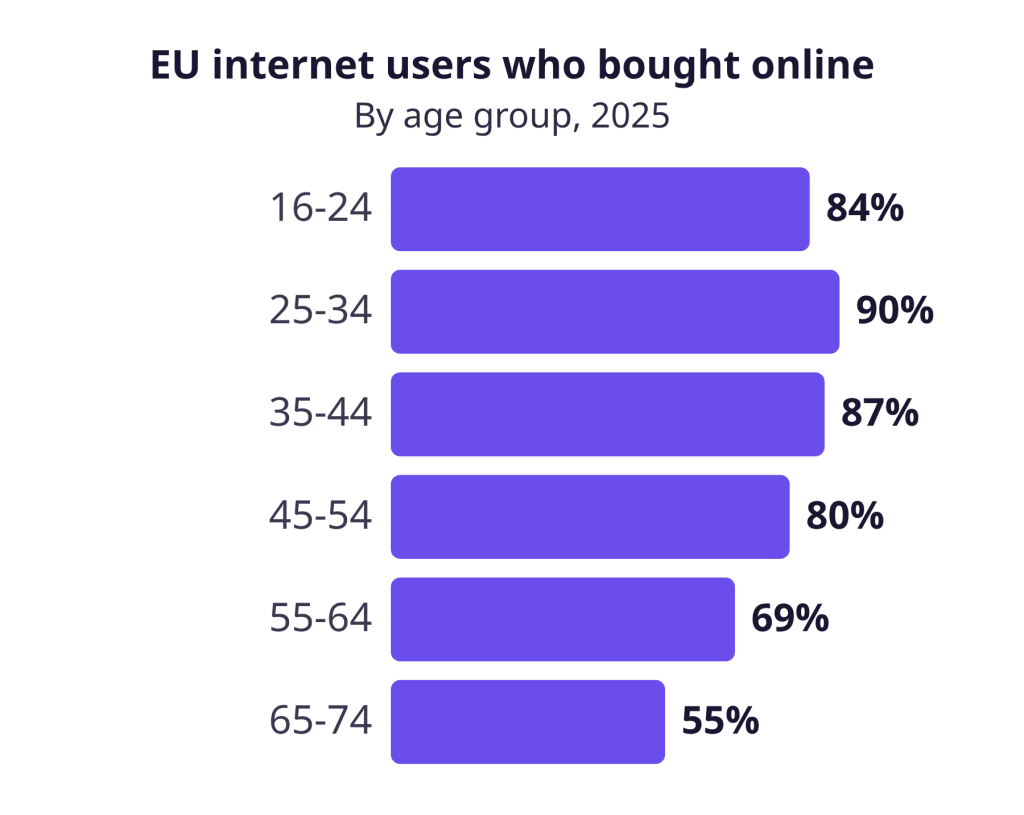
Write “send it back”, not “initiate a return”. Keep the text as typed words: a scanned photo of a printed policy may hold no searchable text.
What it does: every shopper understands the answer.
Here is the template these rules add up to:
| Field | What to write | Example |
|---|---|---|
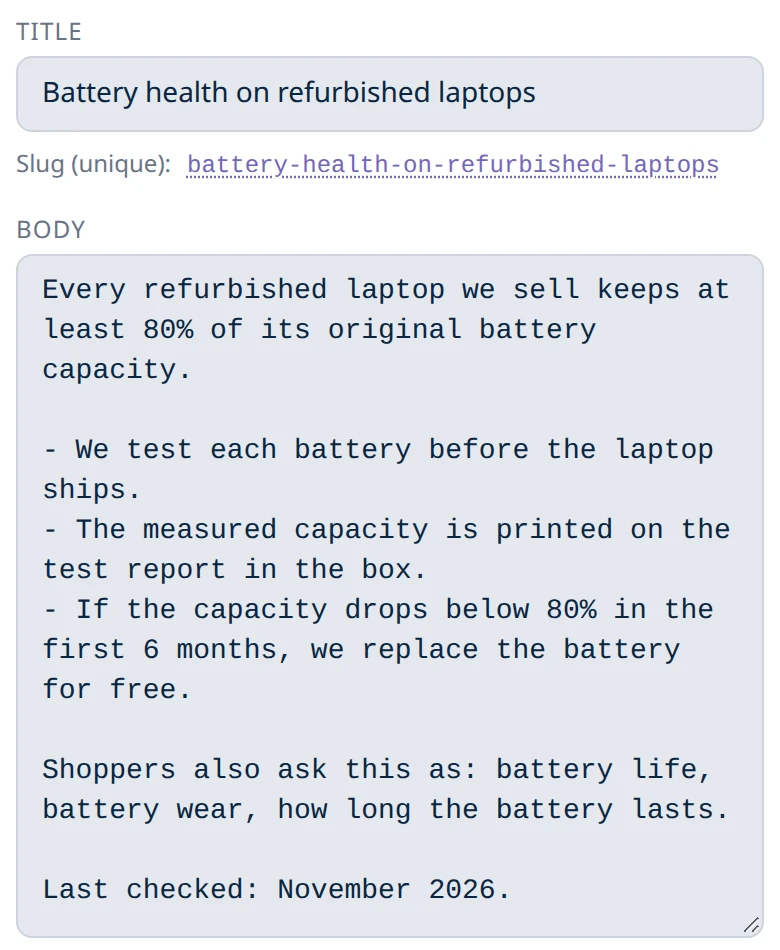
| Title | One topic, in shoppers’ words | Battery health on refurbished laptops |
| First sentence | The answer, with the number | Every refurbished laptop we sell keeps at least 80% of its original battery capacity. |
| Details | Short bullets: how, conditions, remedy | Each battery is tested before shipping; the capacity is on the test report in the box; below 80% in the first 6 months, a free replacement |
| Other wordings | How else shoppers ask | battery life, battery wear, how long the battery lasts |
| Last checked | Month and year you verified it | November 2026 |
Watch one entry go live on a demo store with Ovebot
One entry, saved a few minutes before the first question, answered it. That afternoon on our demo store took three screens.
A few minutes before 04:56 PM: one entry, one topic
04:56 PM: the first shopper asks
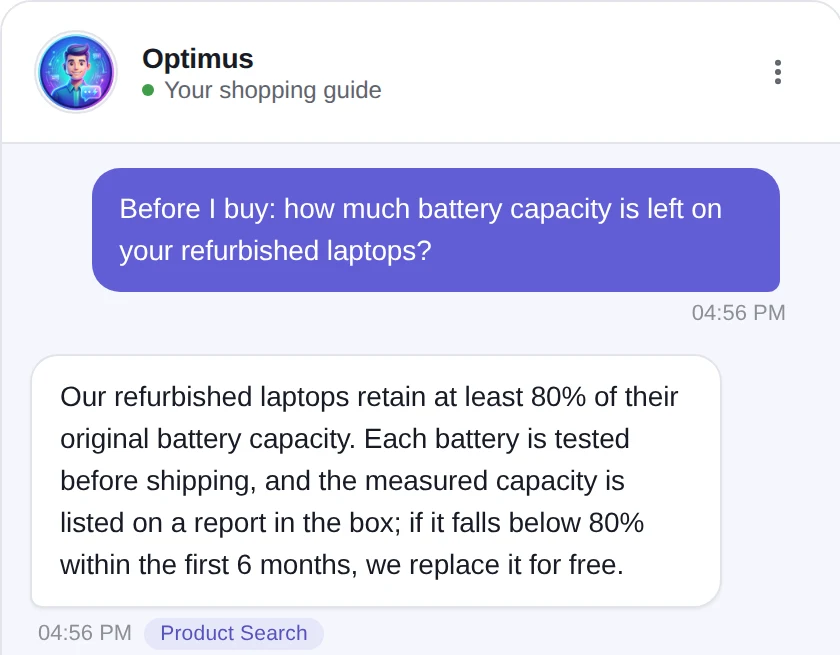
The shopper asked about “battery capacity”, not “battery health”, and the reply matches the entry fact for fact, with nothing added. The Product Search label under the reply shows that the assistant also looked up matching laptops in the catalog; those product cards are cropped out here.
Same afternoon: last year’s holiday dates switched off
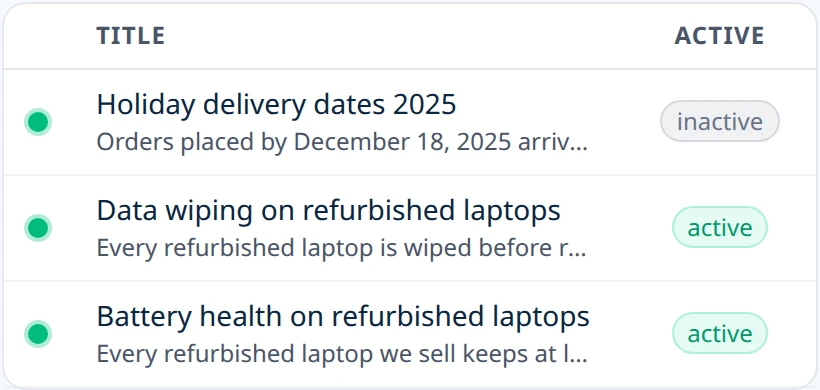
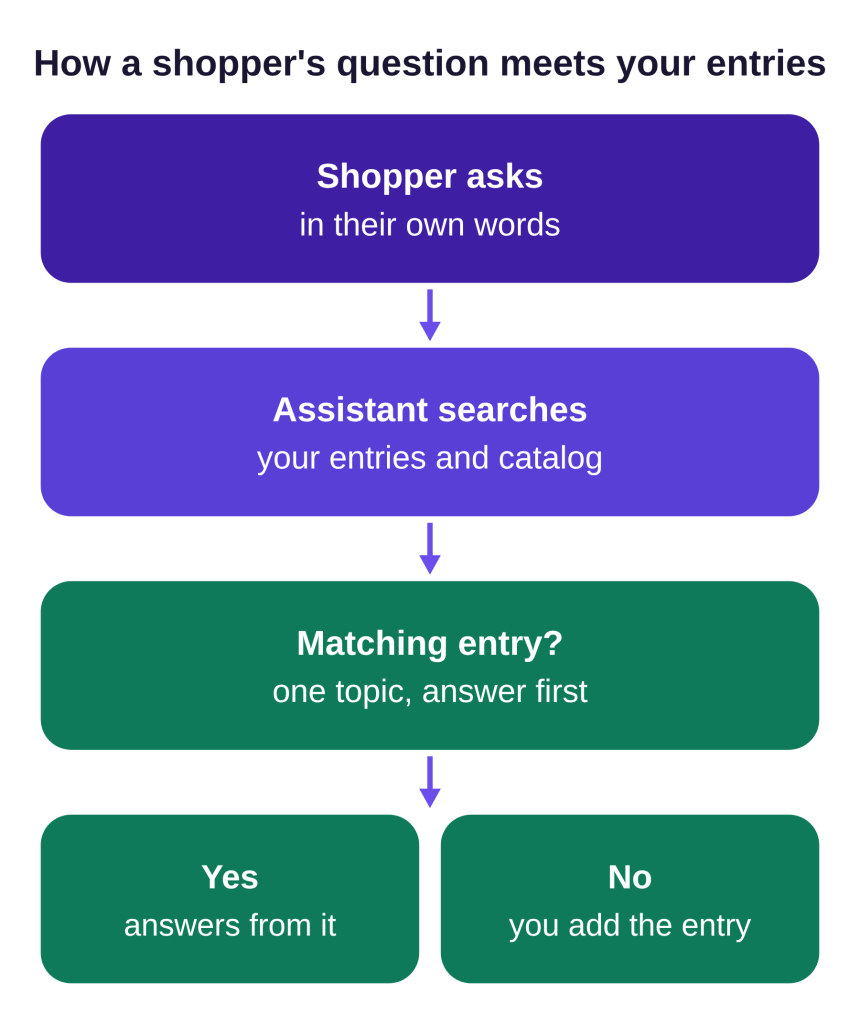
Ovebot learns from pages at URLs, PDF, Word, Excel and CSV files, and manual entries like this one. Your product catalog comes from a JSON or Google Merchant feed, refreshed on a schedule. Each entry can be switched on or off, edited and re-vectorized, so the search works from the new text.
Setup runs through the official plugins for WooCommerce, OpenCart, PrestaShop and Magento, or a one-line snippet on any other site. If you want an assistant that answers from your own ecommerce knowledge base and catalog, we recommend Ovebot; compare the features, then start the 14-day free trial without a card. The screens come from a demo store, and its entries are examples, not a real store’s policy.
Ecommerce knowledge base checklist
These seven topics cover the questions above, plus the store details shoppers check before they buy:
| Topic | What shoppers ask | What to write |
|---|---|---|
| Shipping costs and times | “How much is delivery?” “When will it arrive?” | Cost per zone or free-shipping threshold, times in business days, delivery restrictions |
| Returns | “Can I send it back?” | The 14-day right to cancel, how to start a return, who pays return shipping |
| Legal guarantee and warranty | “It stopped working. What now?” | The minimum 2-year legal guarantee, any extra warranty, how to claim |
| Payment | “Can I pay on delivery?” | Accepted methods and any limits |
| Product compatibility and sizes | “Does it fit my model?” | Model numbers, size charts, what’s in the box |
| Store contacts and company details | “Who am I buying from?” | Company name, address, phone, email, working hours |
| Seasonal dates | “Will it arrive before the holidays?” | Order-by dates and closures, with the year in the title |
Frequently Asked Questions
How long should a knowledge base entry be?
Short enough to answer one question: a title, a first sentence with the answer, a few bullets and a “Last checked” line. A 2025 analysis by Bhat et al. found that small chunks of 64-128 tokens work best for concise, fact-based answers. Split broader topics into several entries rather than writing one long page.
Can I just import my existing FAQ page?
Yes, as a start. Ovebot can import a page from its URL, so your FAQ page becomes knowledge base content without retyping it. Then review what came in: where one entry covers shipping, returns and payment together, split it into one entry per topic, put the answer first and add the wordings shoppers use.
Do I still need structured data for returns and shipping?
Yes, because it serves Google Search, not your chat. Google documents return policy markup (MerchantReturnPolicy, linked from your Organization through hasMerchantReturnPolicy) and shipping markup (ShippingService and OfferShippingDetails). Keep the same facts in your structured data, your policy pages and your knowledge base entries, so no two sources disagree.
How often should I update it?
Add entries every week in the first month, as unanswered chats show the gaps. After that, review your whole ecommerce knowledge base when a policy, price or carrier changes, and before each season. Switch off expired entries such as last year’s holiday dates, and update the “Last checked” line only when you have actually checked the facts.
Bottom line
An ecommerce knowledge base works when each entry answers one question in its first sentence, with numbers and a date. Write the legal basics on day one, fill the gaps your chats reveal, and switch off what expires.
Sources
- Lewis et al. (NeurIPS) – Retrieval-Augmented Generation for Knowledge-Intensive NLP Tasks – 2020 – https://arxiv.org/abs/2005.11401
- Shuster et al. (Findings of EMNLP) – Retrieval Augmentation Reduces Hallucination in Conversation – 2021 – https://aclanthology.org/2021.findings-emnlp.320/
- Liu et al. (TACL) – Lost in the Middle: How Language Models Use Long Contexts – 2024 – https://aclanthology.org/2024.tacl-1.9/
- Bhat et al. (arXiv) – Rethinking Chunk Size for Long-Document Retrieval: A Multi-Dataset Analysis – 2025 – https://arxiv.org/abs/2505.21700
- Baymard Institute – Cart Abandonment Rate – updated list, survey year not stated – https://baymard.com/lists/cart-abandonment-rate
- Baymard Institute – 10% of E-Commerce Sites Have Product Descriptions That Are Insufficient for Users’ Needs – 2021 – https://baymard.com/research-articles/product-descriptions
- Nielsen Norman Group, Jakob Nielsen – How Little Do Users Read? – 2008 – https://www.nngroup.com/articles/how-little-do-users-read/
- Nielsen Norman Group, Kara Pernice – F-Shaped Pattern of Reading on the Web – 2017 – https://www.nngroup.com/articles/f-shaped-pattern-reading-web-content/
- Nielsen Norman Group – Concise, SCANNABLE, and Objective: How to Write for the Web – 1997 – https://www.nngroup.com/articles/concise-scannable-and-objective-how-to-write-for-the-web/
- Eurostat – E-commerce statistics for individuals – 2025 data – https://ec.europa.eu/eurostat/statistics-explained/index.php?title=E-commerce_statistics_for_individuals
- European Commission, Your Europe – Contract information – current page – https://europa.eu/youreurope/citizens/consumers/shopping/contract-information/index_en.htm
- European Commission, Your Europe – Guarantees and returns – current page – https://europa.eu/youreurope/citizens/consumers/shopping/guarantees-returns/index_en.htm
- Google Search Central – Return policy structured data – current page – https://developers.google.com/search/docs/appearance/structured-data/return-policy
- Google Search Central – Shipping policy structured data – current page – https://developers.google.com/search/docs/appearance/structured-data/shipping-policy
- Google Search Central – Creating helpful, reliable, people-first content – current page – https://developers.google.com/search/docs/fundamentals/creating-helpful-content
This article was written with the help of artificial intelligence and reviewed by a human editor.